Showing posts with label Froogle. Show all posts

Google Product Search Suggestions

Google's product search engine started to show suggestions when you type a query. The suggestions are obtained by comparing your partial query with popular searches.


After typing a query or selecting one from the list of suggestions, you can use the options displayed at the bottom of the page to filter the results by price, category, brand, store and seller's rating.

Tax and Shipping Information in Google Product Search

Google Product Search (formerly known as Froogle) added an option to restrict the results to sellers that offer free shipping. If you enter your location, the service also shows tax and shipping information for some of the products.


A recent post from the Google Base blog informed sellers that they can submit tax and shipping information. "We'll soon be displaying this information on Google Product Search to provide buyers with more accurate price information, so we strongly encourage all merchants to start submitting it."

In case you are wondering, Google Base is a low-profile service that lets you upload structured data. Google uses the data about products in Google Product Search and the real estate listings as a refinement option in Google Maps and the main search results, but I find it surprising that Google doesn't use the data in expanded snippets.

Froogle Integrates with Google Book Search

After updating the listings for electronics, Google Product Search (previously known as Froogle) integrated the data from Google's book search engine. In addition to the list of stores where you can find a certain book, Google shows a summary of the book, the table of contents, references from the web and related books. There's also a link to Google Book Search, where you can preview and search inside the book.


In other book-related news, Panlibus points to Zoomii, a great visualization for Amazon's bookstore where books are placed in virtual shelves. If the products are more tangible, people are more likely to buy them, so Google should show more visual information: images, videos, trend charts, feature comparison etc.

Product Images in Google Shopping OneBox


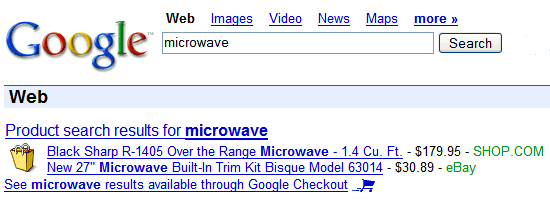
Google started to display a thumbnail in the Product Search OneBox, as you can see by searching for [usb flash]. The image illustrates the top search result, but links to the list of results. As part of the Universal Search, this OneBox can be displayed at the top of the search results page or at the bottom of the page, depending on its relevance to the query.

Another change is that the OneBox groups identical tech products and shows a range of prices. For queries that include clustered listings, Google no longer shows a link that restricts the results to products that can be bought using Google Checkout.

Here's an old screenshot of the Froogle/Product Search OneBox:

Update at Google Product Search

The service formerly known as Froogle, Google Product Search, has received one of the most importance updates since it was launched, back in 2002. For some queries like [cell phone] or [scanner], Google detects identical products that are available in multiple online stores and lets you compare prices, read reviews and technical specifications on a single page. Until now, Google Product Search linked directly to the online store's web page and didn't include product reviews or detailed information about a product, like you can still see if you search for [barney].


Other comparison shopping sites like Shopzilla, MSN Shopping and Yahoo Shopping already have this feature and are more established destinations for finding products online. It's interesting that even Froogle used to include price comparison for an individual product, but the feature has been removed at some point. A mobile version of the site still waits for an update and Google Base needs more visibility.

Froogle Checkout

Google has recently replaced the link to Google Video from the homepage with a link to Product Search (formerly known as Froogle). This change is probably related to the increasing number of people that use Google to buy things in this season.


Product Search is also a great vehicle for Google Checkout, the payment service that still needs a lot of promotion. As you can see from the screenshot below, there's so much Google Checkout in Froogle, that you start wondering if the entire service is an ad.


Google Checkout also has special offers (savings, free shipping, frequent flyer miles) for consumers, in addition to more than a year of free processing for merchants.

Google indexes all the reviews from Google Checkout users and adds them to Product Search (e.g.: reviews for SnowandWater.com).

As the stores who use Google Checkout gain more and more visibility in search results and ads, Google hopes to pressure the rest of the merchants to accept Checkout. Users are trained to look after the Checkout badge because they'll buy things faster and more conveniently.

Even if Google appears to lose money in Checkout, the future could bring a bigger spending in AdWords and happier / more loyal users. To achieve this, Google added a link to an unpopular service to the homepage and cluttered search results and Product Search with Google Checkout badges.

Google's fast and frugal checkout makes Google more powerful because you trust it with information about your credit cards and the things you buy and because you finally allow Google to finish the process of obtaining search results with a genuine confirmation: an acquisition.

Changes in the Names of Google's Products

Google's shopping site has been rebranded from the catchy-but-not-very-clear Froogle to the simple-yet-boring Google Product Search. "You may be familiar with our product Froogle (a pun on "frugal"). Froogle offers a lot of great functionality and has helped many users find things to buy over the years, but the name caused confusion for some because it doesn't clearly describe what the product does," laments Marissa Mayer on Google's weblog.

"The ill-named Froogle was a problem from the start. "I don't think we understood the complications with rolling out another brand," Marissa Mayer, Google's vice president of search product and user experience, said in an interview with CNET News.com. "While it was a cute and clever name, it had issues around copyright and trademark, as well as internationalization. The pun (to "frugal") isn't obvious.", realizes Google five years after product's launch.

Google has a reputation of launching products with long and unattractive names that have the advantage of being very descriptive (Google Blog Search tells you more about the product than Technorati, but it's also less memorable). Some of the exceptions to the rule were: Gmail, Froogle, orkut, AdWords, AdSense, but also acquired services/products like: Blogger, Picasa, YouTube, which kept their original name.

Another change that should happen pretty soon is replacing "Google Personalized Homepage" with "iGoogle", the name behind the URL google.com/ig. With the addition of presentations and wikis, "Google Docs & Spreadsheets" should better choose a different name than "Google Docs, Spreadsheets, Presentations and Wikis" (what about Google Docs?). Also "Picasa Web Albums" is a long and strange name for a photo sharing service and could easily transform into "Google Photos".

Google has a very strong brand and should include that brand in the names of their products, but that doesn't mean there's no room for creativity or consideration for people who actually have to remember or type those names.

(On a related note, maybe Google Operating System is too long as well. But, hey, I'm not a Google property.)

Froogle 2.0

Garett Rogers checked google.com's robots.txt file and found a working version of a new service based on Google Base, that will be released in the coming weeks. Google Product Search (this is not an official name) will be integrated into Google's main search and will replace Froogle's Onebox results.

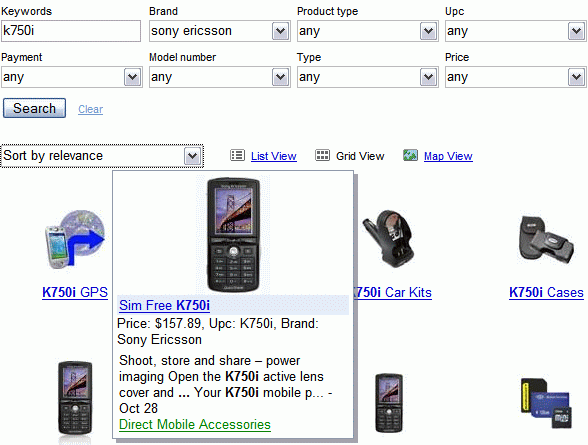
"When users search for products on Google.com, the system will present them with another search box so that they can refine their query. After users refine their queries, Google takes them to a second page populated with product results from the Google Base listings service," reported ComputerWorld last month. The second page might look like this:


You can refine your results without reloading the page, the lists are smarter (you can enter custom values), if you hover over a result you'll see more information. There's also an interesting map view that shows search results on a map, like in Froogle.

Overall, you'll notice the pages use a lot of AJAX and you'll barely find real links. You can't even link to the search result page.

The new product improves Froogle's interface, by adding a touch of Web 2.0 immediacy and using the structured information from Google Base. Unfortunately, it lacks a reviewing system and a simple way to buy products.

Google Checkout Integrates with Froogle


If you search for a product on Froogle, you'll notice a new item in the list of stores: "Google Checkout Stores". Google didn't create a special store, it just lists all the products that can be bought using Google Checkout.

There's also a Google Checkout logo at the bottom of the page: "Google - Accepts Google Checkout". Google wants to make their new service more visible, hoping that more online stores will use it.

Labels

Web Search Gmail Google Docs Mobile YouTube Google Maps Google Chrome User interface Tips iGoogle Social Google Reader Traffic Making Devices cpp programming Ads Image Search Google Calendar tips dan trik Google Video Google Translate web programming Picasa Web Albums Blogger Google News Google Earth Yahoo Android Google Talk Google Plus Greasemonkey Security software download info Firefox extensions Google Toolbar Software OneBox Google Apps Google Suggest SEO Traffic tips Book Search API Acquisitions InOut Visualization Web Design Method for Getting Ultimate Traffic Webmasters Google Desktop How to Blogging Music Nostalgia orkut Google Chrome OS Google Contacts Google Notebook SQL programming Google Local Make Money Windows Live GDrive Google Gears April Fools Day Google Analytics Google Co-op visual basic Knowledge java programming Google Checkout Google Instant Google Bookmarks Google Phone Google Trends Web History mp3 download Easter Egg Google Profiles Blog Search Google Buzz Google Services Site Map for Ur Site game download games trick Google Pack Spam cerita hidup Picasa Product's Marketing Universal Search FeedBurner Google Groups Month in review Twitter Traffic AJAX Search Google Dictionary Google Sites Google Update Page Creator Game Google Finance Google Goggles Google Music file download Annoyances Froogle Google Base Google Latitude Google Voice Google Wave Google Health Google Scholar PlusBox SearchMash teknologi unik video download windows Facebook Traffic Social Media Marketing Yahoo Pipes Google Play Google Promos Google TV SketchUp WEB Domain WWW World Wide Service chord Improve Adsence Earning jurnalistik sistem operasi AdWords Traffic App Designing Tips and Tricks WEB Hosting linux How to Get Hosting Linux Kernel WEB Errors Writing Content award business communication ubuntu unik