Showing posts with label Google Docs. Show all posts

Research Sidebar in Google Docs

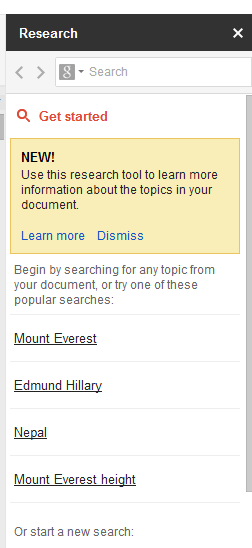
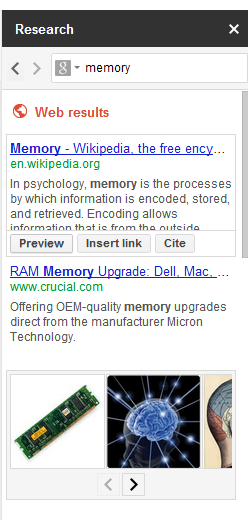
Google Docs has a new feature that lets you find more information about some of the words from a document and also add content from the Web. The research sidebar can be enabled from the Tools menu or by using the shortcut Ctrl+Alt+R (Cmd +Opt+R for Mac). You can also select one or more words from the document, right click and select "Research" from the menu.


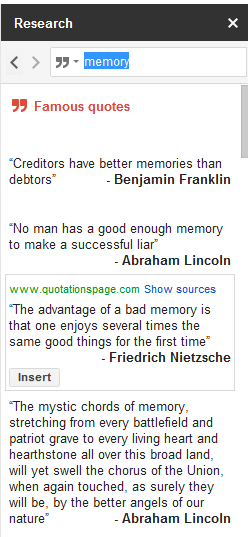
The sidebar includes the top Google search results, image search results, facts, maps, reviews and famous quotes. Click the icon from the search box to restrict the results to images and quotes.

When you mouse over a Web search results, you can preview it, insert a link or cite it. For example, you can select "Google" from a document, press Ctrl+Alt+R, mouse over the top result and click "insert link" to add a link to Google's homepage.


Restrict the results to images to quickly add an image using drag and drop. Google also has a specialized search engine for quotes and you can also add them to your document.


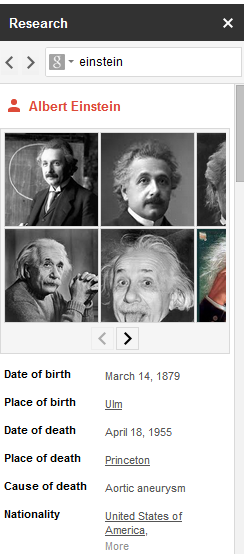
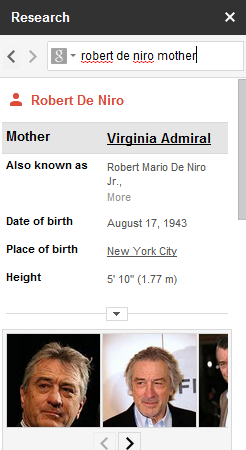
Search for a famous person, a place, a concept or any other entity and Google will display a list of attributes above the search results.


Maybe Google will also add features like translation and definitions to the research sidebar, so you can quickly find them.

{ Thanks, Scott and Evan. }

Google Docs Experiments With a Font Manager

Google Docs tests another great feature: a font manager that will help you customize the list of fonts and add new fonts from the Google Web Fonts project. You can sort the fonts by popularity, by name or the date added and restrict the fonts to serif, sans serif, display and handwriting.

There's also a search box that lets you find a font. For example, you can use the advanced search tool from the Web Fonts project, find your favorite font, then quickly add it to the Google Docs font list.


You can try the new feature using this template (update: the document has been removed). Just click "use this template" and you'll create a new document that opens in an updated version of the Google Docs editor. To access the font manager, click the font dropdown from the toolbar and select "add fonts" at the bottom of the list.


{ Thanks, abarjames1. }

Google Docs Tests Quick Apply Feature

There's a really cool feature that could be available soon in Google Docs. Just press Alt+/ or click the "?" icon from the toolbar and you can type a few letter from the name of a Google Docs command and select it. For example, you can type "in" and select "increase indent" or "insert row above". It's much faster than finding the command in the Google Docs menus.


You can try the new feature using this template (update: the document has been removed). Just click "use this template" and you'll create a new document that opens in an updated version of the Google Docs editor.

{ Thanks, Jediah. }

Google Drive References in Google Docs for Android

The Google Drive launch is not far away and there's more evidence for this in the Google Docs app for Android.

Daniel Baker noticed that the Google Docs app for Android can handle the links that start with "https://drive.google.com".


The Android app includes many references to Google Drive, which is just a new name for Google Docs. There's a file named GoogleDriveSharedPreferences.xml, a special icon file for Google Drive and there's a modal dialog that's displayed when you migrate to Google Drive.


The Google Drive rebranding could be more about positioning Google Docs as an online file storage service. You can already upload any file to Google Docs and there's an Android app for managing your files, but there's no desktop app for syncing files and there's no integration with third-party services. Another issue is that 1 GB of free storage is not enough.

According to The Next Web, Google Drive could launch next week and offer 5 GB of free storage. There are apps for Windows, Mac, phones and tablets, so you can access files on your computer from anywhere.

{ Thanks, Daniel. }

It's Easier to Organize Files in Google Docs

Google Docs now lets you move a file to a folder without using the Docs list. Just click the "folder" icon next to the title of the file and you can pick one or more folders. This works for documents, spreadsheets, presentations, drawings, PDF files and any other files.


Google uses the word "collection" instead of "folder" and that's confusing for both Google Docs users and Google's engineers. When you mouse over the new icon, the tooltip reads "folders". Google Docs collections are actually hierarchical labels because you can place a file in multiple collections.

{ Thanks, Cougar. }

Google Docs and Clipboard Access

A major annoyance when you use web apps that include a rich text editor is that they don't have access to the clipboard. Browsers prevent web pages from reading the clipboard or replacing its text and that's a security feature, but the downside is that apps like Google Docs can't include functional options for copy, cut or paste in the interface. Of course, you can use the browser's features, including keyboard shortcuts like Ctrl+C and Ctrl+V, but not everyone will do that.

Let's see how Google Docs handles this issue. If you use Internet Explorer, cut/copy/paste are available in the Edit menu and in the contextual menu. When you use these features, a browser dialog asks for permission. Annoyingly, IE will ask for permission again when you open a new document or reload the page.


In Firefox, cut/copy/paste are removed from the contextual menu, but they're still available in the Edit menu. Try to click one of these options and Google Docs will ask you to use keyboard shortcuts. Google Toolbar for Firefox included an option that addressed this issue, but Google Toolbar is no longer available for Firefox 4+. Fortunately, there are some workarounds.


What happens when you use Chrome? Select some text, right-click, choose "copy" and Google Docs shows the following message: "Copying and pasting requires the free Google Docs web app. This lets us access your clipboard so you can cut, copy and paste." To install the app you don't need to open a new page, but you'll have to reload Google Docs to use the new permissions.


While browsers don't allow JavaScript access to the clipboard without permission, there are workarounds that use Flash, but they're limited to copying some text to the clipboard.

For now, the best thing you can do is to use keyboard shortcuts (Ctrl+C for copy, Ctrl+X for cut, Ctrl+V for paste) or install the Google Docs app in Chrome.
Smart Spell Checker in Google Docs

Google's search engine has a great spell checker because it doesn't rely on dictionaries and because it's context-sensitive. The smart spell checker from Google Search is now available in Google Docs.

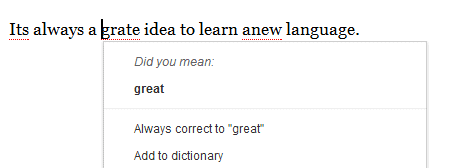
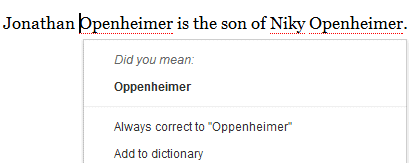
When you type "its", no English spell checker will ever find a mistake, but a smart spell checker will flag it when you add more words: "its a great idea". While "its" is actually an English word, it should be replaced with "it's" in that particular context.

The updated spell checking feature from Google Docs is more precise and it will usually show a single suggestion when you right-click a word that's highlighted. Another advantage is that it works well when you type proper nouns.

"Suggestions are constantly evolving. As Google crawls the web, we see new words, and if those new words become popular enough they'll automatically be included in our spell checker—even pop culture terms, like Skrillex," explains Google. That's the great thing about web services: they evolve faster and they can become smarter by bringing more data. Just like Gmail's spam filter is better than the spam filter of a desktop mail client and Google's online speech-to-text engine is better than any offline speech recognition software, the smart spell checker from Google Search and Google Docs (originally available in Google Wave) is better than any dictionary-based spell checker. There are some downsides (it doesn't work offline and everything you type is sent to Google's servers), but all Google services and software could be improved by switching to the online spell checker.

Unfortunately, the example I used back in 2009, when Google Wave added a context-sensitive spell checker, no longer works today. When you type: "Their coming too sea if its reel" in Google Docs, only "too" and "sea" are flagged, while no misspelled word is flagged in Google Search.

{ Thanks, Techdows. }

Google Drive Will Support Third Party Apps

Back in November 2010, a comment from the Google Docs source code revealed some new features that will be available: third party apps, Cloud Print integration and sync.

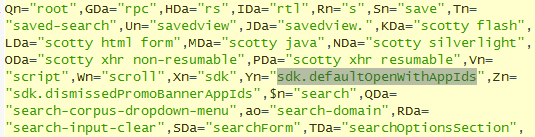
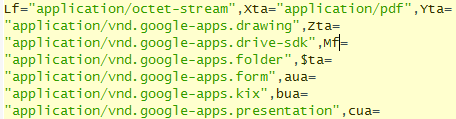
It turns out that the upcoming Google Drive release will add support for third party apps and Google will also include a SDK for developers. This way, you'll be able to open the files stored in Google Drive using non-Google apps. The Google Docs source code mentions "SDK" several times in connection with Google Drive and the "open with" feature.


There's also an interesting message that suggests Google Drive will integrate even more with Gmail: "Say goodbye [to] email attachments and hello to real time collaboration. Drag anything shared with you to My Drive for easy access."

In a recent article, Wall Street Journal reported that GDrive "is expected to launch in the coming weeks or months and will be free for most consumers and businesses. Google will charge a fee to those who want to store a large amount of files."

Most likely, Google Drive is an important upgrade to Google Docs that will detach the online storage service from the Google Docs apps and will make it more useful by offering more free storage, syncing apps and integration with web apps developed by other companies.

Google Docs for Android Adds Real-Time Collaboration

When Google released the Android app for Google Docs, the application didn't include many features that weren't available from the browser. The latest updates made the app more useful: there's a better tablet interface, offline access to your documents and now you can edit documents collaboratively.

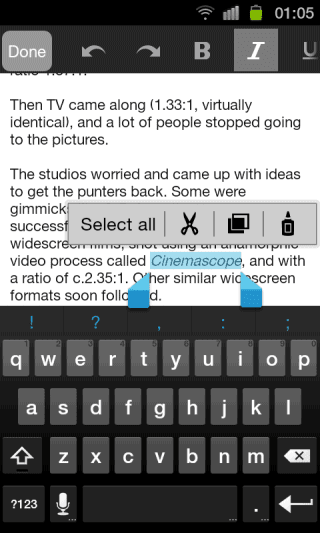
The most powerful Google Docs feature (real-time collaboration) is now available on Android devices and you don't have to switch to the desktop interface. You can see the changes in real-time and all you edits are saved almost instantly. While the Android editor lacks many features that are available in the desktop version, you can use rich text formatting: bold the text, change the color, create lists, indent paragraphs, undo and redo the changes.


"We've brought the collaborative experience from Google Docs on the desktop to your Android device. You'll see updates in real time as others type on their computers, tablets and phones, and you can just tap the document to join in. We also updated the interface to make it easier to work with your documents on the go. For example, you can pinch to zoom and focus on a specific paragraph or see the whole document at a glance," informs Google.

Suddenly, the mobile web app pales when compared to the native app and that's probably the reason why the Google Docs mobile site promotes the app every time you go there.

Keyboard Accelerators in Google Spreadsheets

Google Spreadsheets has recently added an interesting feature: keyboard accelerators for menus, but it only works in Chrome. You can now press Alt+F (or Ctrl-Option-F for Mac) to open the File menu. Then type one of the underlined characters to select an option. It's now much easier to use features that don't have keyboard shortcuts, just like in a native application.

Chrome is the only important desktop browser born without menus and that's probably the reason why web apps can override shortcuts like Alt+F. It's important to point out that you can use shortcuts like Alt+F and Alt+E to open Chrome's wrench, but not in Google Spreadsheets.

While Chrome's interface was so great that many other browsers used it as an inspiration, Google Docs continues to use the old-school menus from Microsoft Office 2000.

Google Docs Will Improve Paragraph Styles and Add More Fonts

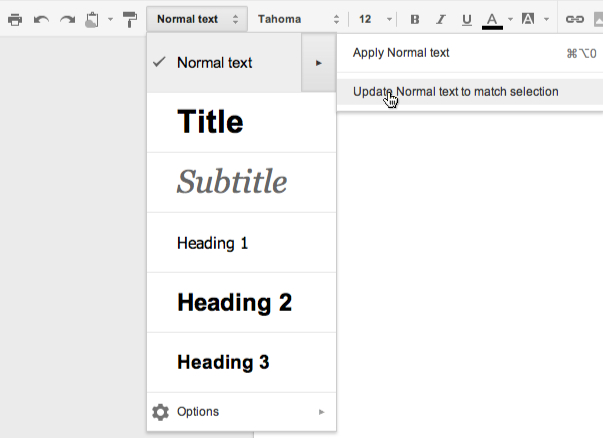
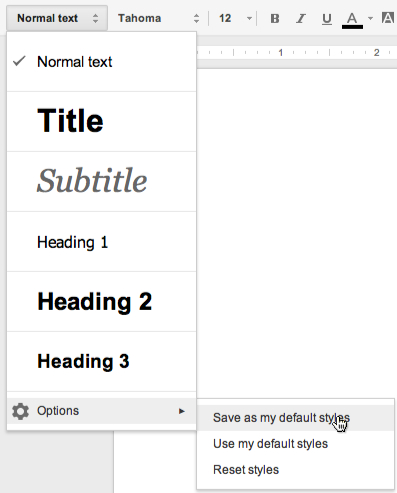
An upcoming Google Docs update will bring a better interface for selecting paragraph styles and new features that lets you customize styles.


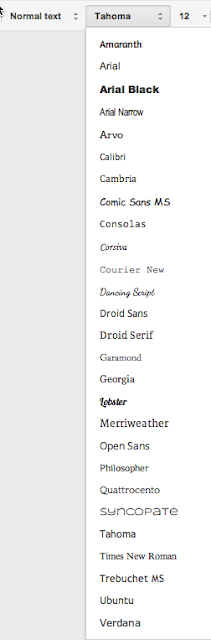
Google Docs will also add some new open source fonts from the Web Fonts project: Amaranth, Arvo, Dancing Script, Lobster, Merriweather, Open Sans, Philosopher, Quattrocento.


Google has recently updated the Android app for Google Docs and added offline support, while also improving the reading layout for tablets.

Update (February 6): Custom styles are now available.

{ Thanks, J. }

Two Ways to Export Your Google Docs

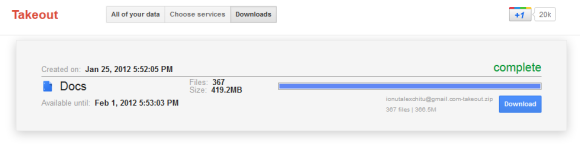
Google Takeout supports a new service: Google Docs. Now you can use the same interface to batch export your documents.


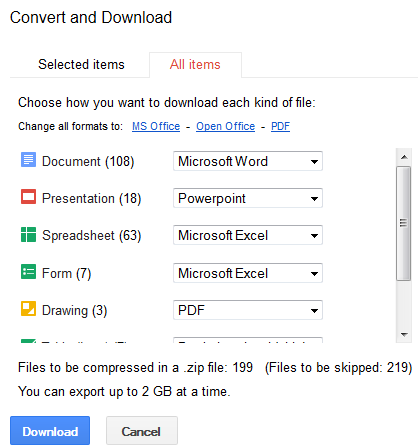
I tried both Google Takeout and the built-in feature from Google Docs that lets you download your documents. Even if they have the same purpose, they're quite different. The Google Docs feature is more flexible: you can choose to download only spreadsheets or presentations and skip all the other documents. You can also skip the files uploaded to Google Docs and not converted to a Google Docs format (for example: PDF files, archives and video files). Google Takeout has a "configure" feature, but you can't skip one or more document types. Another subtle difference is that Google Takeout lets you export only the files that you own, while Google Docs exports all the files from your account.


How to export all your files from Google Docs? Just go to the Google Docs homepage, select one or more documents, click "More" and then "Download", click the "All items" tab, pick your favorite formats and click "Download". The process is not that intuitive and you shouldn't have to select a file to see the download option.

{ via Data Liberation Blog }

Google Starts Exporting Notebooks to Google Docs

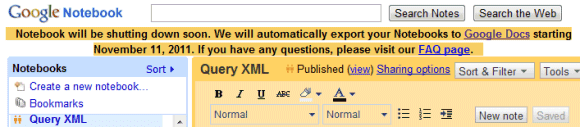
Google Notebook is one of the many Google Labs services that will be shutdown. The team stopped developing the service three years ago and it's surprising that you can still use most of the features in the latest versions of Chrome, Firefox and other browsers.

A message now informs users that Google "will automatically export your Notebooks to Google Docs starting November 11, 2011". The FAQ explains that "once we start the transition, each notebook you have will automatically be exported to Google Docs. We will do this for every single notebook, and you won't have to do anything. This export will work the same as the existing 'Export to Docs' feature in Notebook. The format of the new documents will be as if you manually exported each of your notebooks to Docs."


Google hasn't released a new app for notes probably because the Google Docs word processing app is good enough to handle notes. There's even a cool Chrome extension developed by Google that lets you take notes and synchronizes them with Google Docs.

{ Thanks, Shahed and Taylor. }

No More GoogleLookup in Google Spreadsheets

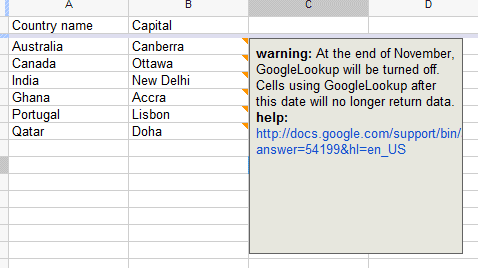
One of the most useful Google Spreadsheets features is the GoogleLookup function, which allows you to find simple facts and quickly create a spreadsheet using Google's data. Unfortunately, the function will be removed at the end of the month and this will break a lot of spreadsheets that use it.

"As of November 2011, the GoogleLookup function will no longer be supported. This function relies on technology from Google Squared, a Google Lab that's been deprioritized. To save your data, copy the selection that contains GoogleLookup functions. Then, go to the Edit menu, navigate to Paste special, and select Paste values only. When the function is no longer supported, cells containing GoogleLookup functions will return #NAME? errors," explains Google.


Well, GoogleLookup was released long before Google Squared (2006 vs 2009) and it relied on Google's Q&A feature, which is still available.

Here's a way to use the ImportXML function to extract facts from Google Search (the mobile interface):

=RegExExtract(ImportXML("http://www.google.com/m/search?q=sri+lanka+capital", "//span[@class='waa4kx']"), "-(.*)")

Can you find a better way?

{ Thanks, Jérôme. }
Prevent Viewers from Downloading Google Docs Files

If you upload a PDF file to Google Docs and share it with other people, they can download it, print it and copy the file to their accounts. Now you can prevent other people from downloading the file from the Google Docs homepage: just right-click the file and select "Prevent viewers from downloading".


For videos, this option is also available in the File menu, where you can uncheck "Viewers can download this file".

While Google removes the download buttons and menu items from the user interface, there may be other ways to download the files.

{ Thanks, Bill. }

Sites in Google Docs?

Aaron, a reader of this blog, noticed that one of his sites created using Google Sites is now listed in Google Docs. "I have an item with a Google Sites icon showing up in my Google Docs home list. Clicking on the link only marks the check box. It's currently not linkable," says Aaron.

The Google Sites icon can already be found in the Google Docs code (here's the URL), but that's not new. It looks like Google Docs will be a central repository for all the files uploaded to Google or created using Google's services, just like Google+ will be Google's sharing platform.


{ Thanks, Aaron. }

More About Google Drive

Google Drive is just a new name for Google Docs, so you shouldn't expect a new service. What you can expect is a new software that synchronizes your files with Google Docs and more free storage.
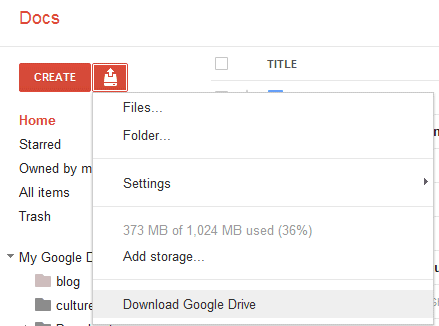
Felipe Zorzo found an evidence (English translation) that Google Drive is also the name of a downloadable software. The clue is a new menu item titled "Download Google Drive" that's disabled by default. To enable it, Felipe opened Google Docs, then loaded Chrome's Developer Tools, switched to the Scripts tab and searched for cookieFetchElement. He clicked on the row number (365) to set a breakpoint, reloaded Google Docs, went back to the Developer Tools and pasted the following code in the console:

config.ed = true; config.ddu = '.';

After going back to the Scripts tab, he clicked the "pause" button (F8) and switched to the Google Docs tab.


At the moment, you can't download the Google Drive software, but it will be interesting to see if it's better than Dropbox.

{ Thanks, Rodrigo. }

Update for Offline Google Docs

Offline Google Docs has an updated interface that looks more like the regular version of Google Docs. At launch, Google used a completely different interface. Google Spreadsheets and the Google Docs word processor still use the old interface in the offline mode.


A better idea would be to use the same interface for the regular Google Docs and the offline mode, but gray out the features that aren't available in the offline mode. This way, the transition between the two interfaces would be almost seamless.

{ Thanks, Filipe. }

The New Version of Google Presentations

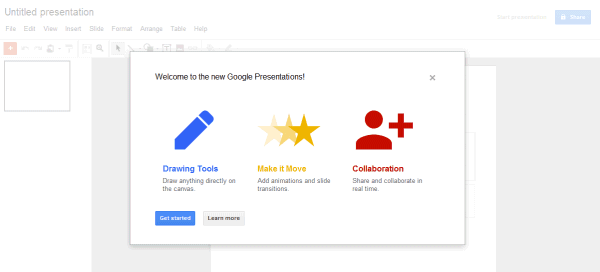
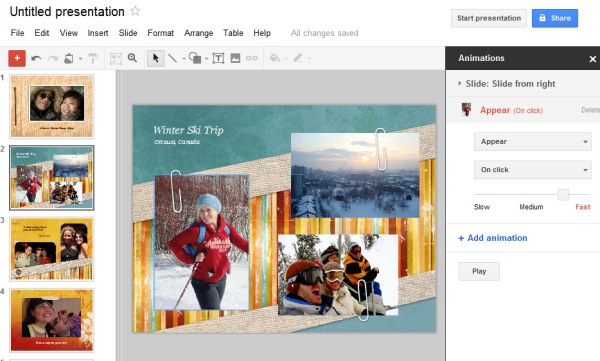
There's a new version of Google Presentations that has both a new interface and new features that bring it on par with the other Google Docs apps. To try the new version, go to the settings page, select the "editing" tab, enable "Create new presentations using the latest version of the presentation editor", go back to Google Docs and create a new presentation.


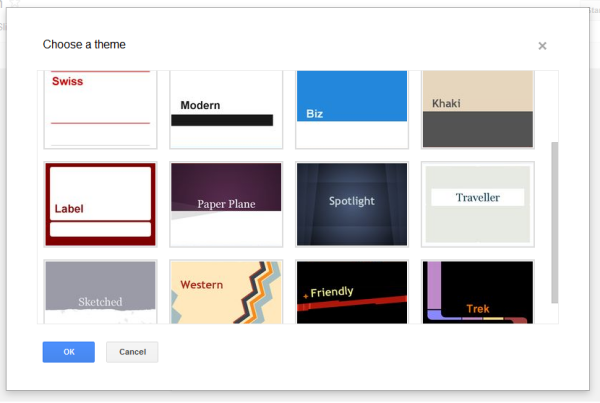
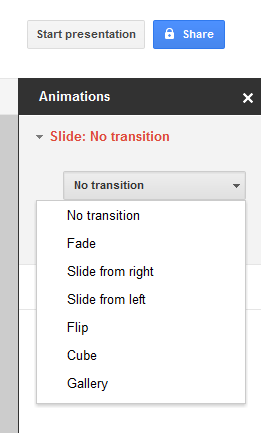
Google Presentations has an HTML5 rich-text editor created from the scratch by Google and initially available in Google's online word processor. The editor supports character-by-character collaboration, transitions and animations, rich tables with merged cells, drawing charts and diagrams within the presentation and using shapes to link to other sides. Google Presentations also includes some new themes.


"At this time, it's only possible to create new presentations in the new version of Google presentations. Older presentations will remain in the old format for the time being, and we'll eventually upgrade them to the new format to give you all of the benefits of using the new version. You can copy old presentations into the new version by using the import slides feature or by copying and pasting slides using the web clipboard," explains Google. "With today's launch, the Google Docs suite is now built on a single, solid foundation. Now that the groundwork is in place, you can expect more useful and collaborative features, delivered faster than ever before," promises Google.

{ Thanks, Andrew. }

Google Drive, a New Name for the Google Docs Homepage?

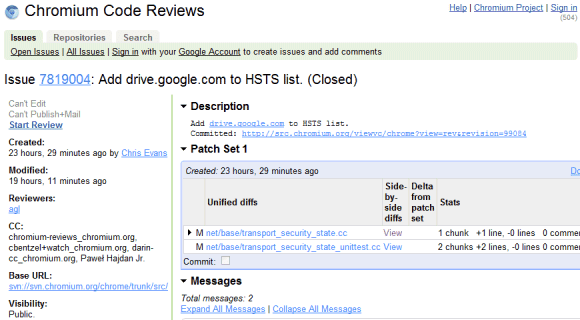
TechCrunch has recently reported that the subdomain drive.google.com has been added to a Chrome file and a Google Docs message includes a reference to Google Drive.


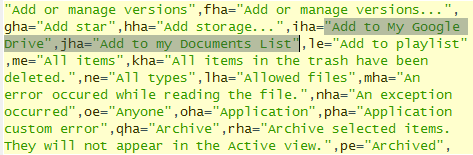
The source code of Google Docs files has many messages related to "Google Drive", but all of them have one thing in common: they replace similar messages that include "Documents List". Here are two examples: "items haved been removed from your Documents List" / "items haved been removed from your Google Drive", "Add to my Documents List" / "Add to My Google Drive".


This suggests that Google Drive could be the new name of the Google Docs List, while Google Docs could be detached from the file storage interface and only be an online office suite. Google Docs is not the right name for an online storage application that lets you upload not just documents, but also music, videos, archives, photos and other files. Hopefully, the rebranding will bring more free storage, file syncing apps for mobile and desktop and integration with third-party apps.

Steven Levy's "In the Plex" included an interesting story about Google Drive being superseded by Google Docs because "files are so 1990". Google's Sundar Pichai said that "when people use our Google Docs, there are no more files. You just start editing in the cloud, and there's never a file." Google Drive might be a better name for a service that stores user files, whether they're created using Web apps, mobile apps or desktop apps.

Labels

Web Search Gmail Google Docs Mobile YouTube Google Maps Google Chrome User interface Tips iGoogle Social Google Reader Traffic Making Devices cpp programming Ads Image Search Google Calendar tips dan trik Google Video Google Translate web programming Picasa Web Albums Blogger Google News Google Earth Yahoo Android Google Talk Google Plus Greasemonkey Security software download info Firefox extensions Google Toolbar Software OneBox Google Apps Google Suggest SEO Traffic tips Book Search API Acquisitions InOut Visualization Web Design Method for Getting Ultimate Traffic Webmasters Google Desktop How to Blogging Music Nostalgia orkut Google Chrome OS Google Contacts Google Notebook SQL programming Google Local Make Money Windows Live GDrive Google Gears April Fools Day Google Analytics Google Co-op visual basic Knowledge java programming Google Checkout Google Instant Google Bookmarks Google Phone Google Trends Web History mp3 download Easter Egg Google Profiles Blog Search Google Buzz Google Services Site Map for Ur Site game download games trick Google Pack Spam cerita hidup Picasa Product's Marketing Universal Search FeedBurner Google Groups Month in review Twitter Traffic AJAX Search Google Dictionary Google Sites Google Update Page Creator Game Google Finance Google Goggles Google Music file download Annoyances Froogle Google Base Google Latitude Google Voice Google Wave Google Health Google Scholar PlusBox SearchMash teknologi unik video download windows Facebook Traffic Social Media Marketing Yahoo Pipes Google Play Google Promos Google TV SketchUp WEB Domain WWW World Wide Service chord Improve Adsence Earning jurnalistik sistem operasi AdWords Traffic App Designing Tips and Tricks WEB Hosting linux How to Get Hosting Linux Kernel WEB Errors Writing Content award business communication ubuntu unik