Showing posts with label YouTube. Show all posts

Remove Deleted Videos from YouTube Playlists

Just because you add a YouTube video to a playlist doesn't mean you'll be able to watch it in the future. Many YouTube videos are removed because of copyright infringement, but some of them are deleted by the uploaders.

YouTube now shows a warning at the top of the page when some of the videos from a playlist have been deleted from YouTube. The warning is only displayed when you open the playlist and there's also a button that lets you remove the videos that are no longer available.


Unfortunately, YouTube no longer shows the title of a video after it's been deleted. This was useful because you could find similar videos and add them to the playlist. Now that YouTube replaces the title with "deleted video" and the video page only shows an error message, YouTube could automatically remove the missing videos.


{ Thanks, Sterling. }

YouTube Preview, Now in HTML5

When YouTube launched the feature that shows a filmstrip of thumbnails when you mouse over a video, it only worked in the Flash player. Now it's also available in the HTML5 player. Unfortunately, the HTML5 player doesn't support yet the second seek bar for videos that are longer than 90 minutes.


It's nice to see that YouTube's HTML5 player supports almost all the features of the Flash player and looks just like the Flash player. If you uninstall or disable the Flash player, YouTube automatically switches to the HTML5 player, assuming that you have a browser that supports the video tag. Obviously, you can still manually switch to the HTML5 player.

{ Thanks, Zachary. }

YouTube's Topics Experiment

Back in 2010, YouTube started to test a feature that associated videos with topics. At that time, the experiment tried to improve search results pages by allowing you to find related videos.

YouTube Topics is still available as a separate page that lists the most popular topics and lets you find topic channels like this one.

There's also an experiment that shows the topic of a video next to the channel's name and lets you subscribe to the topic. The topic is an automatically generated channel. "We use many different sources to find these topics, including frequently used uploader keywords, common search queries, playlist names, and even sources outside of YouTube such as Wikipedia articles," explains YouTube's blog.


Here's how you can enable this experiment. If you use Chrome, Firefox, Safari, Opera or Internet Explorer 8+, open youtube.com in a new tab, load:

* Chrome's JavaScript console (Ctrl+Shift+J)
* Firefox's Web Console (Ctrl+Shift+K)
* Safari's Web Inspector (how to do that?)
* Opera Dragonfly (press Ctrl+Shift+I and select the "console" tab)
or
* IE's Developer Tools (press F12 and select the "console" tab)

and paste the following code:

document.cookie="VISITOR_INFO1_LIVE=4sBbSJYiyUE; path=/; domain=.youtube.com";window.location.reload();

Then press Enter and close the console.

Gmail's YouTube Lightbox

When an email message includes includes links to YouTube videos, Gmail shows a gadget that lets you watch the videos inside Gmail. The YouTube preview feature graduated from Gmail Labs two years ago.

Gmail now tests another interface for previewing YouTube videos, but it only works for YouTube's email digests. When you click one of the thumbnails from the newsletter, Gmail shows the YouTube player in a "lightbox". For some reason, this only works when the "Apps Search" lab feature is enabled.


{ Thanks, Emanuele. }

YouTube Scrobbler

If you frequently watch music videos or listen to music on YouTube and you also use Last.fm, there's a Chrome extension that scrobbles these songs. The official Last.fm client supports players like iTunes and Windows Media Player, but YouTube is probably the largest online repository of free music and it can be used as a music player.

The Last.fm Scrobbler for Chrome detects the category of the video you're watching and tries to find the artist and the song title, then it sends this information to Last.fm. The first time when it scrobbles a song you'll see a Last.fm page that requests your permission.

The extension shows notifications when the track changes and it supports many other sites: Google Music, Pandora, MySpace, Google+ (the YouTube widget) and more. At the moment, you can't scrobble tracks in Google Music because Google changed the URL, but an update should fix this issue.


{ via Matthew }

YouTube Preview

YouTube started to roll out a few features that will make it easier to preview videos and to quickly jump to a certain scene. Just mouse over the seek bar and you'll see a thumbnail of the frame you've selected. The thumbnail is updated almost instantly when you pick a different frame.


This feature is obvious and you'll certainly notice it. There's also a way to preview multiple frames: just drag the handle along the seek bar and YouTube will "show a filmstrip of thumbnails of previous and upcoming scenes".


For movies and other videos longer than 90 minutes YouTube added a more advanced feature: a second seek bar that lets you preview one and a half minutes of video one second at a time.


These features aren't available to everyone yet, they'll be slowly rolled out in the coming weeks. For now, they only work in the Flash player. If you want to try them, they're enabled for videos longer than 90 minutes. Here's one of them:

YouTube Tests Google+ Integration

Now that YouTube uses Google Accounts, Google can easily integrate YouTube with other Google services. The latest YouTube redesign made the integration with social networks more prominent and the videos from Google+ are just one click away.

YouTube now tests the header that's already displayed in Google Search, Gmail, Google Docs and many other Google services. The header shows your Google+ notifications, a box that lets you share videos with other Google+ users and links related to your Google profile.


Right now, the Google+ header is only displayed if you haven't created a YouTube account and you log in using your Google account (so you don't have a YouTube username and channel). Obviously, you need to join Google+ to see the new features.

{ Thanks, Michael. }

YouTube's Snow Effects

If you liked Google's "let it snow" Easter egg, YouTube has some special effects for you. YouTube's player has a new button for snow, the progress bar includes a snowflake, while the search results page for queries like [snow] or [Christmas] use a simplified snow animation.


{ Thanks, Sterling, Venkat and Cookie Lee. }

No More Cosmic Panda

When YouTube launched the new interface, it was obvious that Cosmic Panda was just an experiment and its purpose was to test some new features. Now Cosmic Panda is no longer available and users have been switched to the regular interface.

"Yesterday marked the last day of the channels and watch experiment, otherwise known as Cosmic Panda. Contrary to what some might have thought, Cosmic Panda was not the new version of YouTube to come, but just an experiment we used to test out some new and interesting ideas. Since launching the experiment in July, we learned a lot and incorporated many results of the experiment into our recent homepage and channels update, which you're using now. We're happy with what we found and are now bringing Cosmic Panda to a close," informed a Google employee.

More About YouTube's Latest Experimental Interface

A week ago, I reported that YouTube tests a new interface based on Cosmic Panda. The most important feature is the redesigned homepage that helps you find new channels and explore the videos from your subscriptions. YouTube started to post additional information about the new interface and it's now obvious that it will replace existing UI in the near future (the link only works after you've enabled the new interface).

"We've given YouTube a refresh. When you login, you'll be greeted with recent activity from your subscriptions. You can also browse and add new Channels to your homepage. Connect with Google+ and Facebook to share your favorites with friends. There's plenty to discover, so login and give it a spin."


There's also an article about the new interface for channels.

This new look and feel makes it easier for viewers to to find and watch content. It also makes it easier for Channel creators to organize and showcase exactly what they want. We incorporated your Feedback from the "Cosmic Panda" Channels and Watch experiment, and are excited to present:

* A more streamlined and consistent design
* An easier way to find and view videos
* New, more flexible layouts for featured content, and
* A way to keep your audience engaged even when you don't have new uploads

It's interesting to notice that the new homepage and the new channels are built around feed views and activity streaming to make YouTube even more social.


The new channels are less customizable: you can only choose an avatar, a background image, a background color and a template (creator, blogger, network, everything).


Update: The new interface is available for everyone.

YouTube Tests a New Homepage

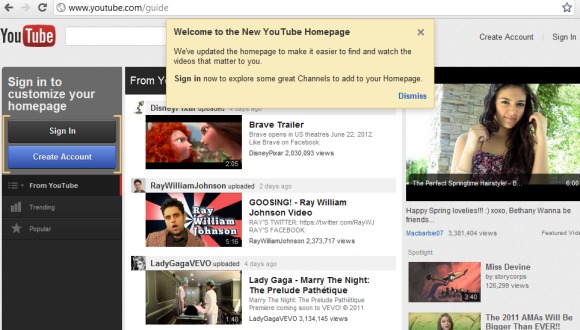
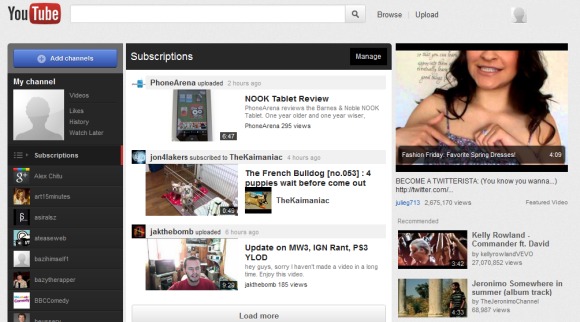
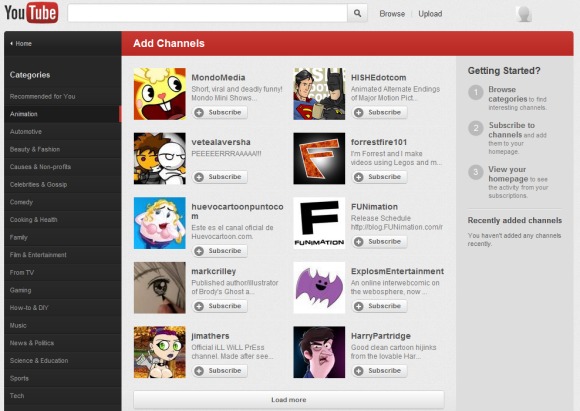
YouTube experiments with a new homepage that makes it easy to filter the videos from your subscriptions, social networks and your account from the homepage. YouTube calls the new homepage a guide, probably because it recommends new channels. There's even a page that lets you browse popular channels by category, including a list of recommended channels.

The nice thing about the new homepage is that you can click an option from the left sidebar and the corresponding videos are displayed without opening a new page. Now you can quickly access the list of videos you liked or your history, the latest videos from a channel and the most popular YouTube videos directly from the homepage. Unfortunately, the updated YouTube.com doesn't look great when you're not signed in since most features are missing and YouTube emphasizes the "sign in" button.


YouTube also updated video pages. The background is now light gray, just like on the homepage. Buttons are embossed, there are new icons for the buttons and for the full screen/larger player options.


To try the redesigned homepage and the updated interface of the video pages, edit the VISITOR_INFO1_LIVE cookie for youtube.com and use the following value: ST1Ti53r4fU. For example, in Google Chrome, go to YouTube's homepage, open the JavaScript console (Ctrl+Shift+J or Menu > Tools > JavaScript Console) and paste the following code:

document.cookie="VISITOR_INFO1_LIVE=ST1Ti53r4fU";

Then press Enter, close the console and reload YouTube's homepage.

You can also use extensions like Edit this cookie (Chrome) or Cookies Manager (Firefox). Opera's cookie manager is really advanced, so you don't need an extension to edit cookies.

To go back to the old interface, open your browser's cookie manager, search for youtube.com and delete the VISITOR_INFO1_LIVE cookie.

{ Thanks, Emerson and Mushaf.}

YouTube's HTML5 Player Gets Better

YouTube's HTML5 player has improved a lot lately and it's almost ready to replace the Flash player. You can enable annotations and captions, the contextual menu lets you copy the embedding code and the video's URL, YouTube now offers 480p and 1080p options for WebM videos and there's native full-screen support if you use a Firefox nightly build or Chrome's dev channel.


I've also noticed that sometimes embedded videos use the HTML5 player even if you've already installed Flash and you haven't enabled the HTML5 trial.

YouTube's Google+ Player

Google+ added a small YouTube icon that's always displayed next to the scrollbar. When you mouse over the icon, you'll see a search box that asks you "what would you like to play?". Type your query and Google+ opens a pop-up window with 20 search results. It's actually a playlist and videos start playing automatically.


You can +1 a video you like or share it with your circles. When you share a video, Google also adds a link to a playlist with related videos.

The nice thing is that you can minimize the pop-up window and still be able to pause a video or go to the next video directly from Google+. This is especially useful for music.


"It's no secret that YouTube is filled with tons of great content (from inspiring speeches to music videos to honey badgers). We wanted to bring YouTube directly into Google+ — as well as make it easier to watch and share your favorites — so we're launching a YouTube 'slider' in the stream," mentions Google's Vic Gundotra.

What about a Google Music player?

{ Thanks, Thomas, Benjamin and Herin. }

YouTube Tests a New Interface

YouTube experiments with a new interface that uses a gray background, muted colors, redesigned buttons and new icons for the like/dislike buttons. Most of the features are available in the Cosmic Panda experiment, but the changes are less drastic.


To try the new interface, change the value of the VISITOR_INFO1_LIVE cookie for youtube.com to Eg7GsyKWzk8. For example, in Google Chrome, go to YouTube's homepage, open the JavaScript console (Ctrl+Shift+J or Menu > Tools > JavaScript Console), paste the following code:

document.cookie="VISITOR_INFO1_LIVE=Eg7GsyKWzk8";

Then press Enter, close the console and reload YouTube's homepage.

You can also use extensions like Edit this cookie (Chrome) or Cookies Manager (Firefox). Opera has a powerful cookie manager, so you don't need an extension to edit a cookie.

To go back to the old interface, open your browser's cookie manager, search for youtube.com and delete the VISITOR_INFO1_LIVE cookie.

{ Thanks, Maurice. }

Connect YouTube with Google+

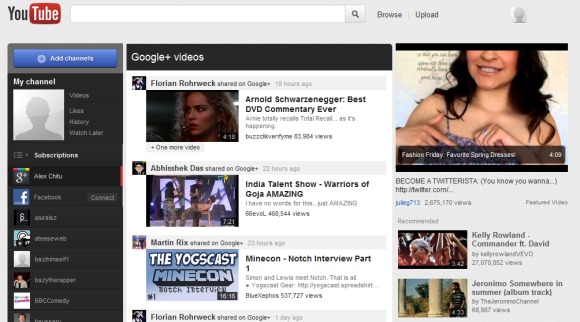
YouTube now lets you connect your Google+ account and watch the videos shared by your friends on YouTube's homepage. At the moment, AutoShare is not available and you can't automatically share activities like uploading a video, commenting on a video or liking a video.

To enable this feature, go to Settings > Sharing and click "Connect" next to Google+.


You'll have to wait a few hours until YouTube starts to show videos shared by the people you follow in Google+. Unfortunately, there's a significant delay and the videos aren't added in real time.


{ Thanks, Katty, Herin and Venkat. Via Nirav. }

YouTube's New Video Editor

YouTube has a new online video editor that lets you trim the video, rotate it, remove shaky camera motions, adjust the contrast, saturation and color temperature, apply simple effects like "sepia", "cartoon", "thermal" and add a free audio soundtrack from YouTube's library.

While the editor is pretty basic, the main advantage is that you can replace the original video, but this only works if your video has less than 1,000 views and YouTube hasn't received a copyright complaint from a third-party. There's also a "save as" option that lets you save the edited version as a new video.


How to find the new editor? Make sure you're logged in, go to "My videos & playlists" and click "Edit video" next to the video you want to edit. You can also open a video you've uploaded and click "Edit video".


To make things more confusing, YouTube has another video editor that lets you mix your videos and Creative Commons videos from other YouTube users, add audio soundtracks from YouTube's library and apply transitions.

YouTube Cosmic Panda

YouTube tests a new interface code-named Cosmic Panda. There are many cosmetic changes: videos are centered, player's controls are now black, video thumbnails are a lot bigger, suggestions are displayed below the video, profile photos are displayed next to the comments, channels and playlists have a completely new layout.


Probably the most interesting thing about the new interface is a Chrome-only feature that lets you play a video in the background while you visit a channel. YouTube is more fluid and I expect to see a similar feature when you perform a search and when you click "view all comments".

The new interface can be enabled and disabled at youtube.com/cosmicpanda.

{ Thanks, Jason and Greg. }

Quickly Add a YouTube Video to a Playlist

YouTube's embeddable player added a new feature that lets you quickly update your playlists with new videos. Click the arrow next to the "plus" button and you can add the video to one of your playlists. You can't create new playlists from the player and you can only see the first 10-15 playlists, depending on the player's height. I couldn't find a way to scroll the list.


Here's a video you're probably anxious to add to your playlists (there's no "remove" button in the player, sorry about that!):


It's surprising that the embeddable player doesn't have like/dislike buttons and you have to go to YouTube's video page for such a simple action. There's also a contextual menu that lets you copy the video's URL and the embedding code, but YouTube uses the old Flash-only code.

YouTube Tests a Black Player

A few readers spotted a new YouTube player with a redesigned control bar that uses a black background. The current control bar doesn't stand out so that you can focus on the video you are watching.


A YouTube user says that he "would really appreciate a way to go back to the normal player, with its more obvious progress bar and less ugly/hyperactive popup controls". I really like the bigger pause button, but YouTube should also change the action buttons below the player to better integrate in the new design.


{ Thanks, Josh and Jon. }

YouTube's Pages for Blogs, Now Available

The YouTube feature I mentioned a few days ago is publicly available: YouTube automatically generates pages that list the most recent videos embedded in a blog.

"By crawling web feeds of sites that have embedded videos, we've built dedicated pages that highlight your embedded videos. This means that there is now a place on YouTube to find videos mentioned on your favorite blogs & sites," explains YouTube's blog.

You can find pages for blogs like Engadget, Boing Boing, Google OS and the nice thing is that the URL is easy to guess. Unfortunately, the pages don't have feeds and you can't follow them.

For now, you'll find links to these pages next to some videos in a section called "as seen on". Instead of linking to a popular page that embeds the video, YouTube now links to a page with the most recent YouTube videos from the site.


Labels

Web Search Gmail Google Docs Mobile YouTube Google Maps Google Chrome User interface Tips iGoogle Social Google Reader Traffic Making Devices cpp programming Ads Image Search Google Calendar tips dan trik Google Video Google Translate web programming Picasa Web Albums Blogger Google News Google Earth Yahoo Android Google Talk Google Plus Greasemonkey Security software download info Firefox extensions Google Toolbar Software OneBox Google Apps Google Suggest SEO Traffic tips Book Search API Acquisitions InOut Visualization Web Design Method for Getting Ultimate Traffic Webmasters Google Desktop How to Blogging Music Nostalgia orkut Google Chrome OS Google Contacts Google Notebook SQL programming Google Local Make Money Windows Live GDrive Google Gears April Fools Day Google Analytics Google Co-op visual basic Knowledge java programming Google Checkout Google Instant Google Bookmarks Google Phone Google Trends Web History mp3 download Easter Egg Google Profiles Blog Search Google Buzz Google Services Site Map for Ur Site game download games trick Google Pack Spam cerita hidup Picasa Product's Marketing Universal Search FeedBurner Google Groups Month in review Twitter Traffic AJAX Search Google Dictionary Google Sites Google Update Page Creator Game Google Finance Google Goggles Google Music file download Annoyances Froogle Google Base Google Latitude Google Voice Google Wave Google Health Google Scholar PlusBox SearchMash teknologi unik video download windows Facebook Traffic Social Media Marketing Yahoo Pipes Google Play Google Promos Google TV SketchUp WEB Domain WWW World Wide Service chord Improve Adsence Earning jurnalistik sistem operasi AdWords Traffic App Designing Tips and Tricks WEB Hosting linux How to Get Hosting Linux Kernel WEB Errors Writing Content award business communication ubuntu unik