Showing posts with label Google Contacts. Show all posts

Gmail's YouTube Group

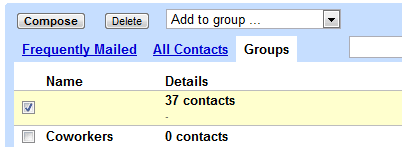
For some reason, Google added a YouTube contact group to many Gmail accounts. I currently have 82 contacts in the YouTube group and they have only one thing in common: they sent me or I sent them an email in 2006, 2007 or 2008. They don't have anything to do with YouTube and some of the email addresses couldn't be used to create Google accounts (for example, the Writely email address for importing documents).


The YouTube group can be renamed or deleted, but it's strange that it was automatically created. Gmail has some system groups for Google Latitude, Google Talk, Google Buzz, but they're hidden and can't be removed.

Do you see the YouTube group in your Gmail account?

{ Thanks, Katty and everyone who commented on Google+. }

Google Contacts Integrates With Google+

Gmail's contact manger started to include information from Google Profiles. You can also find your Google+ circles in the sidebar, below the list of groups.


By default, the data obtained from Google Profiles is displayed below the information you've entered, but you can combine them: go to a contact page, click the "More" dropdown and select "[Show external data] inline".

It's interesting to notice that the Google Profiles data is automatically added when you enter an email address associated with a profile. To remove this information, just delete the corresponding email address.

The latest features are also available at google.com/contacts, which has recently switched to the new Google Contacts interface, but you can find them in the old Gmail interface, as well.

{ Thanks, Scott, Filipe, Venkat, Yavuz, Shimmy, Zachary and Matt. }

Templates for Google Contacts

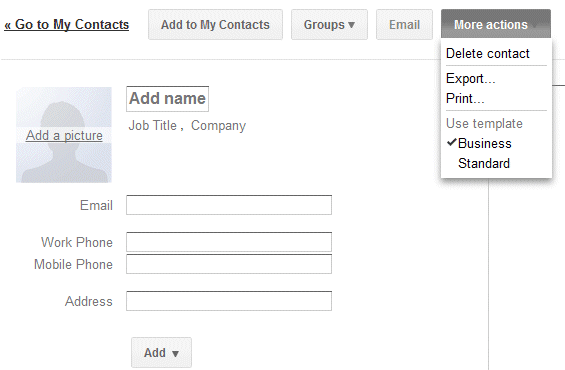
Gmail added a new feature that makes it easier to add a new contact: templates. If you click "More actions" when you create a contact or edit an existing one, you can select the business template to quickly add fields for the job title, company name, mobile phone and work phone.


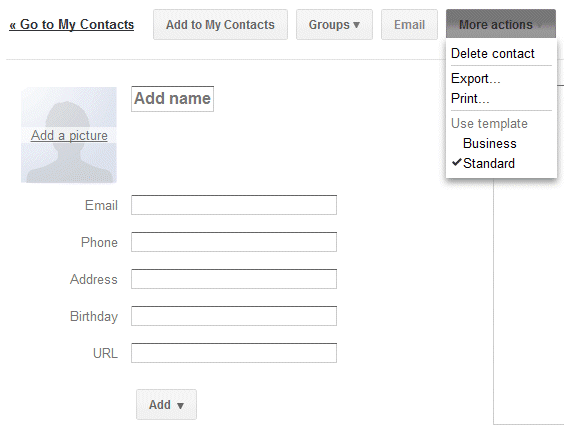
The default template is more generic:


Google Contacts lets you add or delete fields, but you can't delete the fields from a template. Hopefully, Google will allow users to create custom templates and import some of the data from Google Profiles.

{ Thanks, Herin. }

Future Gmail Option: Disable Auto-Adding Contacts

Google's video that introduces the new Gmail ads shows another option that's not yet available outside Google. In the near future you'll be able to disable a feature that's often useful and sometimes annoying: automatically creating contacts when you send a message.

At the moment, "email addresses are automatically added to your Contacts list each time you use the Reply, Reply to all, or Forward functions to send messages to addresses not previously stored in your Contacts list," according to Gmail's help center. Gmail also adds the email addresses used when you compose a message.

The new option will allow you to disable this feature, but Google's description is strange: "Create contacts (sets whether sending or receiving a message can create a new contact)." Right now, Gmail doesn't automatically create contacts when you receive new messages. You need to reply to the messages first.


Here's the video (you can fast forward to 1:14 min).


{ Thanks, François. }

Restore Google Contacts

One of the most annoying things about Google's contact manager is that it doesn't have a "trash" section. If you accidentally delete some of your contacts, it's impossible to retrieve them without a backup. This is a big problem if you use a buggy software that tries to sync your contacts, but manages to overwrite them.

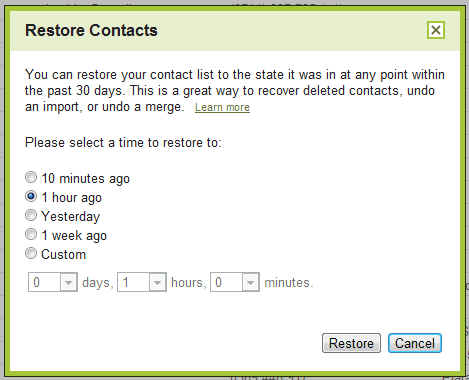
Google tried to address this issue by adding a new option that lets you restore your contacts. You'll find it if you visit Google's contact manager and click on the "More actions" button. "You can restore your contact list to the state it was in at any point within the past 30 days. This is a great way to recover deleted contacts, undo an import, or undo a merge," explains Google.

While this is a very useful feature, Google's implementation doesn't help users who don't remember when they made a mistake. Google should have listed the most recent changes and allowed users to pick one of the revisions, like in Google Docs.


{ via Gmail blog }

Google Promotes Data Portability by Adding Restrictions to the Contacts API

Google found a strange way to show to the world that Facebook is a walled garden that traps your data: by blocking Facebook's access to the Google Contacts API. A Google spokesperson said that "users often aren't aware that once they have imported their contacts into sites like Facebook they are effectively trapped. We hope that reciprocity will be an important step towards creating a world of true data liberation—and that this move will encourage other websites to allow users to automate the export of their contacts as well."

Facebook users can still export their Gmail contacts and manually upload the file to Facebook, but Google Contacts API made this much easier. Facebook even found a direct URL that lets you export your contacts, so you don't have to visit Gmail.


Google may have good intentions, but that's a terrible way to treat users. After all, it's their data and it should be their choice to use services like Facebook.

To show that Facebook is not the only target, Google Contacts API includes some new terms of use: "Google supports data portability. By accessing Content through the Contacts Data API or Portable Contacts API for use in your service or application, you are agreeing to enable your users to export their contacts data to other services or applications of their choice in a way that's substantially as fast and easy as exporting such data from Google Contacts, subject to applicable laws."

That's like trying to make the web faster by asking developers that use the Google Analytics tracking code to make their sites as fast as Google Analytics.

Update: Danny Sullivan quotes a Facebook engineer who says that "the most important principle for Facebook is that every person owns and controls her information. Each person owns her friends list, but not her friends' information. A person has no more right to mass export all of her friends' private email addresses than she does to mass export all of her friends' private photo albums".

But that's not always the case, since Facebook allows Yahoo and Microsoft to build services that import your Facebook friends, while Google can't get that data. Danny concludes that "Facebook simply doesn't want you to mass export them into Google — not unless, I suppose, it gets a business deal with Google. And if it doesn't want to do a deal, then those emails don't get to go. They aren't yours. They belong to Facebook, and can only be exported to the business partners that Facebook agrees with."

Update 2: Google redirects users that want to download their address book directly from Facebook to a page titled "Trap my data now":

"Hold on a second. Are you super sure you want to import your contact information for your friends into a service that won’t let you get it out? Here's the not-so-fine print. You have been directed to this page from a site that doesn't allow you to re-export your data to other services, essentially locking up your contact data about your friends. So once you import your data there, you won't be able to get it out. We think this is an important thing for you to know before you import your data there. Although we strongly disagree with this data protectionism, the choice is yours. Because, after all, you should have control over your data."

Upload Picasa People Photos to Google Contacts

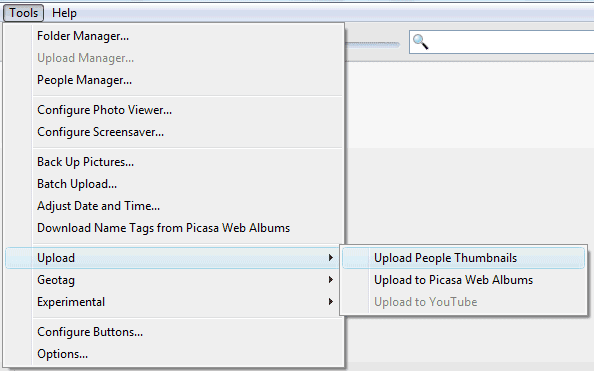
Picasa 3.8 makes it easier to upload pictures for your Google contacts. After scanning all the photos from your library and adding name tags to your photos, you can go to the Tools menu, select Upload and click on Upload People Thumbnails.


Picasa asks if "you want to upload and replace all the thumbnail photos from your People Albums to your Google Contacts". If you click on "Upload", Picasa saves the photos to Google Contacts and you can see them in Gmail or in any other application that synchronizes with Google Contacts (for example, Android's Contacts app or iPhone's Contacts app, if you use Google Sync).

If you don't want to upload photos for all your contacts, you can click on one of the people from Picasa's sidebar, right on a photo and select "Set as Google Contacts Thumbnail". You can also enable "Upload people album thumbnails to Google Contacts" from Tools/Options/Name Tags (or Picasa/Preferences/Name Tags on a Mac) to upload the new thumbnails you select in Picasa.

It's strange to see that Google didn't add this option to Picasa Web Albums and that the photos tagged in Picasa Web Albums aren't displayed in Google Contacts. Google could at least offer the option to pick one of the photos tagged in Picasa Web Albums when you add a picture to one of your contacts. Right now, you can only select a photo from your public albums.

Gmail's Hidden Groups

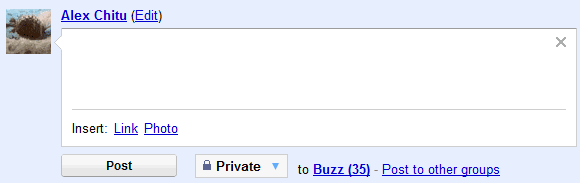
In a previous post, I mentioned a trick that lets you create a Gmail group for the people you follow in Google Buzz. The downside was that the group doesn't update when you follow other people in Google Buzz.

It turns out that Gmail already has a built-in group for Google Buzz contacts. The group doesn't have a name and it's not displayed in Gmail's new contact manager, but you can find it in the old version of Gmail: it's the only one without a name.


Since the group doesn't have a name and it's hidden in the interface, you can't use it to send email messages or to post private Buzz messages, but you can select all the contacts and add them to another group.


There's also a hidden group for Google Latitude friends, which includes the people that can see your location in Google Latitude.

Another group lists all your Gmail Chat/Google Talk friends. Some of these people were automatically added by Google if you didn't disable "Automatically allow people I communicate with often to chat with me and see when I'm online" in the settings.

For those who miss the "all contacts" group in the new contact manager, here's the built-in group that includes both the people you've manually added ("my contacts") and the people automatically added by Google ("other contacts").

Create a Google Buzz Group

Google's contact manager doesn't include built-in groups for Google Chat friends or for the people you follow in Google Buzz. Fortunately, you can easily create a group for the people you follow in Google Buzz using a clever trick found by Siegfried Hirsch:

1. Go to Gmail's contact manager and search for http://www.google.com/profiles. Here's the URL for the search results.

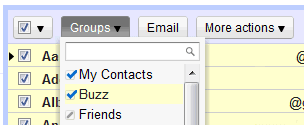
2. Select all the results, click on the "Groups" drop-down and then on the "Create new" option.

3. Create a new group called "Buzz".

This works because Google automatically adds each Google Buzz user you follow to your contacts list and also includes the address of the Google Profile. If you've manually removed Google Profile address or added Google Profile addresses to other contacts, the results won't accurately reflect your Google Buzz group. Obviously, the group won't update automatically when you follow/unfollow Google Buzz users.


Google could use a lot of information from other services to enrich Google Contacts: the photos you tag in Picasa Web Albums, information and links from Google Profiles, Google Latitude location, the most recent Google Buzz message, but that will probably happen when Google Me is released.

Gmail's Streamlined Interface and Better Contact Manager

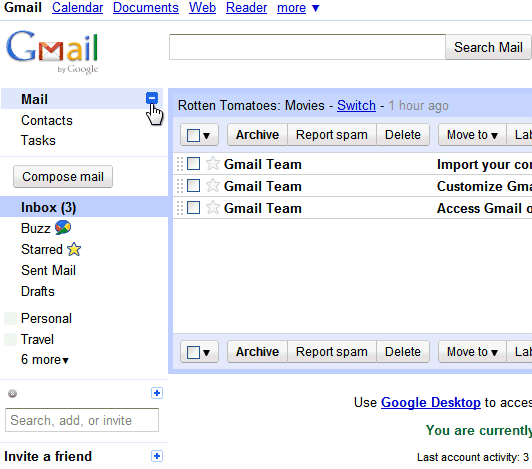
Google launched a slightly refreshed Gmail UI that hides unessential features and uses more screen estate to display your messages. Gmail's logo is smaller, the links to mail, contacts and contacts are grouped in a collapsible panel, while the options that let you select all messages, starred or unread messages are available in a drop-down.

"Overall, there's now a smaller header area that puts the first message in your inbox about 16 pixels higher on the screen than before," explains Google.


Gmail's contacts section has also been redesigned to better integrate with Gmail. The updated interface supports keyboard shortcuts, saves the changes automatically, adds structured name fields and lets you sort contacts by last name. The notes field is now really big, but I don't think it deserves so much attention.


These features will be rolled out today to all Gmail accounts. The new Gmail contact manager won't be available in Google Apps right now, but it will be released in the near future.

{ Thanks, Sterling. }

New Fields in Google Contacts

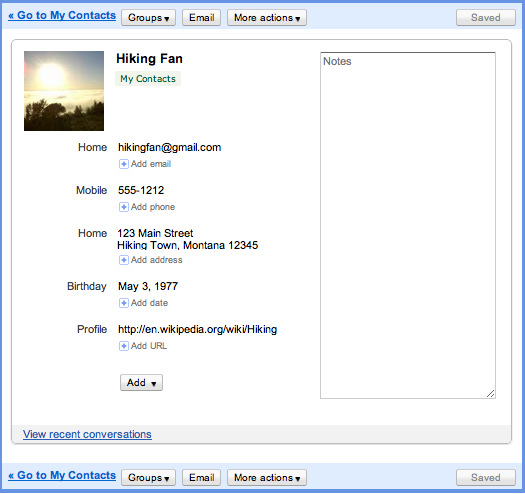
Google Contacts, which is now available at google.com/contacts, has some new fields: website, birthday, date (anniversary), related person (spouse, domestic partners, assistant) and even custom fields. Just click on the "add" button to see some of the other fields that can be used.

For some reason, I can see the changes in the standalone version of Google Contacts, but not yet in Gmail. The most obvious missing feature is the option to create events for birthdays in Google Calendar, but it will probably be added soon.


After years without significant updates, Google's contact manager has been constantly updated in the past year (better contact search, the option to merge duplicate entries, an API, sync options), but there's a lot of room for improvement. What's on your wishlist?

{ Thanks, Kevin. }

Better Search in Google Contacts

One of the most significant limitation of Google's contact manager was that most of the contact fields weren't searchable. This problem has been addressed and you can now search for any information included, from titles and companies, to locations and phone numbers.

"We've heard you loud and clear, and contact search now works much better: instead of just searching contact names and email addresses, it now includes phone numbers, notes fields, and mailing addresses as well. So, if you're visiting the Bay Area and looking for friends to catch up with, you could try typing "650" or "415" in the contact manager search box," suggests Gmail's blog.


Gmail should also include an advanced search option for contacts, so you can find more precisely the contacts that work for a certain company or the people who sent you more than 3 messages in the past month. Some of these searches could be saved and used to create dynamic groups.

Merge Gmail Contacts

The feature is not yet automatic, so you need to find the contacts you want to merge, but it's useful if you don't have too many duplicates. Just select two or more entries for the same person, click on "Merge these contacts" and Google will combine the information from the selected contacts.

All the email addresses from the merged contacts will continue to be available in the auto-complete feature, so you'll still be able to choose one of the addresses.


Try this new feature in Gmail's contact manager.

{ via Blogoscoped Forum }

Update: To make things even more confusing, Gmail added a new view titled "All Contacts". So now you have:

* My Contacts - "a place to import, store and view all of the contact information that's important to you"
* All Contacts - "these are all of your contacts"
* Suggested Contacts - "the people you have contacted frequently"
* Most Contacted - "contacts you email and chat with the most"

The descriptions are not clear enough to distinguish between all these views and I wonder if all of them are really necessary.

Google Sync, Available for iPhone and Windows Mobile

If you have an iPhone or a Windows Mobile, you can now synchronize Google Calendar events and Gmail events using Google Sync. "Once you set up Sync on your phone, it will automatically begin synchronizing your address book and calendar in the background, over-the-air, so you can attend to other tasks. Sync uses push technology so any changes or additions to your calendar or contacts are reflected on your device in minutes," explains Google Mobile Blog.

Google Sync already works on BlackBerry. For the rest of the mobile phones, you can only synchronize contacts if there's support for SyncML. Contact synchronization should work on some Nokia and Sony Ericsson phones, for example Nokia N-Series and Sony Ericsson W-Series.


Before synchronizing data, read the known limitations of the initial release and follow the instructions from Google's site.

Google mentions that the service available for iPhone and Windows Mobile uses the Microsoft Exchange ActiveSync protocol. "When setting up a new Exchange ActiveSync account on your phone, all existing Contacts and Calendar events may be removed. Please make sure to back up any important data before you set up Google Sync."

Import Contacts and Mail to Gmail

Gmail includes some options that let you import contacts and messages, but they're not very easy to use and migrating data to Gmail is not straightforward. But things are about to change: Google has partnered with TrueSwitch and Gmail will start to include a simple migration tool that works with some of the most popular mail services (AOL Mail, Yahoo Mail, Hotmail and many services provided by ISPs and mobile carriers).


"If you're switching to Gmail from another email provider, importing contacts and messages from your old email account can help you make the transition without having to do a bunch of housekeeping," explains Google. You can import the contacts from your old account, import the existing messages and the messages you will receive in the next 30 days and create a new label for the imported messages.

Of course, you can also import contacts by first exporting a CSV file from your old account, there's also the powerful mail fetcher that downloads messages from services that support POP3 and you can auto-forward messages to Gmail if your old service has this feature.

The new option should be added to the new Accounts and Import tab from Gmail's settings page.


If it's not there yet, then you'll have to wait until it's available for everyone. One thing is clear: when this option is available, it will be much easier to migrate from Yahoo Mail and Hotmail to Gmail and that could the increase the adoption of Google's mail service. "Between December 2007 and December 2008, Gmail's number of unique monthly visitors in the United States grew 43%, from 20.8 million to 29.6 million, according to ComScore. Windows Live Hotmail lost 5% of its unique monthly visitors during this period, falling from 45.7 million to 43.5 million," reports InformationWeek.

{ Thanks, Kevin. }

Upcoming Gmail Features: Contact Deduplicator, Better Video Chat

Gmail's Product Manager Todd Jackson told CNet some of the Gmail features that will be released in the next months, but hopefully the best new things are still secret.

The video chat plug-in for Gmail will show higher-quality videos and this is one of the reasons why Google chose not to use Flash. "Jackson says the plug-in route will be able to provide even higher-quality video as people's connections improve, going to Video Graphics Array (640x480 pixels) all the way up to high definition."

Gmail's contact manager will add a feature that's even in Hotmail, not to mention some business-oriented mail clients: removing duplicates. "Jackson says a de-duper is on the way and that contacts will have more of a presence both in your inbox and in conversations."

Regarding email attachments, CNet suggests that Gmail could increase the already generous limit of 20 MB, but Gmail's Product Manager hints at something else. "We know people's file sizes are getting bigger. They want to share their files, keep them in the cloud, and not worry about which computer they're on. Google wants to be solving these problems."

Will Google release a more comprehensive solution for storing and sharing files, now that Gmail's storage quote increases much slower, small projects like Google Notebook enter hibernation and Gmail starts to limit the way you use free products like Google Apps Standard Edition?

Share Personal Information with Your Gmail Contacts

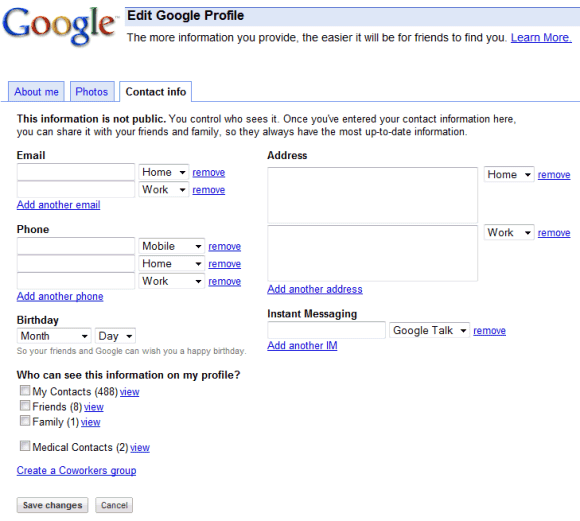
Google Profiles has a new feature that lets you share information about yourself with your contacts. "This information is not public.You control who sees it. Once you've entered your contact information here, you can share it with your friends and family, so they always have the most up-to-date information."

You can add your email addresses, phone numbers, and home address, and allow all your contacts or specific contact groups, like Friends or Family, to see this information on your profile. For some reason, Google doesn't prefill some of the fields like the email address or your Google Talk ID and you can't share the data with contacts that are not part of a group.


It's not clear if the shared data will be used in Gmail, but Microsoft offers a similar feature called Windows Live People that's integrated with Hotmail. "Windows Live People allows real-time updates to contact's information. Suppose one of the user's contacts just moved and has a new home address. When that contact enters their new information in Windows Live People, the user's contact list across Windows Live services is automatically updated in real time."

{ via Blogoscoped Forum }

New Default Groups for Google Contacts

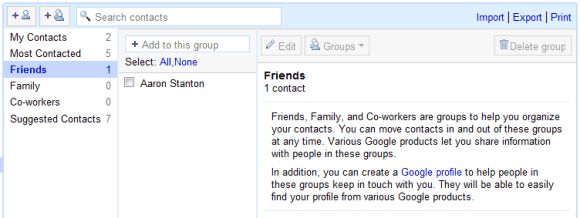
Gmail added three new built-in contact groups. "Friends, Family, and Co-workers are groups to help you organize your contacts. You can move contacts in and out of these groups at any time. Various Google products let you share information with people in these groups. In addition, you can create a Google profile to help people in these groups keep in touch with you. They will be able to easily find your profile from various Google products."

iGoogle is one of the services that will use these groups for managing your shared activities. One size doesn't fit all, so separating your contacts could simplify the way you share and receive information.


If you don't like the new groups, the bad news is that you can't delete them. Try to ignore them, but keep in mind that they'll be useful at some point.

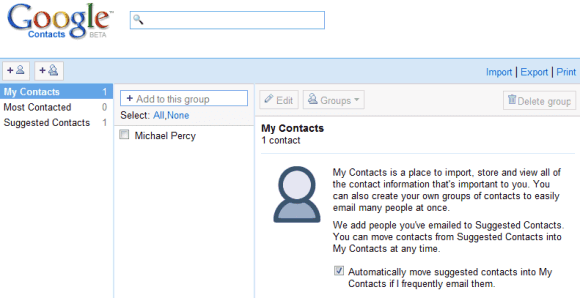
Google has three other default contact groups: My Contacts (manually-added contacts), Suggested Contacts (email addresses collected from your conversations) and Most Contacted (20 frequently-used email addresses). Google no longer automatically adds email addresses to My Contacts. "Only contacts that you've edited, imported or added to a group will remain in My Contacts. This will provide everyone with a clean slate and, we hope, a better point for syncing contacts with mobile devices."

{ Thanks, Roody. }

Google Contacts


One of the most visible changes in Gmail 2.0 was the new contact manager with better search options and more flexible exporting. You might have noticed that the contacts list doesn't load instantly and that's because Gmail opens a separate web page in an iframe.

Google has recently updated the stand-alone contacts page by adding a logo and a more prominent search box. Unfortunately, the URL is not user-friendly: http://mail.google.com/mail/contacts/ui/ContactManager.

The page should be useful if you have a Google account that is not connected to a Gmail address and you would like to access your list of contacts from services like Google Docs or Google Reader.


{ Thanks, Tony. }

Portable Gmail Contacts

If you use Gmail, many Google services have access to your contacts list and you can easily add addresses using autocomplete or from a contact picker. But what happens when you need to enter an email address on a site that's not from Google? Many news sites have options to send a link to your friends and sometimes this is more convenient than loading Gmail and pasting a link to the article.

Google Contacts Autocomplete is a Greasemonkey script that brings your Gmail contacts everywhere you go on the web. When you start to type the name of your friend or his email address, the script shows a list of suggestions.


For now, the script only provides suggestions for a single email address, but I'm sure this could be easily fixed. Unlike Gmail, the script sorts the suggestions alphabetically, not by affinity.

Labels

Web Search Gmail Google Docs Mobile YouTube Google Maps Google Chrome User interface Tips iGoogle Social Google Reader Traffic Making Devices cpp programming Ads Image Search Google Calendar tips dan trik Google Video Google Translate web programming Picasa Web Albums Blogger Google News Google Earth Yahoo Android Google Talk Google Plus Greasemonkey Security software download info Firefox extensions Google Toolbar Software OneBox Google Apps Google Suggest SEO Traffic tips Book Search API Acquisitions InOut Visualization Web Design Method for Getting Ultimate Traffic Webmasters Google Desktop How to Blogging Music Nostalgia orkut Google Chrome OS Google Contacts Google Notebook SQL programming Google Local Make Money Windows Live GDrive Google Gears April Fools Day Google Analytics Google Co-op visual basic Knowledge java programming Google Checkout Google Instant Google Bookmarks Google Phone Google Trends Web History mp3 download Easter Egg Google Profiles Blog Search Google Buzz Google Services Site Map for Ur Site game download games trick Google Pack Spam cerita hidup Picasa Product's Marketing Universal Search FeedBurner Google Groups Month in review Twitter Traffic AJAX Search Google Dictionary Google Sites Google Update Page Creator Game Google Finance Google Goggles Google Music file download Annoyances Froogle Google Base Google Latitude Google Voice Google Wave Google Health Google Scholar PlusBox SearchMash teknologi unik video download windows Facebook Traffic Social Media Marketing Yahoo Pipes Google Play Google Promos Google TV SketchUp WEB Domain WWW World Wide Service chord Improve Adsence Earning jurnalistik sistem operasi AdWords Traffic App Designing Tips and Tricks WEB Hosting linux How to Get Hosting Linux Kernel WEB Errors Writing Content award business communication ubuntu unik