Showing posts with label Google Plus. Show all posts

Share Embedded Images From a Gmail Message Using Google+

Google+ was built around sharing content and that's its main purpose, so many Google products started to provide a unified sharing experience powered by Google+.

Gmail allows you to share image attachments with other Google+ users by clicking the "Share" link, but what about the embedded images from a message? Now you can share them by mousing over the images and clicking the "share" button.


How to insert images into a Gmail message? Just drag and drop the images from your favorite file manager. It should work in the latest versions of Chrome, Safari and Firefox, assuming that you haven't disabled the rich text mode.

{ Thanks, Enrico. }

A New Google+ Interface

Google+ has a new interface that brings a lot of changes. It's not yet available to everyone and that's because it rolls out over the next few days.

The new interface has a vertical navigation bar that lets you reorder and hide apps. When you mouse over an app, Google+ shows a list of quick actions. This change will make it easier to add third-party apps in the future.

There are two new pages in the navigation bar: a hangouts page that lists the invitations from the people you've added to your circles, as well as a list of popular hangouts and an explore page for "what's hot".


The list of circles is now displayed at the top of the page, the search box is larger and the chat gadget has been moved to the right sidebar. When you resize the window and there's not enough room to display the chat sidebar, it becomes a floating panel.

Google+ conversations borrowed the old card interface from the previous versions of Gmail, while thumbnails for images and videos are bigger and include captions.

The profile page now accommodates bigger photos, so it's probably a good idea to upload new photos.


Vic Gundotra, Google Senior VP, says that there are 170 million Google+ users, up from 90 million users 2 months ago. That's a really impressive achievement.

{ Thanks, Jérémy. }

New Google +1 Buttons

The ubiquitous +1 buttons will soon have a new look. The updated version is available when you subscribe to the Google+ Platform Preview, at least for now.

"Following in the footsteps of our new red and white Google+ icon, the +1 button is sporting a fresh coat of paint," informs Google.


While the new buttons are more consistent and include the Google+ branding, the old buttons are more colorful and more descriptive. "+1" is bigger and more obvious in the old buttons and that made them more clickable.

Here's the tiny +1 button from Google+:


... and here's the +1 button from Google Groups:


The small +1 buttons are not legible and it's not obvious that you're supposed to click them. As Fernando Fonseca says, "I understand the need to have a button that looks like the new logo but the problem is that a white background with a thin red line is hardly eye catching and hardly says 'Click me'."

You can compare the different versions of the +1 (v1) and +1 (v2) using the corresponding sprites. I'd choose the old buttons.

Update: There's still time to improve the buttons. Share your feedback here and here.

{ Thanks, Yu-Hsuan Lin. }

Google's Thank You Notes

Google sometimes displays some annotations below search snippets. Showing that one of the people you trust +1'd a page is useful and might help you decide to click a search result.

Now Google also adds a link that lets you send a thank you note to the person that +1'd page: "Your +1 helped me find this. Thank you!". It's a cute idea and this also helps Google find the recommendations that were really useful, but the links clutter Google's results pages. Maybe Google could show the "thank you" link when you +1 the page.


Another issue is that social annotations aren't necessary when it comes to the top result for a navigational query. Most people that search for [Yahoo] want to visit Yahoo's homepage or use services like Yahoo Mail, Yahoo News, so the annotations for these results are unnecessary. It's probably a better idea to show the annotations less often and only for the results that deserve to be highlighted.

{ via Search Engine Roundtable }

The Google+ Upgrade

After a strong start, Google+ could have lost its momentum, at least if we are to believe ComScore's numbers. "According to comScore, Google+ users averaged only three minutes on the site during January, a pittance compared to Facebook's average of 405 minutes per visitor."

That's a really low number, but I'm not sure it's accurate. Google+ is not a separate service like Google Finance or Google Scholar, it's the social fabric from many Google products. Below Google's navigation bar, there's always a share box and a notification button that lets you read comments and post your replies without visiting Google+. Google's search results include pages shared by your Google+ circles, YouTube's homepages shows videos shared by the people you follow in Google+ and many pages have +1 buttons. You're using Google+ even you're not visiting plus.google.com and that's because Google+ is an upgrade, not a new product.

"This is just the next version of Google. Everything is being upgraded. We already have users. We're now upgrading them to what we consider Google 2.0," says Vic Gundotra, Google VP.

Google's bet is so significant that Google+ simply can't fail. Google+ is just a fancy name for a new Google that knows more about you, so that it can offer a more personalized experience. Upgrading to Google+ will offer better search results, better ads, simple ways to share content, collaborate and communicate with the people you care about. It's the same Google made more powerful by a social upgrade.

No New Mail? Try Google+

What's the message displayed by Gmail when there's no message in your inbox? If you answered "No new mail! Want to read updates from your favorite sites? Try Google Reader", you are right. It was Google's subtle way to promote Google Reader.


Before Google Reader was released, Gmail's "inbox zero" message used to be: "No new mail! There's always Google News if you're looking for something to read."

Now that Google focuses on developing Google+, a modern version of Google Reader, Gmail's new message is: "No new mail! See what people are talking about on Google+." The links sends Gmail users to the "what's hot" section of Google+ which "highlights selected content thought to be exemplary, interesting, and appropriate: showing you serendipitous and diverse information".


From Google News to Google Reader and now Google+, Gmail illustrates three different ways to read news. Google News ranks and clusters articles from the web, Google Reader allows you to read news from your favorite sites, while Google+ lets you read the articles shared by the people you follow. From news that are important to everyone to news that are important to the people you trust.

Google+ and the Post-Web Google

I've noticed an increasing number of ads that no longer send people to the company's sites. Instead, the ads only include a link to the official Facebook page. Sites suddenly look outdated, no longer include the latest information and people stop visiting them.


There are still people that visit those outdated sites and many are coming from search engines like Google. Despite Google's efforts to have a comprehensive index, there's a growing subset of the Web it can't properly index and that's Facebook. Sure, Google indexes a lot of Facebook pages, but that's like trying to find your keys in a dark room. Google needs Facebook's map to index all the pages and find the connections between pages and between users, but Facebook is not willing to license this valuable data to the most important competitor. Google tried to make the web social and failed, so now the only option to stay relevant is to build an alternative to Facebook's walled garden and that's Google+.

+1s are the new links, authors have profiles, companies have social pages and this new universe will try to coexist with the old Web in Google's search results. Google tried to focus on the users and find ways to make the social Web more open, but now it has to focus on itself and do everything it can to stay alive and maybe even save the Web. "Google's mission is to organize the world's information and make it universally accessible and useful," but that's impossible if it can't access, understand and rank that information.

Back in 1996, Larry Page and Sergey Brin used links to determine the importance of a Web page. Now links and pages are no longer that important and the old rule of trying to send people to other sites as quickly as possible is difficult to apply. Showing personalized results requires understanding users better, encouraging them to share more content and create connections. In many ways, Google+ is the anti-Google and that's why it's difficult to understand some of the new features.

Google+ Now Open for Teens

Google+ changed the age requirements so that any Google Account user can join Google+. In most countries you need to be at least 13 years old to create a Google Account and join Google+, but there are 3 exceptions: Spain, South Korea and Netherlands. Until now, Google+ required to be at least 18 years old to "upgrade" your account.

Google's VP Bradley Horowitz mentioned that there are a few tweaks and new default settings for teens. By default, only the people from teens' circles can trigger notifications and comment on their public posts. If someone outside a teen's circles joins a hangout, Google+ temporarily removes the teen from the hangout and gives him a chance to rejoin.


Teens and young adults are the most active Internet users on the planet. And surprise, surprise: they're also human beings who enjoy spending time with friends and family. Put these two things together and it's clear that teens will increasingly connect online. Unfortunately, online sharing is still second-rate for this age group.

In life, for instance, teens can share the right things with just the right people (like classmates, parents or close ties). Over time, the nuance and richness of selective sharing even promotes authenticity and accountability. Sadly, today's most popular online tools are rigid and brittle by comparison, so teens end up over-sharing with all of their so-called "friends."

With Google+, we want to help teens build meaningful connections online. We also want to provide features that foster safety alongside self-expression. Today we're doing both, for everyone who's old enough for a Google Account.

It's interesting that the updated form for creating a Google Account doesn't automatically create a profile and doesn't add the user to Google+ if he's not at least 18 years old.

{ Thanks, Oskar. }

The Self-Serving Google+ Results

Google has been often accused of promoting its own services in Google Search. Whether it was Google News, Image Search, Product Search or Video Search, the specialized search engine showed results from all over the web and not just from Google's own services. Image Search wasn't restricted to Picasa Web Albums, Video Search wasn't restricted to YouTube, Blog Search wasn't restricted to Blogger. Even for services like Google Dictionary and Google Finance that have their OneBox at the top of the Google search results, Google shows a list of other relevant services.

Google's special section that shows people and pages from Google+ doesn't look like a regular Google OneBox. It's placed in the right sidebar, where Google used to display ads. It shows up for general queries like [music], [sports], [math], that aren't typically associated with social search results. It only shows results from Google+, not from other social services like Twitter or Facebook. It's there even if you're not logged in using your Google account or you're not using Google+.

If Google+ wasn't a Google product, would it make sense to show a similar OneBox with profiles from social sites? Normally, Google would have created a profile search engine and showed a group of relevant results somewhere in the list of search results. Like this:


Google already indexes profiles from different sites and even shows special snippets with structured data. Why not create a special search engine for profiles like the one that lets you search recipes or the search engine for applications?

When Google released Knol, many people wondered if Google could boost the rankings for Knol articles or create a special OneBox with Knol results. "Google Knol does not receive any sort of boost or advantage in Google's rankings," replied Matt Cutts and he was right. Now what if Google displayed a Knol OneBox at the top of the search results for queries that returned relevant Knol articles? Maybe Knol would've become more popular and it wouldn't have been discontinued.

Is it fair to promote results from a single service, especially when you own that service? Even if those results are comprehensive, relevant and useful, it's always a good idea to also show results from other services.

Some engineers at Facebook, Twitter and MySpace developed a site called Focus on the User that lets you replace the Google+ results with other social profiles from the web. From:


... to:


The results are better simply because you can check the accounts from other social services. Maybe an artist shares more information on Twitter or maybe the Facebook account is more important. "When you search for 'cooking' today, Google decides that renowned chef Jamie Oliver is a relevant social result. That makes sense. But rather than linking to Jamie's Twitter profile, which is updated daily, Google links to his Google+ profile, which was last updated nearly two months ago," noticed the authors of the Focus on the User site. I still don't think that the social search box should be placed next to the results, but at least the tweak made it more useful.

"Focus on the user and all else will follow. Since the beginning, we've focused on providing the best user experience possible. Whether we're designing a new Internet browser or a new tweak to the look of the homepage, we take great care to ensure that they will ultimately serve you, rather than our own internal goal or bottom line." (Google's philosophy)

{ via waxy.org. Thanks, Michel. }

If Google Results Aren't Helpful, Ask on Google+

Sometimes Google's results aren't that useful and they don't answer your question. Maybe the query is imprecise or obscure, the results are outdated or you don't have the patience to check the first 100 results to find something helpful. Asking your Twitter followers or your Facebook friends could be a great idea. Google doesn't integrate with Twitter or Facebook, but it experiments with a new feature that shows a message below the list of results: "Want to ask your friends about [your query]? Ask on Google+".


Clicking the link opens a Google+ box that already includes a message: "Hi there! I have a question about [my query]..." Edit your message, click "Ask" and the first results could show up in a few seconds in Google's notification widget.


Maybe Google+ also will include a revamped version of Aardvark and you'll be able to send your question to the right people.

New Google Accounts Require Gmail and Google+

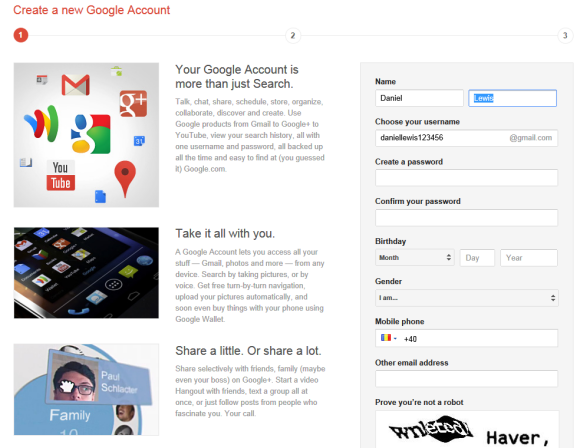
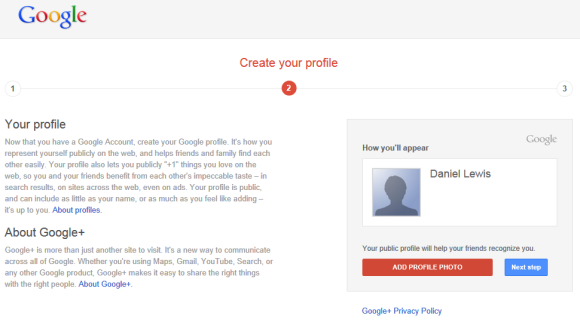
If you try to create a Google account from Google's homepage, you'll notice that Google redesigned the page, but that's not all. You'll now have to create a Gmail account, a Google Profile and you'll automatically join Google+.

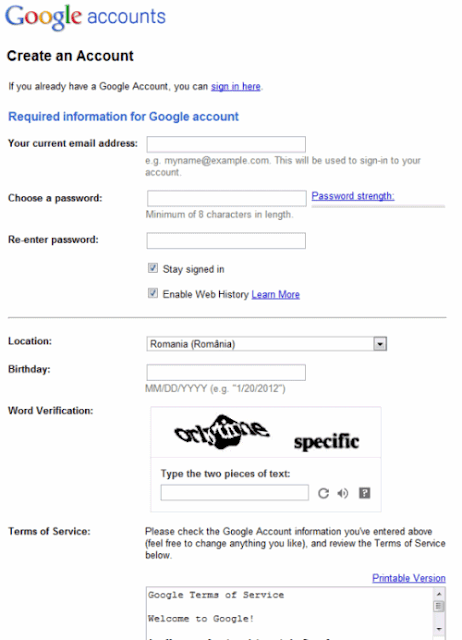
Until now, creating a Google account was quite simple. You could either use an existing email address or create a Gmail account. The redesigned form includes new fields: name, gender (required for Google+) and mobile phone number (not required).


"Your Google Account is more than just Search. Talk, chat, share, schedule, store, organize, collaborate, discover and create. Use Google products from Gmail to Google+ to YouTube, view your search history, all with one username and password, all backed up all the time and easy to find at (you guessed it) Google.com," informs the page.

You can still delete your Google profile, the Google+ content and also your Gmail account.

New users no longer have to manually create a profile and join Google+, while Google found another way to increase the number of Google+ users (currently at 90 million) and the number of Gmail users (currently at 350 million). I've always wondered why Google never offered the option to create a Gmail account when you sign up for a Google account and now that's the only way to create a Google account.

Update: You can still use the old form if you know the URL or if you click "Sign up for a new Google Account" in Google Calendar, Blogger and probably a few other Google products.


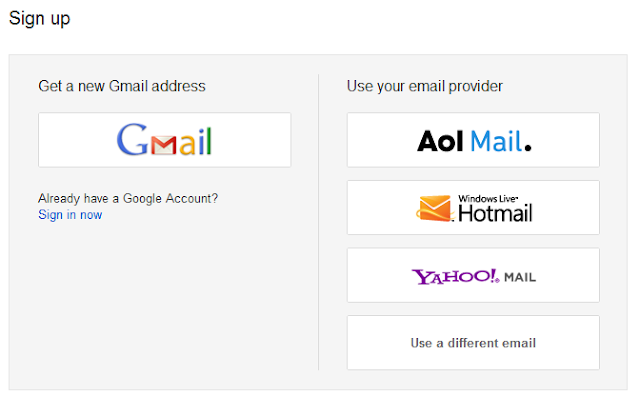
Google Docs, Google Sites and Google Groups use a different page that lets you sign up using a Gmail address or a different email account. Just click "use a different email" and you'll see the old form.


Update 2. A Google spokesperson sent the following statement: "We're working to develop a consistent sign-up flow across our different products as part of our efforts to create an intuitive, beautifully simple, Google-wide user experience. Making it quick and easy to create a Google Account and a Google profile enables new users to take advantage of everything Google can offer."

{ Thanks, Herin. }

Google Search Shows More Results From Google+

Google's search results are personalized even if you don't log in to a Google account. Google uses your location and your previous searches to customize the results. When you log in to your account, Google has more information: your search/browsing history, your social connections, the pages you've bookmarked or +1'd. Everyone is different and Google has the opportunity to use information about you to disambiguate queries, to show more results from the sites you trust and pages you're already visited.

Google+ can change Google results more than any other Google service because social data is an important signal for personalizing results, Google owns the end-to-end experience and it's in Google's best interest to show that Google+ helps sites get better rankings. After all, the reason why many sites added Google+ buttons is that Google+ data is used by Google's search algorithms.

The latest initiative that integrates Google+ with Google Search is called "Search, plus Your World." It's an upgrade of the social search feature that integrates the rich content from Google+.

Google Search now has access to non-public posts and photos from Google+ and you'll be able to search all the posts and photos shared with you or from your circles. "You can find relevant Google+ posts from friends talking about an amazing trip they just took, whether they've shared privately with you or publicly. You'll find links shared by your friends, such as activities, restaurants and other things they enjoyed on their trip," mentions Google. Personal results have a special icon next to the snippet, Google shows the number of personal results at the top of the page and you can also restrict the results to these pages.


Google Instant suggestions now include the people from your Google+ circles. "Now, typing just the first few letters of your friend's name brings up a personalized profile prediction in autocomplete. Selecting a predicted profile takes you to a results page for your friend, which includes information from their Google+ profile and relevant web results that may be related to them." Google shows similar suggestions for "prominent people from Google+, such as high-quality authors."


Another change is that Google includes a special box with Google+ pages related to your query. "Starting today, if you search for a topic like [music] or [baseball], you might see prominent people who frequently discuss this topic on Google+ appearing on the right-hand side of the results page. You can connect with them on Google+, strike up meaningful conversations and discover entire communities in a way that simply wasn't possible before," informs Google. I think it's a mistake to show Google+ pages that are vaguely related to a general query like [music]. The box looks more like a thinly disguised ad than a genuinely useful feature (an ad both for Google+ and the celebrity pages).


To balance the increasing number of social features, Google also added two new buttons at the top of the search results pages that help you toggle between the personalized results and the non-personalized results. This works for an entire session and you can also remove personal results from the preferences page.


Right now, "Search, plus Your World" is gradually rolled out over the next few days, but it only be available when you use Google.com in English and you sign in.

While Google+ data can certainly improve search results, I feel like there's too much information that's not really useful and too much Google+ bias. When Google developed the OneBoxes for maps and stocks, it linked to its own services, but also to competing services. Today Google no longer tries to be fair. Showing the number of people that added the author of a news articles to their circles is not more useful than showing the PageRank of the page or the number of Twitter followers. Showing the latest Google+ posts below the homepage of a business is not more useful than showing the latest Twitter posts. Google profiles are not necessarily better than Facebook profiles and the number of +1's is not more useful than the number of likes. To make Google+ more powerful, to attract more celebrities and businesses, Google might end up making Google results less useful. It's a tricky balancing act to use Google search's popularity to increase Google+ adoption, while also improving Google results using Google+ data and there are many mistakes to be made along the way.


YouTube Tests Google+ Integration

Now that YouTube uses Google Accounts, Google can easily integrate YouTube with other Google services. The latest YouTube redesign made the integration with social networks more prominent and the videos from Google+ are just one click away.

YouTube now tests the header that's already displayed in Google Search, Gmail, Google Docs and many other Google services. The header shows your Google+ notifications, a box that lets you share videos with other Google+ users and links related to your Google profile.


Right now, the Google+ header is only displayed if you haven't created a YouTube account and you log in using your Google account (so you don't have a YouTube username and channel). Obviously, you need to join Google+ to see the new features.

{ Thanks, Michael. }

Google Search Pages Hide +1 Buttons

+1 buttons no longer clutter Google's search results pages. They're now displayed when you mouse over the results for most of the pages. If you have +1'd a page, the button will be displayed by default to highlight the result.


In other search-related news, the preferences page has a new interface with custom controls, while the advanced search page switched back to the old interface. Maybe someone read this post and decided to fix the drop-down lists.


Gmail Integrates With Google+

It looks like not only Google Contacts integrates with Google+. Gmail also added many features that make it easier to share files in Google+, add new people to your circles and find messages from these circles.

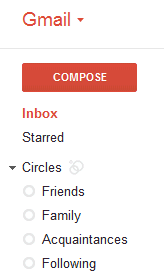
A lot of people complained that you can't find the messages sent or received by the members of a group. This feature is still not available, but you can restrict the messages to a circle. Gmail now displays the list of circles below the labels and you can use it to find mail from your family, friends, colleagues etc. It's obvious that groups are now less important than circles, even though I don't think they'll disappear.

"If you've spent time building your Google+ circles, you can now quickly use them to filter your mail, saving yourself from having to sift through that pile of daily deal emails and newsletters. You can see messages from all of your circles at once or from each individual circle. And if you want, you can show circle names on emails in your inbox. Contacts can also be filtered by circles, making it easier to view your social connections."


You can now add someone to a circle from the widget displayed in the right sidebar. There's also an easy way to share pictures from an email to Google+: just click "share" next to the attachment.


{ Thanks, Petros and Joost. }

Face Recognition in Google+

Google+ is rolling out a feature called Find My Face, which helps other people tag you in their photos. Find My Face uses the face recognition data from Picasa Web Albums to make suggestions. The feature is disabled by the default and you can enable it from the settings page. Google says that it will share this data with the people you know, which probably means the people from your circles.

"Around the holidays, many of us get together with friends and family, and if you're like me, you take lots of photos! Tagging those photos can be a lot of work. So today we're launching Find My Face, an easier way to tag photos of yourself and your friends. By turning on Find My Face, Google+ can prompt people you know to tag your face when it appears in photos. Of course, you have control over which tags you accept or reject, and you can turn the feature on or off in Google+ settings. Find My Face will be rolling out over the next few days," informs Google.


Unlike Facebook, Google won't enable this feature by default. "We recognize that Google has to be extra careful when it comes to these [privacy] issues. Face recognition we will bring out once we have acceptable privacy models in place," said a Google employee back in March. VentureBeat concludes that "by making a simple opt-in procedure, Google will let the 'privacy-schmivacy' set enjoy the benefits of the new tech while sidestepping any accusations of dirty dealing from those who take privacy a bit more seriously".

{ Thanks, Venkat. }

Google Schemer: Social Goal Management

Schemer is an invite-only Google service for sharing and discovering things to do. "A scheme is any activity that can be done in the world, whether it's ordering a favorite dish at a restaurant or snorkeling in the Caribbean with sharks," explains Google.

Much like 43 Things, Schemer lets you define goals and mark the things you've already accomplished. You can inspire other people, find people who have the same goals and join the conversation. To make it easier to find a scheme, you can add tags and locations. Google also partnered with Bravo, Food Network, Rolling Stone, IGN and Entertainment Weekly, so you can get ideas from experts, not just from your friends.


"Whether it's exploring a new city, checking out a friend's movie recommendation, or just finding new activities for your weekends, Schemer lets you discover new things to do, share schemes with friends, and make the most of your day," mentions Schemer's team. The service is integrated with Google+ and you need to join Google+ to be able to use it. "Schemer uses your profile picture and name from your Google+ account to identify you as a schemer user. This means that when you post a scheme, write a comment, post a reply, or indicate either you want to do or have done a scheme, your profile picture and name will be attached to those activities."

Schemer is actually a Google+ app and it's likely that you'll be able to use it inside Google+ in the future. Google also promises to launch a mobile app for Schemer so you can find schemes related to your location.

Now that Google+ no longer requires invitation, Schemer could make Google+ more popular. There's a great viral video, an interesting design and a site that doesn't look like a regular Google service. A scheme is "a secret or devious plan" (American Heritage Dictionary) and a schemer is a person who is involved in making these secret plans, so Google uses a mustache logo, a mesmerizing animated homepage, the Hitchcock font and catchy messages like "You're looking diabolical!" or "Invite your partners in crime".


Note: this post includes another invitation link. The first 20 people who can find it will get access to Schemer, but each one can invite other 20 people.

Update: you can find more invitations using Google Search and Twitter Search.

{ Thanks, Venkat. }

Google Contacts Integrates With Google+

Gmail's contact manger started to include information from Google Profiles. You can also find your Google+ circles in the sidebar, below the list of groups.


By default, the data obtained from Google Profiles is displayed below the information you've entered, but you can combine them: go to a contact page, click the "More" dropdown and select "[Show external data] inline".

It's interesting to notice that the Google Profiles data is automatically added when you enter an email address associated with a profile. To remove this information, just delete the corresponding email address.

The latest features are also available at google.com/contacts, which has recently switched to the new Google Contacts interface, but you can find them in the old Gmail interface, as well.

{ Thanks, Scott, Filipe, Venkat, Yavuz, Shimmy, Zachary and Matt. }

Google Reader's New Share Button

When Google Reader released the new interface, I complained that sharing a post takes too many clicks: you first need to +1 the post, then click the share box and finally click "share". Now it's easier to share a post: just click the new "share" button and click "share" once again in the modal dialog.


Another advantage is that you can use the old keyboard shortcut for sharing items: Shift+S. Unfortunately, you can't use keyboard shortcuts in the modal dialog, so you still need to click "Share".

Decoupling the "+1" button from the "share" button is a good idea and Google should adjust the code of the +1 widget to make this possible. "Liking" and "sharing" are two different actions and should be treated separately, especially considering that +1's are always public, while sharing can be limited to a few people or circles.

{ Thanks, Zachary and Herin. }

Google+ Badges

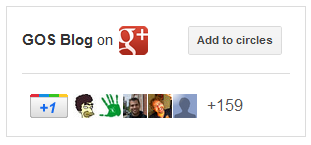
Now that you've created a Google+ page for your company, product or blog, how do you get people to follow the page? The answer is the Google+ badge, a customizable widget that helps you connect your site to a Google+ page. "The Google+ badge helps you grow your audience on Google+ and show more recommendations in Google search by letting people add you to their circles and +1 your page, all without leaving your site," explains Google.

Right now, the badge is only available if you sign up for the Google+ Platform Preview, but it will soon be publicly available. If you already have a Google +1 button on your site, you only need to add two lines of code.

1. connect your site with the Google+ page by adding this code to the <head> section of the HTML document:
<link href="https://plus.google.com/PAGE_ID/" rel="publisher" />

(where PAGE_ID is the long number from the URL of your Google+ page).

This has the added benefit that the page may qualify for Direct Connect and people can visit the page by typing +PAGE_NAME in Google's search box. "In addition to helping us better index your Google+ page, this snippet will help you show more personal recommendations around the web by linking your +1's on sites, your Google+ page, search and display ads," mentions Google.

2. add this code where you want to place the badge:
<g:plus href="https://plus.google.com/PAGE_ID/" size="badge"></g:plus>


You can also add static badges that only include an icon and a short text, although it's probably easier to manually add the icon and link to the Google+ page.

Use this page to generate the code, but make sure that you subscribe to the Platform Preview group to see the badge. Please note that only those who subscribe to the group can see the badges and try other new features that aren't publicly available.

Labels

Web Search Gmail Google Docs Mobile YouTube Google Maps Google Chrome User interface Tips iGoogle Social Google Reader Traffic Making Devices cpp programming Ads Image Search Google Calendar tips dan trik Google Video Google Translate web programming Picasa Web Albums Blogger Google News Google Earth Yahoo Android Google Talk Google Plus Greasemonkey Security software download info Firefox extensions Google Toolbar Software OneBox Google Apps Google Suggest SEO Traffic tips Book Search API Acquisitions InOut Visualization Web Design Method for Getting Ultimate Traffic Webmasters Google Desktop How to Blogging Music Nostalgia orkut Google Chrome OS Google Contacts Google Notebook SQL programming Google Local Make Money Windows Live GDrive Google Gears April Fools Day Google Analytics Google Co-op visual basic Knowledge java programming Google Checkout Google Instant Google Bookmarks Google Phone Google Trends Web History mp3 download Easter Egg Google Profiles Blog Search Google Buzz Google Services Site Map for Ur Site game download games trick Google Pack Spam cerita hidup Picasa Product's Marketing Universal Search FeedBurner Google Groups Month in review Twitter Traffic AJAX Search Google Dictionary Google Sites Google Update Page Creator Game Google Finance Google Goggles Google Music file download Annoyances Froogle Google Base Google Latitude Google Voice Google Wave Google Health Google Scholar PlusBox SearchMash teknologi unik video download windows Facebook Traffic Social Media Marketing Yahoo Pipes Google Play Google Promos Google TV SketchUp WEB Domain WWW World Wide Service chord Improve Adsence Earning jurnalistik sistem operasi AdWords Traffic App Designing Tips and Tricks WEB Hosting linux How to Get Hosting Linux Kernel WEB Errors Writing Content award business communication ubuntu unik