Showing posts with label Google Chrome OS. Show all posts

A New Window Manager for Chrome OS

Chromebook users who install the latest Dev channel release of Chrome OS will be surprised to notice that Chrome OS looks more like a desktop operating system.

Google has been working on a new window manager called Aura that brings many features of a desktop OS. Chrome OS now has a desktop, a taskbar, apps are placed on the desktop, there's support for wallpapers and overlapping windows.

According to Chrome's engineers, Aura is a hardware-accelerated "user interface framework for Chrome UI" that offers "rich visuals, large-scale animated transitions and effects that can be produced only with the assistance of hardware acceleration". Aura is cross-platform and should "provide the foundation of a flexible windowing system and shell for Chrome and ChromeOS on a variety of form factors".


The latest Chrome OS release is only available for Samsung and Acer Chromebooks as Cr-48 Chromebooks will skip Chrome 19.

New Icons for Games and Music in Google Chrome

The latest Dev Channel release of Google Chrome for Chromebooks added two icons to the new tab page. They're similar to the Chrome Web Store icon, but they're for games and music. At the moment, the new icons don't send users to some special pages, but it's likely that they'll be used to promote the games section from the Chrome Web Store and an updated Google Music.


As AllThingsD reports, "Google is finally close to launching a music service with help from the labels". The news was confirmed by Andy Rubin, Google's Senior Vice President of Mobile. "Google is in the very, very early phases of adding consumer products to our portfolio. The media industry didn't see us as that. They saw us a search company," Andy Rubin said, trying to explain why it takes so long to launch a music store and other similar services. At the moment, Google Music is an invite-only service that lets you upload up to 20,000 songs and stream them to any computer, iOS or Android device.

{ Thanks, Sean. }

Chrome Remote Desktop

Chrome Remote Desktop is a new Chrome extension that lets you remotely control a computer from your browser. It's the first software that uses a technology code-named "chromoting" and it's especially useful if you have a Chromebook.
The goal of this beta release is to demonstrate the core Chrome Remoting technology and get feedback from users. This version enables users to share with or get access to another computer by providing a one-time authentication code. Access is given only to the specific person the user identifies for one time only, and the sharing session is fully secured.

One potential use of this version is the remote IT helpdesk case. The helpdesk can use the Chrome Remote Desktop BETA to help another user, while conversely a user can receive help by setting up a sharing session without leaving their desk. Additional use cases such as being able to access your own computer remotely are coming soon.

Chrome Remote Desktop BETA is fully cross-platform, so you can connect any two computers that have a Chrome browser, including Windows, Linux, Mac and Chromebooks.

I've installed the extension on a Dell laptop that runs Windows 7 and on a Samsung Chromebook. The extension has more than 17 MB, so you have to wait a little bit until it's downloaded and installed. After installing the extension on my Dell laptop, I clicked the new icon from the new tab page and Chrome Remote Desktop asked me to "grant extended access permissions" to my computer.


Chrome Remote Desktop is a special extension because it can be used to control your computer. It's interesting that the extension uses Google Talk's technology to send messages.


When you decide to share your computer, Remote Desktop generates a code you need to enter on a second computer.


Here's what happens after installing the extension on my Chromebook:


The performance is pretty good, but it depends on your Internet connection and the computers you're using. The extension is especially useful for businesses and it will make Chromebooks even more attractive for companies.

{ Thanks, Venkat. }

Undocumented Shortcut for Caps Lock in Chrome OS

One of the most important changes Google made when designing the keyboard for Chrome OS notebooks was replacing the Caps Lock key with a search key. While the search key is not very useful since it only opens a new tab, the Caps Lock key made a lot of comments, forum threads and emails unreadable.


If you really need to use the Caps Lock key, there's a way to change the search key into a Caps Lock key in the settings. Unfortunately, this is time consuming, especially if you constantly switch between the search key and the Caps Lock key. There's a better way: press both Shift keys at the same time to enable or disable Caps Lock. It's an undocumented shortcut that works in the latest versions of Chrome OS.


{ Thanks, Cougar. }

Chromebooks Could Automatically Delete User Data

The latest Chrome for Chrome OS Dev Channel release (14.0.835.87) added a warning at the bottom of the file manager which informs users that "these files are temporary and may be automatically deleted to free up disk space".


The warning links to a page that provides more details: "Your browsing data is automatically deleted if your Chromebook is running low on space. If additional space is needed, non-owner profiles that have not been accessed for more than 3 months may be erased (including downloaded files)."


In Chrome OS, the owner is the first user who logged in using a Google account. He's the only user who can restrict sign-in access or switch to the beta/dev channels. Regular users don't have these permissions, but they can save files. Google's warning informs users that these files are temporary and they could be automatically deleted if the accounts are rarely used. Google recommends users to upload the files to Google Docs or another "web-based storage application", but it would be a much better idea to add a new feature that automatically saves files to Google Docs.


Chromebooks include a 16GB SSD that's mostly used to store system files and cached user files. User data is encrypted and some of the data is automatically synchronized (preferences, bookmarks, extensions, apps, passwords). To reclaim disk space, Chrome OS can always delete discardable data like browser cache, so it's unlikely that important user files are removed first.


{ Thanks, Cougar. }

Google Makes Money from Chromebooks

While many people think there's a lot of overlap between Android and Chrome OS, the products don't have a lot in common. Chrome OS is a proprietary operating system based on an open-source project and OEMs can't tweak it or add new features. Just like for Nexus One and Nexus S, you get all of the updates from Google. Another difference is that Chrome OS is constantly updated and you can even switch to the beta or the dev channel to try the latest features. Chrome OS has an automatic update feature, so that Chromebooks run the latest version of the operating system.

Google's CFO, Patrick Pichette, mentioned another difference between Android and Chrome OS: "Google is making some money from companies buying computers that run the Chrome operating system." Google came up with an innovative subscription model for businesses and schools. Instead of paying for the hardware, organizations can pay $20-$33/device/month and get a notebook, enterprise support, new devices every 3 years or even more often, a Web-based central management console, integration with Google Apps. While enterprise Chromebooks are a lot more expensive than the regular Chromebooks available at Amazon or Best Buy, Google says that the total cost of ownership of a notebook can be reduced by up to 70%. "Chromebooks and the management console automate or eliminate many common, time-intensive IT tasks like machine image creation, application distribution, patching, and upgrades. Additionally, there is no need to purchase licenses for anti-virus, data encryption or data back-up software."

Like Android, Chrome OS also encourages people to use Google's services more often. "People search more when they use the Chrome browser or Android phones, which increases Google's core business," says Patrick Pichette. Android will also offer additional revenue opportunities. "Nonsearch revenue will eventually arrive for Android as it combines Google Maps, mobile payments with Google Wallet and daily deals with Google Offers."
When we have products that get resounding user and consumer success and that are growing in the hundreds of millions we don't worry. The only question is when and how will we monetize. Everybody's all nervous about the fact it's been 36 months since Android has launched and you only have search (revenue). That's the criticism I hear. The questions that are asked are so short-termish. That's just not the way that Google thinks.

For now, Chromebooks are the perfect Google Apps "thin clients", while Android devices have so many sensors that help you explore the world and make Web services a lot more useful when you are on the go.

Chromification of the Operating System

Three years ago, when Google launched Chrome many people wondered if it will be successful. Chrome became a very popular browser, with more than 160 million active users, but its most important achievement was accelerating the development of all the other browsers and shifting their priorities from adding UI features to removing clutter, making them faster and better suited for running Web apps. Internet Explorer embraced HTML5, Firefox started to update more often, Opera simplified its interface. Google started from the scratch and created a browser for today's Web apps.


For some, Chrome OS may seem pointless. Why buy a notebook that can only run a single program, when you can install Chrome on your existing computer? But why switch from Firefox to a browser that doesn't support advanced extensions? After all, Firefox is a lot more customizable than Chrome since any extension can dramatically alter the interface and integrate with the browser. It turns out that Firefox extensions can sometimes slow down the browser, some use a lot of resources, they're difficult to update and every new major release can break them. Chrome's extensions are less powerful, but they don't slow down the browser, they're easier to develop and to maintain and major new releases rarely break them.

Just like Chrome influenced all the other important browsers, Chrome OS will change the other operating systems. Sandboxing applications can make the operating system a lot more secure, saving your settings and files online allows you to use them from any other computer, Web applications are powerful enough to replace some of the native apps and they don't live on your computer, so they can be constantly updated. Even Windows intends to switch to "Web-powered apps built using HTML5 and JavaScript that have access to the full power of the PC" in the next major release, while still supporting "legacy" apps. It's obvious that most of the apps will eventually migrate to the Web and Chrome OS is better suited to support them because it doesn't have to worry about legacy apps and because it's designed just like a Google Web app: constantly updated, fast, clutter-free. "The future is already here – it's just not evenly distributed," said William Gibson. Chrome OS is ready... when you are.


{ image from the Chrome Comic Book, licensed by Google as Creative Commons }

Chromebooks

Fast, simple, secure, built for the Web, doesn't require administration. It's a Chromebook, a Chrome OS notebook that will be available starting from next month.

"Chromebooks will be available online June 15 in the U.S., U.K., France, Germany, Netherlands, Italy and Spain. More countries will follow in the coming months. In the U.S., Chromebooks will be available from Amazon and Best Buy and internationally from leading retailers," informs Google.

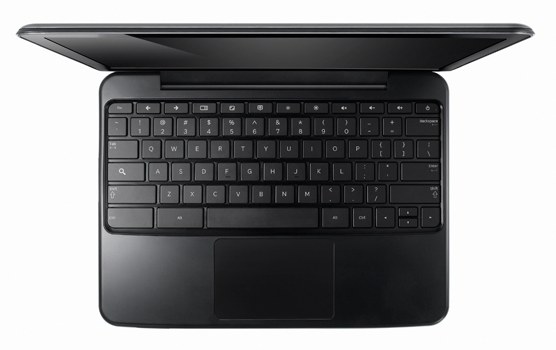
Google's simplified computing model puts the browser at the core and creates an operating system that revolves around Google Chrome. Samsung and Acer are the launch partners. Samsung's notebooks have 12.1" displays, Atom Dual-Core processors, 16 GB solid state drives, weigh 1.48 kg and get 8.5 hours of continuous usage. They're similar to the Acer notebooks, which have 11.6" displays, a higher resolution, but only get 6 hours of usage. Some of the notebooks include 3G support, while other notebooks are Wi-Fi only. "The Samsung Chromebook will cost $429 in the U.S. for the Wi-Fi only version and $499 for the 3G version. Acer's Wi-Fi only Chromebook will cost $349," reports CNet.

Here's one of the Samsung Chromebooks:


While Chromebooks don't require administration, businesses and schools need a way to manage hundreds or thousands of notebooks, so Google decided to offer a service that includes a cloud management console, support, device warranties and regular hardware refreshes for only $20/user (schools) or $28/user (businesses).

Chromebooks are actually the real netbooks, lightweight and inexpensive computers built for simple tasks like browsing the Web. Unfortunately, netbooks are no longer very popular and users replace them with tablets like the iPad, which have better displays, better battery and are easier to use. For now, Chromebooks will compete with Windows netbooks and it won't be easy to convince people to buy a Chrome netbook when they could run Chrome on a regular netbook. The good news is that Chromebooks will force Google to improve its web applications, to offer more advanced features, more free storage and all Google users will benefit even if they don't buy a Chromebook.

Chrome OS Is All About the Missing Features

Here's an interesting quote from Ted Power, a former designer for Google's mobile web apps:

"Chrome OS could potentially mark a profound leap forward. For the first time, all the layers between the network and the computer have been removed. The device itself is of little consequence; you can 'feel right at home' from any networked device. Chrome OS isn't so much about what has been added, but what has been stripped out; no more complicated file systems, software updates, etc."

Paul Buchheit, the ex-Googler who created Gmail, thinks that the ideal design of a computer that acts like a local node of a global super-computer matches the design target of Chrome OS. "It should be relatively cheap and reliable, secure (no viruses or anything), zero-administration (I don't want to be a sys-admin), easy to use, and fast." Paul says that Chrome OS is unnecessary because iOS and Android devices meet the same ideal and there are already millions of devices that run these operating systems.

There are already millions of people who use Chrome and some of them would like to buy a computer that's as fast as their browser. Mobile phones are not yet powerful enough to handle complex web apps, but that will change and, at some point, web apps will be indistinguishable from native apps. You'll be able to use your favorite web apps from almost any device, but why not use a device that removes everything that's unnecessary and slows you down?

Win a Chrome OS Notebook

When I started this blog, Google Operating System was just a metaphor for a future when Google's apps will make your operating system irrelevant. We're not yet there, but we're close and Chrome OS is an attempt to show what's possible right now.

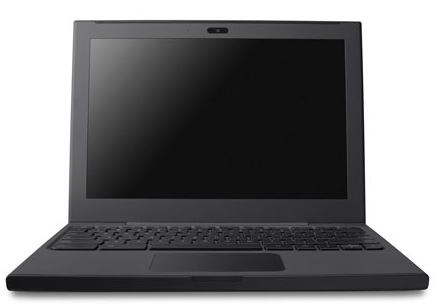
If you'd like to try an early version of Chrome OS on a notebook that's optimized for Chrome OS, post a short essay on the future of computing in a comment and you can win a Cr-48 Chrome notebook.

Here are the rules:

1. This competition is only open to USA residents. Google can't ship the notebook outside USA due to product certification requirements.
2. You must be 18 years of age or older.
3. Your essay must be original and it must be written in English.
4. You should a include a way to contact you: a link to your Google profile, a link to your website, a link to your Twitter account etc.
5. If you win the notebook, you're expected to use it regularly and send your feedback to Google.
6. The competition ends 1:59pm Pacific Time on December 14.
7. Only one of you will win the notebook.

Good luck!


Update (December 14): Thank you for all your great comments. I'll announce the winner tomorrow.

Update 2: We have a winner.

Google Chrome OS and Disposable Computers

When you use a Chrome OS computer, most of your data and your settings is saved online, so it doesn't really matter which Chrome OS computer you're using. Just sign in with your Google account and you can find your bookmarks, your applications and maybe even your documents.

Chrome OS computers are actually designed for sharing and there's even a guest mode based on Chrome's incognito mode. "When you use web apps on your Chrome notebook, all your documents are stored safely in the cloud. But certain kinds of files, like downloads, cookies, and browser cache files, may still be present on your computer. Your Chrome notebook encrypts all this data using tamper-resistant hardware, making it very difficult for anyone to access those files. With Guest Mode, you can let friends use your Chrome notebook without signing in. They can use the web freely, but they won't be able to access your email or other data. And once they sign off, all their browsing data is permanently erased from your computer," explains Google.

Glen Murphy, who is a Chrome user interface designer, tried to show what happens when an inexpensive Chrome OS notebook is damaged. Your data is still available because it's stored online and you can resume your work using another computer.

Chrome OS, Google's True Operating System

After today's Chrome event, it became clear that Chrome OS is Google's true operating system and Android is just a placeholder. Google says that web apps are the native apps in Chrome OS and there are a lot of cool applications in the Chrome Web Store, which is now available.


Chrome OS is still an early project and it's not yet ready for primetime, so the first Chrome OS notebooks will be available in mid 2011. For now, Google focuses on notebooks, but that will change in the future.

Google realized that cloud computing wasn't successful 15 years ago because there weren't great Web applications. Now there are a lot of great apps and Chrome Web Store is the place where you can find some of them. We'll see a lot of iPhone and Android developers creating web apps that work in Google Chrome, but also work in other browsers.

Check the New York Times web app, which has a beautiful interface, it's customizable and also works offline.


Chrome now has 120 million active users, up from 40 million users one year ago. This number will grow next year, when people will buy Chrome OS devices. Google hopes that Chrome OS will become one of the top 3 operating systems in terms of usage, but it won't be easy to achieve this. For some people, a Chrome OS notebook will be the main computer, for others it will be a secondary device. What's important is that users will have a great platform for running web apps, a computer that doesn't require maintenance, it's really secure and easy to use.

Chrome OS is "nothing but the web". It may seem limited, but it's actually open ended. It's a platform that lets you access the web instantly, that's always connected and always in sync, it's built for sharing with other people, it's up-to-date and it's constantly improving.

Chrome OS is the obvious extension to Chrome. Why use a bulky operating system that requires maintenance, it's slow and insecure when you can switch to a lightweight operating system that's fast, free and refreshing? If Chrome can open in 3 seconds, why can't the operating system load so fast? Chrome OS is an operating system that doesn't need drivers to print, doesn't need an antivirus to be secure and doesn't need to store or process your data. Chrome OS could make computers exciting once again and the best part is that you won't have to use it to benefit from its influence.

Further reading and exploring:
* Google's blog post about the Web Store and Chrome OS
* Chrome Web Store
* Chrome OS website
* Chrome OS pilot program for US early adopters: get a free Cr-48 Chrome notebook.

Google Will Launch Chrome Web Store and Chrome OS Today

Today is an important day for Google Chrome: Google will launch Chrome Web Store, a marketplace for web apps, and Chrome OS, the first browser-centric operating system. Google has uploaded two introductory videos to the YouTube channel, but they're not yet publicly available. Here are some snapshots from the videos:

Chrome OS Tour

Chrome Web Store: Museum of Thieves (Flash game)

Chrome Web Store: Sports Illustrated

Google has already announced the launch event a few days ago: "On December 7, we will host an event in San Francisco where we plan to share some exciting news about Chrome. The event will be webcast live on YouTube at: www.youtube.com/googlechrome. Mark your calendars for 10:30 a.m. PST and tune in."

{ Thanks, Emanuele. }

Chrome OS Tablets, Only for Early Adopters?

Google's CEO, Eric Schmidt, made an interesting comment about Chrome OS and the potential users of a Chrome OS tablet:
Chrome OS, Schmidt said is focused on selling Netbook-class computers to early believers in cloud-based storage. The first devices, which he reiterated will come this year, will use either Intel or ARM chips, have a keyboard and won't have local storage beyond that needed to cache data.

"People who believe in cloud computing, believe in the benefits of Web computing and who are Chrome users will be the target market," he said. "It's probably a large market."

Google Chrome has more than 70 million users, but not all of them switched to Chrome because it's a good platform for Web apps. Few Chrome users will decide that Google Chrome is the only important application they use and migrate to a Chrome OS tablet. Google should promote the tablet as a complementary device for browsing the Web and running Web apps, a device that boots quickly, updates automatically, doesn't require maintenance or security software.


It's interesting to read Andy Rubin's blog post that explains why Google decided to close the Nexus One online store:

"While the global adoption of the Android platform has exceeded our expectations, the web store has not. It's remained a niche channel for early adopters."

Google Chrome Web Store

One of the reason why mobile app stores are successful is that applications are more discoverable. Users know where to find applications, there's a consistent interface for ratings and reviews, an easy way to buy applications and to compare them.

For web applications there's no web store and it's not always easy to find a good web app. Since Google Chrome OS is an operating system designed for running web apps, it's really important for Google to provide a list of high-quality web applications. Users may need an online photo editor, a music player, a chess game, a Math software or an online IDE.

Chrome Web Store will be launched later this year and intends to be "an open marketplace for web apps". Users will be to "install" applications by adding a shortcut to the new tab page. When you "install" an application, it can integrate with the browser by using advanced features that require permission: local storage, user's location, notifications.


"An installed web app could be separated visually from other tabs, could integrate better with the OS, and could be granted increased permissions. This special handling of web apps is exactly what we're working on in Google Chrome. Installing a web app in Google Chrome is easy and quick, with no restart required. At its simplest, installing a web app is like creating a super-bookmark to it. Once installed, a web app gets a big icon in Google Chrome's app launcher area, as well as some integration with the host OS," explains Google.


Even if the web applications from the Chrome Store will work in other browsers, Chrome will include some features that make it easier to use the applications. It will be interesting to see how many paid apps from the Chrome Web Store will be successful.

Update: You can already install applications in the latest Chromium builds. This post explains how to add the "enable-apps" flag and shows an example of application.

More Google Chrome OS Screenshots

Google posted more images that show the user interface of Google Chrome OS. The interface is still under development, so it may change until the first stable version is released, later this year.

Chrome OS uses an interesting visualization for tab overview. "The overview is available via either gesture and hotkey. It provides a visual way of switching between windows and tabs. Windows are exploded into the tabs they contain, and all tabs/windows are visible in a single 2.5d space. This model is largely based on Peter Jin Hong & Elin Pedersen's G.L.I.D.E. Tab Navigation. We present tabs in a venetian blind arrangement, ensuring visibility of the top left of every page, and using perspective to compress the most useful portions of the page into the available strips. Favicons are presented as an alternative visual aid."


Google also posted some screenshots of the open/save dialogs and the download shelf panel. "The shelf is an on demand target for downloading and uploading. It acts as a temporary resting place for files that have been accessed, and for content being uploaded to websites."

Even if the Chrome OS only lets you use a browser, you can still download files and open them using Chrome's multimedia libraries or using web applications like Google Docs.


A notification panel will be used for OS and website notifications, so web applications will be able to add their own alerts.


Chrome OS will also include simple applications like a calculator:


{ via TechCrunch }

Google Cloud Print

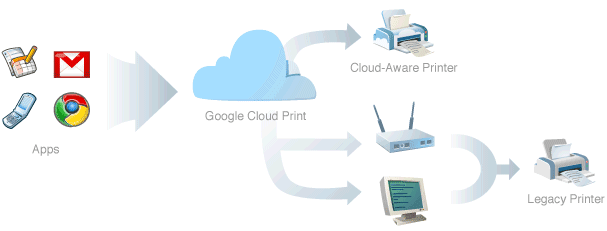
Google found an interesting solution for printing documents in Chrome OS. Instead of preloading the drivers for the most popular printers, Chrome OS will use an online service for printing: Google Cloud Print.
In Google Chrome OS, all applications are web apps. Therefore, in designing the printing experience for Google Chrome OS, we want to make sure printing from web apps is as natural as printing from traditional native apps is today. Additionally, with the proliferation of web-connected mobile devices such as those running Google Chrome OS and other mobile operating systems, we don't believe it is feasible to build and maintain complex print subsystems and print drivers for each platform. In fact, even the print subsystems and drivers on existing PC operating systems leave a lot of room for improvement.

Our goal is to build a printing experience that enables any app (web, desktop, or mobile) on any device to print to any printer anywhere in the world. This goal is accomplished through the use of a cloud print service. Apps no longer rely on the local operating system (and drivers) to print. Instead, apps (whether they be a native desktop/mobile app or a web app) use Google Cloud Print to submit and manage print jobs. Google Cloud Print is then responsible for sending the print job to the appropriate printer, with the particular options the user selected, and providing job status to the app.

The only problem is that no printer supports Google Cloud Print and that's why Google revealed some details about the service's interfaces, hoping that printer manufacturers will update their software and support it. If a printer doesn't support Google's service, you'll need a proxy software for the computer where the printer is installed. Google says that the proxy software will be bundled with Google Chrome.

Google wants to associate your printers with a Google account and manage them the same way as you manage Google Docs documents, so you can share them with other people. Web applications can use APIs to customize the printing options and change the user interface displayed when you start printing a document.

"We believe cloud printing has tremendous benefits for end users and for the industry and is essential, given the rapid shift toward cloud-based applications and data storage. We also believe that the only way that the benefits of cloud printing can be realized is if the protocols are open, freely implementable, and, when possible, based on existing industry standards. We expect there to be multiple cloud print services, and users should have a choice in which services they use and which printers they can connect to a service. Stay tuned for more details. We are confident that cloud-aware printers will soon be a reality," suggests Google.

It may seem that Google's solution is complicated and difficult to implement: we need an open standard for cloud printing, cloud-aware printers and users need to associate printers with an online service. Instead of sending the printing job directly to the printer, you'll send it to the online service, which forwards it to the printer. Despite all these hurdles, Google Cloud Print allows you to print documents from a mobile phone, tablet, notebook or any other mobile device. You'll be able to print files from an Android phone or tablet, from a Chrome OS computer, from any computer that runs Google Chrome and from other devices that will support Google Cloud Print.

Eric Schmidt on Chrome OS

At Google Atmosphere, a CIO event about cloud computing, Eric Schmidt explained why Chrome OS is meaningful:

"The promise of Chrome and Chrome OS is that the devices that you give to your employees will have a 2-second boot time, will be completely disposable and the price will be incredibly low."

Chrome OS computers will no longer be personal because it doesn't matter which computer you use. After logging to your Google account, Chrome OS will retrieve your bookmarks, themes, settings, web history from Google's servers. Your data is stored in a central location and you can access it from all your devices.

Computers will boot almost instantly, so you no longer have to wait. They'll be cheap, easy to replace and to maintain.

You can already use Chrome on your computer, but a Chrome OS computer is optimized for running a browser, doesn't have extraneous software and it's inherently more secure.

Chrome OS Tablet Mockups

Hot on the heels of the Apple iPad announcement, Google released some mockups for Chrome OS tablets.

"On tablets, the UI would be adjusted to handle larger touch targets. Initial explorations have maintained the same basic chrome layout, but enlarged the controls. Icons could be placed above tabs to provide larger, square targets. Panels would be placed along the bottom edge and could be opened with upward dragging motions," explains Google.


Even if Chrome OS was initially designed for netbooks, Google hopes to create an operating system that works on tablets, laptops and desktop computers. "Each would have vastly different input methods, available screen space, and processing power".


Chrome OS has the advantage of a simple interface optimized for web applications. This may seem too restrictive, but Chrome, Safari, Firefox and other browsers are quickly evolving and many popular apps are migrating to the web.

{ via TechCrunch }

Google Chrome OS Use Cases


Google didn't do a good job at explaining the intended use of Chrome OS and many people wondered if Google's operating system is an alternative to Windows. The goal is to build "an operating system that provides a fast, simple, and more secure computing experience for people who spend most of their time on the web". Here are the initial use cases for Chrome OS:
* Computing on the couch
* Use as a lightweight, secondary work computer
* Borrowing a device for use in coffee shops and libraries
* Sharing a second computer among family members

For now, Chrome OS is not designed to be your main operating system. It's just a fast way to get online, a simplified operating system that removes unnecessary software and opens the browser in a few seconds. If Google Chrome loads almost instantly, why not build an operating system that boots fast and doesn't slow down the browser?

Even though developers can view its source code and compile it, Chrome OS won't be available for download because it requires a special hardware configuration and it's not designed for multi-boot. Chrome OS is just the platform for Chrome OS netbooks.

"We are taking out every unnecessary process, optimizing many operations and running everything possible in parallel. This means you can go from turning on the computer to surfing the web in a few seconds. Our obsession with speed goes all the way down to the metal. We are specifying reference hardware components to create the fastest experience for Google Chrome OS," explains Google.

Labels

Web Search Gmail Google Docs Mobile YouTube Google Maps Google Chrome User interface Tips iGoogle Social Google Reader Traffic Making Devices cpp programming Ads Image Search Google Calendar tips dan trik Google Video Google Translate web programming Picasa Web Albums Blogger Google News Google Earth Yahoo Android Google Talk Google Plus Greasemonkey Security software download info Firefox extensions Google Toolbar Software OneBox Google Apps Google Suggest SEO Traffic tips Book Search API Acquisitions InOut Visualization Web Design Method for Getting Ultimate Traffic Webmasters Google Desktop How to Blogging Music Nostalgia orkut Google Chrome OS Google Contacts Google Notebook SQL programming Google Local Make Money Windows Live GDrive Google Gears April Fools Day Google Analytics Google Co-op visual basic Knowledge java programming Google Checkout Google Instant Google Bookmarks Google Phone Google Trends Web History mp3 download Easter Egg Google Profiles Blog Search Google Buzz Google Services Site Map for Ur Site game download games trick Google Pack Spam cerita hidup Picasa Product's Marketing Universal Search FeedBurner Google Groups Month in review Twitter Traffic AJAX Search Google Dictionary Google Sites Google Update Page Creator Game Google Finance Google Goggles Google Music file download Annoyances Froogle Google Base Google Latitude Google Voice Google Wave Google Health Google Scholar PlusBox SearchMash teknologi unik video download windows Facebook Traffic Social Media Marketing Yahoo Pipes Google Play Google Promos Google TV SketchUp WEB Domain WWW World Wide Service chord Improve Adsence Earning jurnalistik sistem operasi AdWords Traffic App Designing Tips and Tricks WEB Hosting linux How to Get Hosting Linux Kernel WEB Errors Writing Content award business communication ubuntu unik