Showing posts with label Web Search. Show all posts

Googlepedia

As previously anticipated, Google introduced Knowledge Graph, a new way to handle queries that replaces keywords with objects. It's like replacing a dictionary with an encyclopedia.

"The Knowledge Graph enables you to search for things, people or places that Google knows about—landmarks, celebrities, cities, sports teams, buildings, geographical features, movies, celestial objects, works of art and more—and instantly get information that's relevant to your query. This is a critical first step towards building the next generation of search, which taps into the collective intelligence of the web and understands the world a bit more like people do," explains Google.

For now, you'll only notice a new info pane in the right sidebar that shows more information about your query. Google's graph has 500 million objects and 3.5 billion facts, so you'll see the new section quite often. Google shows a small thumbnail, a snippet from a Wikipedia article, a few relevant facts and some related queries. It's just like a Wikipedia infobox automatically generated using data from the Web and that's smart enough to only show important facts and hide the things people won't need.


The new info panes will also help users disambiguate queries just like Wikipedia's disambiguation pages help users find the right articles.


Wikipedia's internal links help you find other interesting articles. Google also adds links to all the other objects from the graph.

Some may say that Google borrowed too many ideas from Wikipedia, but that's one step that could help search engines evolve. Understanding the relation between entities and learning their attributes allows Google to answer more complicated questions and get better search results. As Mashable says, "the transition from a word-based index to this knowledge graph is a fundamental shift that will radically increase power and complexity."

Google "begun to gradually roll out this view of the Knowledge Graph to U.S. English users. It's also going to be available on smartphones and tablets". If you don't see the new features yet, check back later.


{ Thanks, David. }

New Interface for the Google Q&A OneBox

Google's OneBox for instant answers has a new interface that emphasizes the results. Google now displays the answer on the first line and the font size is bigger.


The Q&A OneBox now shows multiple answers for questions like [What is the cast of The Help?] or queries like [the dictator actors].


Until now, Google used the following template: "Best guess for ... is ...".


Just because Google no longer mentions that the answer is a "guess" doesn't mean that it's always accurate.


Google Tests a New Interface for Info Panes

Last year, Google started to test a new sidebar that offers useful information about your query. As the Wall Street Journal mentioned in a recent article, Google will soon "present more facts and direct answers to queries at the top of the search-results page". There's a large database of entities and each one has a list of relevant attributes.

For example, you could search for [California] and Google displays the capital of the US state, a list of important cities, attractions, the Secretary of State, a map and a snippet from Wikipedia. Google continues to test the info panes, but the interface has been updated, the main thumbnail is smaller and there's more information that's displayed. For singers, Google displays a long list of songs and some important albums.


Google's experimental sidebar is similar to Wikipedia's infobox, "a fixed-format table designed to be added to the top right-hand corner of articles to consistently present a summary of some unifying aspect that the articles share and sometimes to improve navigation to other interrelated articles". It includes structured information about your query, related queries and links to all the topics that are mentioned. Google will look more like an encyclopedia.

{ Thanks, Anirban. }

Google Experiments With a Collapsible Search Sidebar

Google tests a new search interface that hides the options from the sidebar by default. You need to click a small arrow icon to see the list of specialized search engines and some advanced search options that let you filter results.

Essentially, this experiment hides the sidebar's content, but the sidebar still takes up space. Back in 2009, the sidebar was hidden by default and Google made it more visible one year later.

Now that the navigation bar no longer includes many specialized search engines, it doesn't make sense to hide the sidebar. Another issue is that the sidebar highlights advanced options that are relevant to your query, but few people will find them if the sidebar is collapsed by default.


{ via Websonic. Thanks, Akos. }

Google Play, Added to the Navigation Bar

There's a new service in Google's navigation bar: Google Play. The link replaces Google Music and it's prominently placed next to popular services like Google Maps and YouTube. For now, the link takes you to the Google Play homepage and your query is ignored.

It's interesting to notice that Google's navigation bar changed its purpose from showcasing popular services to promoting new services. Ever since it was launched, Google+ became the first service from the navigation bar, even if Google Search was the most popular service. Then Google added links to services like Google Offers, Google Wallet and a page that lists Google's mobile apps.

Google Play is more than a new name for Android Market, it's Google's attempt to sell digital content across different platforms: from apps to music, from books to movies, from magazine subscriptions to TV shows and more. It makes sense to integrate Google Play with Google Search and maybe include the top results in an OneBox, assuming that they're relevant.

{ Thanks, Joshua, Kartik, Thomas, Marian, Shimmy, Matan and TechDows. }

Google's Easter Eggs for Binary and Other Number Systems

Google has some new geeky Easter eggs. When you search for [binary], [octal] and [hexadecimal], Google writes the number of results using the numeral system from the query.

Make sure that "search plus your world" is disabled to see the Easter eggs. Either click the "hide personal results" button below the search box or sign out.


{ Thanks, Abhishek. }

Google's Thank You Notes

Google sometimes displays some annotations below search snippets. Showing that one of the people you trust +1'd a page is useful and might help you decide to click a search result.

Now Google also adds a link that lets you send a thank you note to the person that +1'd page: "Your +1 helped me find this. Thank you!". It's a cute idea and this also helps Google find the recommendations that were really useful, but the links clutter Google's results pages. Maybe Google could show the "thank you" link when you +1 the page.


Another issue is that social annotations aren't necessary when it comes to the top result for a navigational query. Most people that search for [Yahoo] want to visit Yahoo's homepage or use services like Yahoo Mail, Yahoo News, so the annotations for these results are unnecessary. It's probably a better idea to show the annotations less often and only for the results that deserve to be highlighted.

{ via Search Engine Roundtable }

Bring Back Keyword Highlighting to Google Cache

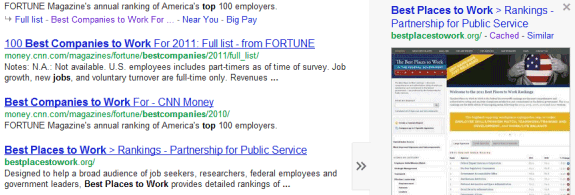
For some reason, Google's caching feature is more and more difficult to use. The "cached" link is hidden inside the Instant Preview box and it's no longer available in the mobile interface.


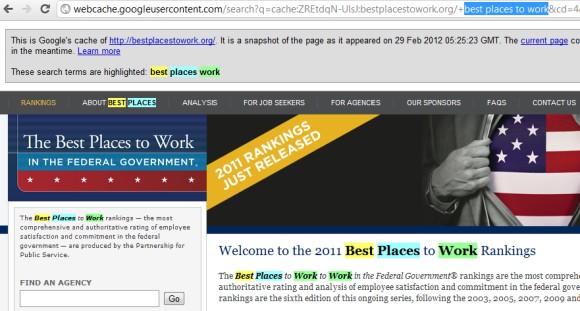
Now the keywords from cached pages aren't highlighted if you are logged in. Search pages use encrypted connections (HTTPS) when you're logged in and this disables referrals, so that's probably the reason why Google no longer includes the query in the cached pages URLs. Google suggests to sign out and you can also use a different browser or the private browsing mode, but there's another way to bring back keyword highlighting:

- click the "similar" link in the Instant Preview box instead of clicking "cached"

- replace "related" with "cache" in the URL and press Enter.

If there's no "similar" link, you can copy the query, go to the cached page and paste the query in the address bar between "+" and "&cd=".


There's also a cool Chrome extension called MultiHighlighter, but you need to copy the query, visit the page, press Ctrl+Shift+A and paste the query. If you use Internet Explorer, Google Toolbar has a cool highlighting feature.

A Strange Google Mobile Experiment

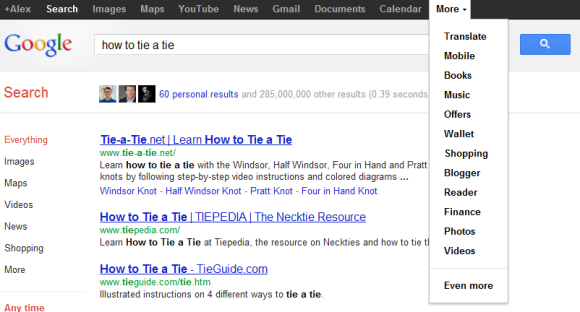
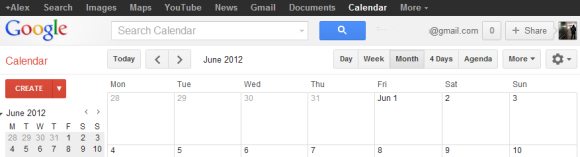
Sometimes it's difficult to understand Google. A few weeks after dropping the non-obvious navigation menu from the desktop UI, Google tests a new mobile interface that uses the same menu.


Cascading menus on a mobile device? They're too large and many Google services are missing (Reader, Blog Search, iGoogle, Product Search, Google Finance, Picasa Web, Google Talk, Google Tasks), not to mention that there's no room for displaying Google+ notifications.

Google's Knowledge Graph

Google usually returns pretty good search results, but only if there are pages that include the words from your query or some synonyms. Google doesn't understand the query, it only tries to match the words from that query. Sometimes Google can answer questions like "How tall was Albert Einstein?" or "What's the real name of Al Pacino?", but it can't go beyond simple facts.

Amit Singhal, Senior Vice President at Google, says that Google works on building "a huge knowledge graph of interconnected entities and their attributes". Freebase was just the starting point: Google's knowledge graph has 200 million entities, while Freebase only has 22 million entities. The graph is actually an encyclopedia with structured information obtained from the web. This will help Google understand your queries, provide answers to complex questions and find more relevant results.

Right now, Google only uses the graph to show a list of related searches for singers, actors, painters etc. As Google improves its infrastructure, the knowledge graph will be used more and more.

Google Tests a New Version of the Black Bar

While Google hasn't abandoned the navigation bar launched last year, both the old and the new interface are used today. If you load google.com in Chrome's incognito mode, the old interface shows up more often than the new UI. The simplified interface made navigation more complicated, even if it looks better than the black bar.

Google even tests a slightly updated version of the old bar that uses the services from the new UI, more spacing and a different color scheme.


Here's how you can try the latest Google experiment. If you use Chrome, Firefox, Safari or Internet Explorer 8+, open google.com in a new tab, load:

* Chrome's JavaScript console (Ctrl+Shift+J)
* Firefox's Web Console (Ctrl+Shift+K)
* Safari's Web Inspector (how to do that?)
or
* IE's Developer Tools (press F12 and select the "console" tab)

and paste the following code:

document.cookie="PREF=ID=381502750b6e9119:U=aaee74aefea7315a:FF=0:LD=en:CR=2:TM=1328391998:LM=1328392000:S=yPtlCgLbEnezu5b4; path=/; domain=.google.com";window.location.reload();

Then press Enter and close the console. If you're not in the US and you're using a different Google domain, replace ".google.com" with your domain in the code (for example: ".google.co.uk" in the UK).

If you'd like to go back to the old interface and reset the Google PREF cookie, repeat the same steps, but use the following code:

document.cookie="PREF=; path=/; domain=.google.com";window.location.reload();

Google Instant, Disabled For Slow Computers

Google Instant is supposed to make searching faster, but you need a pretty good Internet connection, a modern browser and a decent computer. Google Instant is not available if you use IE6 or other outdated browsers and it's automatically disabled if you have a slow Internet connection.

Now Google also disables Instant if you have a slow computer. "If Instant gets automatically disabled, we continue to check your computer speed and will re-enable Instant if your performance improves," informs Google. If you don't like this change, you can disable it from the search preferences page. Just select "always show Instant results" in the "Google Instant predictions" section.


I've tested this feature on an old laptop and Google's implementation isn't great. Google Instant continues to be enabled for the initial query even if it's slow, then it's suddenly disabled when you visit Google Search again. Google doesn't show a message next to the search box to explain why Instant is disabled and not many people will visit the search preferences page, which both an explanation and a fix.


This is just one of the 17 updates from last month that improved Google Search.

Google+ and the Post-Web Google

I've noticed an increasing number of ads that no longer send people to the company's sites. Instead, the ads only include a link to the official Facebook page. Sites suddenly look outdated, no longer include the latest information and people stop visiting them.


There are still people that visit those outdated sites and many are coming from search engines like Google. Despite Google's efforts to have a comprehensive index, there's a growing subset of the Web it can't properly index and that's Facebook. Sure, Google indexes a lot of Facebook pages, but that's like trying to find your keys in a dark room. Google needs Facebook's map to index all the pages and find the connections between pages and between users, but Facebook is not willing to license this valuable data to the most important competitor. Google tried to make the web social and failed, so now the only option to stay relevant is to build an alternative to Facebook's walled garden and that's Google+.

+1s are the new links, authors have profiles, companies have social pages and this new universe will try to coexist with the old Web in Google's search results. Google tried to focus on the users and find ways to make the social Web more open, but now it has to focus on itself and do everything it can to stay alive and maybe even save the Web. "Google's mission is to organize the world's information and make it universally accessible and useful," but that's impossible if it can't access, understand and rank that information.

Back in 1996, Larry Page and Sergey Brin used links to determine the importance of a Web page. Now links and pages are no longer that important and the old rule of trying to send people to other sites as quickly as possible is difficult to apply. Showing personalized results requires understanding users better, encouraging them to share more content and create connections. In many ways, Google+ is the anti-Google and that's why it's difficult to understand some of the new features.

The Self-Serving Google+ Results

Google has been often accused of promoting its own services in Google Search. Whether it was Google News, Image Search, Product Search or Video Search, the specialized search engine showed results from all over the web and not just from Google's own services. Image Search wasn't restricted to Picasa Web Albums, Video Search wasn't restricted to YouTube, Blog Search wasn't restricted to Blogger. Even for services like Google Dictionary and Google Finance that have their OneBox at the top of the Google search results, Google shows a list of other relevant services.

Google's special section that shows people and pages from Google+ doesn't look like a regular Google OneBox. It's placed in the right sidebar, where Google used to display ads. It shows up for general queries like [music], [sports], [math], that aren't typically associated with social search results. It only shows results from Google+, not from other social services like Twitter or Facebook. It's there even if you're not logged in using your Google account or you're not using Google+.

If Google+ wasn't a Google product, would it make sense to show a similar OneBox with profiles from social sites? Normally, Google would have created a profile search engine and showed a group of relevant results somewhere in the list of search results. Like this:


Google already indexes profiles from different sites and even shows special snippets with structured data. Why not create a special search engine for profiles like the one that lets you search recipes or the search engine for applications?

When Google released Knol, many people wondered if Google could boost the rankings for Knol articles or create a special OneBox with Knol results. "Google Knol does not receive any sort of boost or advantage in Google's rankings," replied Matt Cutts and he was right. Now what if Google displayed a Knol OneBox at the top of the search results for queries that returned relevant Knol articles? Maybe Knol would've become more popular and it wouldn't have been discontinued.

Is it fair to promote results from a single service, especially when you own that service? Even if those results are comprehensive, relevant and useful, it's always a good idea to also show results from other services.

Some engineers at Facebook, Twitter and MySpace developed a site called Focus on the User that lets you replace the Google+ results with other social profiles from the web. From:


... to:


The results are better simply because you can check the accounts from other social services. Maybe an artist shares more information on Twitter or maybe the Facebook account is more important. "When you search for 'cooking' today, Google decides that renowned chef Jamie Oliver is a relevant social result. That makes sense. But rather than linking to Jamie's Twitter profile, which is updated daily, Google links to his Google+ profile, which was last updated nearly two months ago," noticed the authors of the Focus on the User site. I still don't think that the social search box should be placed next to the results, but at least the tweak made it more useful.

"Focus on the user and all else will follow. Since the beginning, we've focused on providing the best user experience possible. Whether we're designing a new Internet browser or a new tweak to the look of the homepage, we take great care to ensure that they will ultimately serve you, rather than our own internal goal or bottom line." (Google's philosophy)

{ via waxy.org. Thanks, Michel. }

Google Search, Punctuation Marks and Other Symbols

Google usually ignores punctuation and mathematical symbols from a query because it doesn't index them. They rarely change the meaning of a query and Google's index would have to grow a lot bigger, without improving the results too much. Some punctuation marks and mathematical symbols are used to provide advanced features (for example: colon, quotes, minus sign, plus sign).

I've recently noticed that Google started to show results for queries like [.], [,], [:], [;], [#], [%], [@], [^], [)], [~], [|], ["], [<], [$]. When you search for [%], Google shows the results for [percent sign] and that happens irrespective of the interface language, so it's not a synonym generated by Google's algorithms.


Search for [:] and you'll get the results for [colon]. Most results are about the colon from the human anatomy and they're not relevant.

If Google Results Aren't Helpful, Ask on Google+

Sometimes Google's results aren't that useful and they don't answer your question. Maybe the query is imprecise or obscure, the results are outdated or you don't have the patience to check the first 100 results to find something helpful. Asking your Twitter followers or your Facebook friends could be a great idea. Google doesn't integrate with Twitter or Facebook, but it experiments with a new feature that shows a message below the list of results: "Want to ask your friends about [your query]? Ask on Google+".


Clicking the link opens a Google+ box that already includes a message: "Hi there! I have a question about [my query]..." Edit your message, click "Ask" and the first results could show up in a few seconds in Google's notification widget.


Maybe Google+ also will include a revamped version of Aardvark and you'll be able to send your question to the right people.

Blocked Sites, No Longer Available in Google Search?

Last year, Google released a feature that allowed you to block sites from appearing in your search results. After clicking a result and going back to the search results page, Google displayed a special link next to the result for blocking the entire domain.

The feature no longer seems to work: the "block" link is no longer displayed, the preferences page doesn't mention the feature and the blocked domains still appear in Google's results. The page that allows you to manage blocked sites is still available.

"When you're signed in to Google, you can block a specific website from appearing in your future search results. This is a helpful option when you encounter a site that you don't like and whose pages you want to remove from your future results. If you change your mind, you can unblock the site at any point," explains a help center page.


Update: Google's Matt Cutts says that this could be a temporary issue. "The right people are looking at what needs to happen to re-enable this, but it might take some time."

Google Search Shows More Results From Google+

Google's search results are personalized even if you don't log in to a Google account. Google uses your location and your previous searches to customize the results. When you log in to your account, Google has more information: your search/browsing history, your social connections, the pages you've bookmarked or +1'd. Everyone is different and Google has the opportunity to use information about you to disambiguate queries, to show more results from the sites you trust and pages you're already visited.

Google+ can change Google results more than any other Google service because social data is an important signal for personalizing results, Google owns the end-to-end experience and it's in Google's best interest to show that Google+ helps sites get better rankings. After all, the reason why many sites added Google+ buttons is that Google+ data is used by Google's search algorithms.

The latest initiative that integrates Google+ with Google Search is called "Search, plus Your World." It's an upgrade of the social search feature that integrates the rich content from Google+.

Google Search now has access to non-public posts and photos from Google+ and you'll be able to search all the posts and photos shared with you or from your circles. "You can find relevant Google+ posts from friends talking about an amazing trip they just took, whether they've shared privately with you or publicly. You'll find links shared by your friends, such as activities, restaurants and other things they enjoyed on their trip," mentions Google. Personal results have a special icon next to the snippet, Google shows the number of personal results at the top of the page and you can also restrict the results to these pages.


Google Instant suggestions now include the people from your Google+ circles. "Now, typing just the first few letters of your friend's name brings up a personalized profile prediction in autocomplete. Selecting a predicted profile takes you to a results page for your friend, which includes information from their Google+ profile and relevant web results that may be related to them." Google shows similar suggestions for "prominent people from Google+, such as high-quality authors."


Another change is that Google includes a special box with Google+ pages related to your query. "Starting today, if you search for a topic like [music] or [baseball], you might see prominent people who frequently discuss this topic on Google+ appearing on the right-hand side of the results page. You can connect with them on Google+, strike up meaningful conversations and discover entire communities in a way that simply wasn't possible before," informs Google. I think it's a mistake to show Google+ pages that are vaguely related to a general query like [music]. The box looks more like a thinly disguised ad than a genuinely useful feature (an ad both for Google+ and the celebrity pages).


To balance the increasing number of social features, Google also added two new buttons at the top of the search results pages that help you toggle between the personalized results and the non-personalized results. This works for an entire session and you can also remove personal results from the preferences page.


Right now, "Search, plus Your World" is gradually rolled out over the next few days, but it only be available when you use Google.com in English and you sign in.

While Google+ data can certainly improve search results, I feel like there's too much information that's not really useful and too much Google+ bias. When Google developed the OneBoxes for maps and stocks, it linked to its own services, but also to competing services. Today Google no longer tries to be fair. Showing the number of people that added the author of a news articles to their circles is not more useful than showing the PageRank of the page or the number of Twitter followers. Showing the latest Google+ posts below the homepage of a business is not more useful than showing the latest Twitter posts. Google profiles are not necessarily better than Facebook profiles and the number of +1's is not more useful than the number of likes. To make Google+ more powerful, to attract more celebrities and businesses, Google might end up making Google results less useful. It's a tricky balancing act to use Google search's popularity to increase Google+ adoption, while also improving Google results using Google+ data and there are many mistakes to be made along the way.


Google's Snowy Easter Egg

If you search for [let it snow] using Google, you'll have a hard time checking the search results. Google uses a JavaScript animation that adds some snowflakes and covers the entire page with snow.


Fortunately, Google added a "defrost" button that makes the search results reappear. You can also click anywhere on the page and move your mouse to "defrost" the page or draw something. Click the "+" button and you can share the Easter egg with other Google+ users.


{ Thanks, Venkat. }

Google Mobile Search Increases Text Size

Google Mobile Search increased the text size for search results and reduced the number of words from the snippets. While this change made search results more legible, it also reduced the number of results that are displayed before you start scrolling.

On an iPhone, Google only displays two results in their entirety, instead of three results, and the snippets are way too short.

Old UI:


New UI:

Labels

Web Search Gmail Google Docs Mobile YouTube Google Maps Google Chrome User interface Tips iGoogle Social Google Reader Traffic Making Devices cpp programming Ads Image Search Google Calendar tips dan trik Google Video Google Translate web programming Picasa Web Albums Blogger Google News Google Earth Yahoo Android Google Talk Google Plus Greasemonkey Security software download info Firefox extensions Google Toolbar Software OneBox Google Apps Google Suggest SEO Traffic tips Book Search API Acquisitions InOut Visualization Web Design Method for Getting Ultimate Traffic Webmasters Google Desktop How to Blogging Music Nostalgia orkut Google Chrome OS Google Contacts Google Notebook SQL programming Google Local Make Money Windows Live GDrive Google Gears April Fools Day Google Analytics Google Co-op visual basic Knowledge java programming Google Checkout Google Instant Google Bookmarks Google Phone Google Trends Web History mp3 download Easter Egg Google Profiles Blog Search Google Buzz Google Services Site Map for Ur Site game download games trick Google Pack Spam cerita hidup Picasa Product's Marketing Universal Search FeedBurner Google Groups Month in review Twitter Traffic AJAX Search Google Dictionary Google Sites Google Update Page Creator Game Google Finance Google Goggles Google Music file download Annoyances Froogle Google Base Google Latitude Google Voice Google Wave Google Health Google Scholar PlusBox SearchMash teknologi unik video download windows Facebook Traffic Social Media Marketing Yahoo Pipes Google Play Google Promos Google TV SketchUp WEB Domain WWW World Wide Service chord Improve Adsence Earning jurnalistik sistem operasi AdWords Traffic App Designing Tips and Tricks WEB Hosting linux How to Get Hosting Linux Kernel WEB Errors Writing Content award business communication ubuntu unik