Showing posts with label Google Translate. Show all posts

Tabs in Google Translate

Google Translate made it easier to translate a text into multiple languages by adding tabs. When you select a language from one of the two lists, it's added as a tab and you can quickly switch between the most recent three languages. Google's language detection works pretty well, so I'm not sure why there are tabs for the source languages, but the tabs for the target languages are useful.


You've probably noticed that Google Translate's custom drop-downs for selecting languages remember the most recent languages you've selected and highlight them.


In other Google Translate news, the Android app's conversation mode now supports 14 languages. "Earlier this year, we launched an update to Google Translate for Android with an experimental feature called Conversation Mode, which enables you to you translate speech back and forth between languages. We began with just English and Spanish, but today we're expanding to 14 languages, adding Brazilian Portuguese, Czech, Dutch, French, German, Italian, Japanese, Korean, Mandarin Chinese, Polish, Russian and Turkish," informs Google.

{ Thanks, Xavier. }

Rate Google Translations

Google Translate has a new feature that allows users to improve translation quality: rating translations. There are three options: helpful, not helpful and offensive, but Google doesn't let you highlight the text that's poorly translated.


Another way to improve Google Translate is to click a word from the translated text and choose one of the alternate translations. You can also enter a better translation or hold down the shift key and drag the words to reorder them.

While Google Translate supports 64 languages, you probably use it for a small number of language pairs. That's the reason why Google highlights the languages you've recently selected.


{ Thanks, Charlie. }

A New Look for Google Translate

Google Translate is the latest Google service with a new design based on Google+. Since Google Translate's interface is simple, there aren't many changes: a new grey header, updated buttons and drop-downs.


"We're working on a project to bring you a new and improved Google experience, and over the next few months, you'll continue to see more updates to our look and feel. The way people use and experience the web is evolving, and our goal is to give you a more seamless and consistent online experience—one that works no matter which Google product you're using or what device you're using it on," explained Google last month.

After launching a new interface for Google Search, Google created two themes that preview Gmail's new design and started to test Google Calendar's new UI and Blogger's new UI. Up next: Google Docs, Google Sites, Picasa Web Albums, Google Reader and probably other services.

{ Thanks, Kon. }

Google Translate Supports 5 Indic Languages

Google Translate has improved a lot in the past 3 years and it's now the most powerful machine translation service that's available for free. Google Translate is the only machine translation service which supports languages that have less than one million speakers (Maltese, Welsh) and languages that are underrepresented on the Web (Galician).

Google added 5 new languages to Google Translate and they're some of the most popular languages in the world, with more than 600 million speakers: Bengali (300 million speakers), Gujarati (46 million), Kannada (51 million), Tamil (65 million), Telugu (130 million).

"Beginning today, you can explore the linguistic diversity of the Indian sub-continent with Google Translate, which now supports five new experimental alpha languages. (...) You can expect translations for these new alpha languages to be less fluent and include many more untranslated words than some of our more mature languages—like Spanish or Chinese — which have much more of the web content that powers our statistical machine translation approach. (...) Since these languages each have their own unique scripts, we've enabled a transliterated input method for those of you without Indian language keyboards," informs Google.


Google Translate now supports 63 languages and 9 of the 10 languages that have more than 100 million native speakers. The only missing language is Punjabi.

Google Translate, Now With Voice Input

Google Chrome 11 added support for HTML speech input API. "With this API, developers can give web apps the ability to transcribe your voice to text. When a web page uses this feature, you simply click on an icon and then speak into your computer's microphone. The recorded audio is sent to speech servers for transcription, after which the text is typed out for you."

Google Translate is the first Google service that uses this feature. If you use Google Chrome 11 Beta, Google Chrome 12 Dev/Canary or a recent Chromium build and visit Google Translate, you can click the voice input icon. Right now, this feature only works for English, so you need to select "English" from the list of input languages.


Unfortunately, the results aren't great. I tried to translate "beautiful sunshine" into French, but the speech-to-text engine didn't work properly and Google had to translate "wake up beautiful sunshine girl".


{ Thanks, Kalin. }

Google Translate App for iPhone

Yet another Google app initially developed for Android makes its way onto the Apple App Store: Google Translate. It doesn't have all the features of the Android app: there's no conversation mode, no SMS translation, Google Suggest or a list of related phrases. Another issue is that the font size is way too big.

The application has a feature that's not available in the Android app: full-screen mode, so it doesn't make sense to use a such a big font size which is not even configurable. Google says that "the ability to easily enlarge the translated text to full-screen size" makes it "much easier to read the text on the screen, or show the translation to the person you are communicating with. Just tap on the zoom icon to quickly zoom in."


Why would you use the native application instead of visiting translate.google.com? The native application supports voice input for 15 languages, text-to-speech for 23 languages and it's better suited for quickly switching between multiple languages.

{ via Google Mobile Blog }

Conversation Mode in Google Translate for Android

Google Translate's app for Android added a feature that has previously announced by Google: conversation mode. The new option is experimental and it only works for English and Spanish, so it's more like an early preview. Conversation mode is a fancy name for making it easy to have a conversation in two different languages.

"In conversation mode, simply press the microphone for your language and start speaking. Google Translate will translate your speech and read the translation out loud. Your conversation partner can then respond in their language, and you'll hear the translation spoken back to you. Because this technology is still in alpha, factors like regional accents, background noise or rapid speech may make it difficult to understand what you're saying," explains Google.


The conversation is supposed to be fluid, but you still need to confirm that Google's voice recognition system worked well and tap the "Reply" button to switch roles. Here's a demo that shows the new feature in action for English and German:

Google Translate's Beatbox Easter Egg

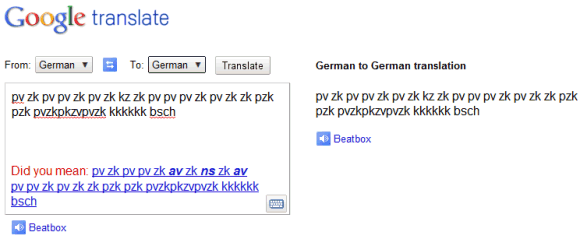
Last month, a Reddit user found an unexpected way to use Google Translate: as a beatbox.
1) Go to Google Translate
2) Set the translator to translate German to German
3) Copy + paste the following into the translate box: pv zk pv pv zk pv zk kz zk pv pv pv zk pv zk zk pzk pzk pvzkpkzvpvzk kkkkkk bsch
4) Click "listen"
5) Be amazed :)

You could also use this permalink, but it's less exciting. There are many other variations you could try.

Google decided to make it more obvious that this is an Easter egg by replacing "Listen" with "Beatbox".


Here's a YouTube video featured in Google Demo Slam:


{ Thanks, Zachary. }

Google Translate Shows Alternate Translations

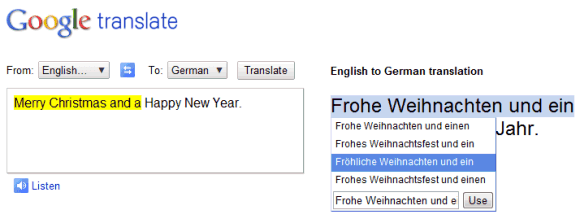
No translation is perfect, and that's especially true for a machine translation service like Google Translate. From now on, when you translate a text using Google Translate and Google finds some reliable alternate translations, you can pick one of them.

"Just click the translated phrase and you'll see a pop-up menu of possible alternates for that phrase, as well as the original phrase highlighted in your original text. Not only can these alternative translations give you a better understanding of a confusing translation, but they also allow you to help Google choose the best alternative when we make a mistake," explains Google.

It's interesting to notice that the new feature helps you better understand the technology behind Google Translate. "Typically, when we produce a translation, our system searches through millions of possible translations, selecting the best -- that is, the most statistically likely -- translation. With this feature, we expose more of those possible alternatives."


Right now, Google only shows alternate translations when you try to translate a text, so this doesn't work for web pages.

Google Translate Adds Support for Latin

Google Translate is the first important machine translation service that supports Latin. Google says that thousands of books that are available in Google Book Search include Latin passages and the machine translation service has been trained using texts that are already translated.

The results aren't great and it will be difficult to improve them, but it's still an interesting experiment. Here's an example of translation:

"Translating by machine from Latin is difficult and our grasp of grammar not without error. The Latin is unmatched because most of them Latin books have already been written and only a few of the new shall be hereafter. Many have been translated into other languages and these translations we use to train our translation system. Since this system translates books well similar to those from whom he learned, our ability to translate famous books (such as The Gallic War Caesar 's) is already good."

Google Translate's Conversation Mode

Google has recently demoed a new feature that will make Google Translate a lot more useful: conversation mode. Instead of typing the text you want to translate, you can just speak it and Google will convert speech into text, translate the text and use text-to-speech to output the result. You can already do that if you install the Google Translate app from the Android Market. Conversation mode lets you quickly switch between two languages, so that two people can have a conversation even if they speak different languages.

"Google showed off a new application that translates conversations on Android mobiles at a recent conference in Germany. Google employees held a conversation over two Android mobiles with one person speaking German and the other English. The application worked its magic after each persons statement and then referred the translated message back to the other person," reported Simon Thomas.

Unfortunately, the results aren't always great. Google Translate's conversation mode will be released in a few months.


{ spotted by François Beaufort }

Google Tests a New Interface for Google Translate

Garrid Lou spotted a new user interface for Google Translate, which shows examples of news sites that can be translated and other Google products that use Google Translate. The new interface replaces the long drop-down of languages with a multi-column list and moves the translated text to the right.


{ via google.org.cn }

How Google Translate Works

Google uploaded a video that explains how Google's machine translation service works. It's fascinating to see how much Google Translate has improved in the past 4 years and how many Google services use it.


Here's the full text of the video:
"Google Translate is a free tool that enables you to translate sentences, documents and even whole websites instantly. But how exactly does it work? While it may seem like we have a room full of bilingual elves working for us, in fact all of our translations come from computers. These computers use a process called 'statistical machine translation' -- which is just a fancy way to say that our computers generate translations based on patterns found in large amounts of text.

But let's take a step back. If you want to teach someone a new language you might start by teaching them vocabulary words and grammatical rules that explain how to construct sentences. A computer can learn foreign language the same way - by referring to vocabulary and a set of rules. But languages are complicated and, as any language learner can tell you, there are exceptions to almost any rule. When you try to capture all of these exceptions, and exceptions to the exceptions, in a computer program, the translation quality begins to break down. Google Translate takes a different approach.

Instead of trying to teach our computers all the rules of a language, we let our computers discover the rules for themselves. They do this by analyzing millions and millions of documents that have already been translated by human translators. These translated texts come from books, organizations like the UN and websites from all around the world. Our computers scan these texts looking for statistically significant patterns -- that is to say, patterns between the translation and the original text that are unlikely to occur by chance. Once the computer finds a pattern, it can use this pattern to translate similar texts in the future. When you repeat this process billions of times you end up with billions of patterns and one very smart computer program. For some languages however we have fewer translated documents available and therefore fewer patterns that our software has detected. This is why our translation quality will vary by language and language pair. We know our translations aren't always perfect but by constantly providing new translated texts we can make our computers smarter and our translations better. So next time you translate a sentence or webpage with Google Translate, think about those millions of documents and billions of patterns that ultimately led to your translation - and all of it happening in the blink of an eye."

5 New Languages in Google Translate

Google Translate added 5 new languages: Armenian (6.7 million speakers), Azerbaijani (20-30 million speakers), Basque (about 660,000 speakers), Georgian (4 million speakers) and Urdu (70 million speakers), but don't expect to read high-quality translations because the language models are still in alpha. "Translation to and from ALPHA languages may not work as well as other languages, as these systems are still in early stages of development," explains Google Translate's FAQ.

In a recent article from Spiegel, Google's Franz Och said that "the databases for 296 other languages are in development". Right now, Google Translate supports 57 languages, while Microsoft's Bing Translator has support for 30 languages.


Google Translate Annoyance

One of the most annoying issues with Google Translate is that it's very difficult to copy the translated version of a web page. Translate a web page, copy some text, paste it in a text editor and you'll notice that, before each translated phrase, there's the original version of the phrase.


Fortunately, you can properly copy some text from a translated page if you use the translation feature from Google Toolbar or from Google Chrome. Microsoft's translation service has a more flexible interface and it doesn't mix the translated text with the original text.

Google Translate Adds Text-to-Speech for More Languages

Google Translate has made the text-to-speech feature more useful by adding 27 new languages: Afrikaans, Albanian, Catalan, Chinese (Mandarin), Croatian, Czech, Danish, Dutch, Finnish, Greek, Hungarian, Icelandic, Indonesian, Latvian, Macedonian, Norwegian, Polish, Portuguese, Romanian, Russian, Serbian, Slovak, Swahili, Swedish, Turkish, Vietnamese and Welsh.

Google used the open-source speech synthesizer eSpeak, but I'm sure that this is just a placeholder until Google manages to obtain better results. "You may notice that the audio quality of these languages isn’t at the same level as the previously released languages. Clear and accurate speech technology is difficult to perfect, but we will continue to improve the performance and number of languages that are supported," says Google's Fergus Henderson.

Initially, the feature was only available for English, but 4 other languages have been added in the past two months: Haitian Creole, French, Italian and German.

To try Google's TTS service, go to Google Translate, type some text, translate it and click on the audio icon to listen to the translation.

Translate Microsoft Office Documents Using Google Translate

Google offers three services for translating Microsoft Office documents, but none of them works well. You can upload documents to Google Translate, but the output is an HTML file that can't be properly saved and that doesn't include images. There's also Google Translator Toolkit, which has a buggy document converter. Google Docs has a translation feature, but the document is first converted to HTML and the original formatting isn't always preserved.

DocTranslator is a service that translates Microsoft Office documents using Google Translate, but it manages to preserve the layout of the original file. Unlike Google Docs, DocTranslator is not limited to Microsoft Word documents that have less than 500 KB and it works for Excel spreadsheets and PowerPoint presentations, as well. DocTranslator uses a Java applet to upload the files and it translates them using Google Translate's API.

"Its benefits are that you can save the documents in their original file format and also maintain the original layout (fonts, tables, columns, spacing, etc.). It basically replaces the text of the file while keeping everything else," explained a user of the service.

The following screenshots show a document translated in Google Docs and the same document translated using DocTranslator and opened in Microsoft Word.


{ Thanks, Anonymous. }

Top 10 Google Services that Use Google Translate

Google Translate has come a long way since Google switched to its own machine translation service, back in 2007. Google now supports 52 language pairs and "the databases for 296 other languages are in development," according to a Spiegel article.

Google Translate is more useful, now that it's integrated with many Google services. Here's a list of the best uses of Google Translate in other Google services:

1. Translate web pages dynamically using Google Chrome or Google Toolbar for Internet Explorer and Firefox. Browsers can now detect web pages in foreign languages and automatically translate the text, without opening a new page.


2. Google Translate for Android is a free application that uses voice input and a text-to-speech engine that reads the translation.


3. Google Goggles for Android is a free visual search application, which is now able to extract text from photos and translate it. "On a recent trip to Japan, Franz Och [Google's head of translation services], who doesn't speak Japanese, was able to decipher restaurant menus and even read local news -- using his mobile phone, which provided him with the translations within seconds," reports Spiegel.

4. Cross-language search is a feature of Google Search that lets you find web pages written in other languages. When you click on "translated search" in Google's left sidebar, Google finds the most appropriate languages for your query, translates your query and shows the results translated into your language.


5. Google Translator Toolkit is a great way to translate documents using Google's machine translation service as a starting point.


6. Gmail Translate is a Labs feature that lets you translate messages written in foreign languages.


7. YouTube lets you translate captions, which is quite useful for videos that have closed captions in one language.


8. Google Talk's translation bots help you translate messages from a conversation. "Google Talk can help you with quick translations, or even translate your chats in real-time. All you need to do is chat with one of the Translation Bots. You can also get your conversation translated by inviting a bot to a group chat with a friend."

9. Picasa Web Albums has a great feature that translates comments into your language.


10. Google Translate OneBox shows the translation of a text if you start your query with "translate". The OneBox is displayed at the top of Google's search results page,


Google Translate is also used to translate feeds in Google Reader, documents in Google Docs, reviews in Google Maps and YouTube's search results.

Translate Text Using Google Goggles

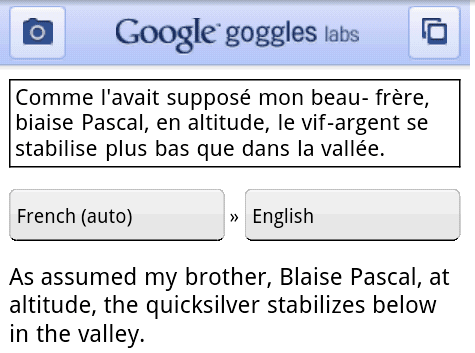
Google Goggles 1.1 for Android added another feature that makes visual search more useful: translating text. For now, the application detects text in the following languages: English, French, Italian, German, Spanish and is able to translate the text to all the languages supported by Google Translate.

"Traveling to another country can be an amazing experience. The opportunity to immerse yourself in a different culture can give you a new perspective. However, it can be hard to fully enjoy the experience if you do not understand the local language. For example, ordering food from a menu you can not read can be an adventure," explains Google's mobile blog.

Google says that it's a good idea to point your phone at the phrase you want to translate and select the region that includes the text to improve detection.

I tested the feature by trying to translate phrases from a French magazine (Science & Vie Junior), but the results weren't great all the time. Here's one of the best results:


(screenshots taken using ShootMe on a Nexus One)


To install Google Goggles, you need a phone that runs Android 1.6+. Search for Goggles in the Android Market or open the barcode scanner and scan this QR code.

Tweak Google Chrome's Translation Feature

Google Chrome 4.1 added a feature that detects the language of a web page and lets you translate it. The feature can't be disabled entirely (there's a setting for disabling it in the latest dev build), but you can hide the translation bar for certain languages. For example, if you go to Google Greece's homepage, there's an option button that lets you disable the translation bar for google.gr or for all Greek web pages.


The easiest way to disable the translation feature for the languages you're familiar with is to define a list of your preferred languages:

* click on the wrench menu, select Options, go to the "Under the hood" tab.

* click on "Change fonts and language settings" and go to the "Languages" tab.

* add the languages you use the read web pages.

Labels

Web Search Gmail Google Docs Mobile YouTube Google Maps Google Chrome User interface Tips iGoogle Social Google Reader Traffic Making Devices cpp programming Ads Image Search Google Calendar tips dan trik Google Video Google Translate web programming Picasa Web Albums Blogger Google News Google Earth Yahoo Android Google Talk Google Plus Greasemonkey Security software download info Firefox extensions Google Toolbar Software OneBox Google Apps Google Suggest SEO Traffic tips Book Search API Acquisitions InOut Visualization Web Design Method for Getting Ultimate Traffic Webmasters Google Desktop How to Blogging Music Nostalgia orkut Google Chrome OS Google Contacts Google Notebook SQL programming Google Local Make Money Windows Live GDrive Google Gears April Fools Day Google Analytics Google Co-op visual basic Knowledge java programming Google Checkout Google Instant Google Bookmarks Google Phone Google Trends Web History mp3 download Easter Egg Google Profiles Blog Search Google Buzz Google Services Site Map for Ur Site game download games trick Google Pack Spam cerita hidup Picasa Product's Marketing Universal Search FeedBurner Google Groups Month in review Twitter Traffic AJAX Search Google Dictionary Google Sites Google Update Page Creator Game Google Finance Google Goggles Google Music file download Annoyances Froogle Google Base Google Latitude Google Voice Google Wave Google Health Google Scholar PlusBox SearchMash teknologi unik video download windows Facebook Traffic Social Media Marketing Yahoo Pipes Google Play Google Promos Google TV SketchUp WEB Domain WWW World Wide Service chord Improve Adsence Earning jurnalistik sistem operasi AdWords Traffic App Designing Tips and Tricks WEB Hosting linux How to Get Hosting Linux Kernel WEB Errors Writing Content award business communication ubuntu unik