Showing posts with label How to Blogging. Show all posts

facebook status - Add Blogger Sitemap to Google Webmaster Tools


I hope you do know about Google Web Master Tools. This tool enables Webmasters to provide a better and detailed information of their site to Google.This will greatly help you in your SEO needs.Webmaster Tools allows you to submit your blog's sitemap so that Google gets a better idea of your blogs structure.
Blogger’s robots.txt file automatically specifies a sitemap URL[The blog feed], but it would be even better if you manually add the sitemap URLs to GWT.
Wordpress and other blogging platforms have some Sitemap generator plugins for the same.If you are using blogger you can use your blog's atom.xml feed as your sitemap.
Note:- If you have disabled Blog Feeds then enable it by going to Settings > Site Feed and change Allow Blog Feeds to Short or Full. (Don't set it to None)
1. Login to Google Web Master Tools with your Blogger account.
2. See if your Blog is already listed there, if it is listed and verified then click on the blog name and proceed to Step 5
3.If its not listed, Click on the Add a site button and provide your blog URL there and hit continue.
add-blogger-blog-to-webmaster-tools
4.It will now ask you to verify your Blog using any of the two methods. You can use any of those. The File upload method would be simpler.
  a. File Upload Method – Change the Verification method to Upload an HTML File. Ignore the file download and upload instructions provided there. Google will automatically download and upload that file for you. So just ignore the instructions and hit the Verify button. Your blog should get verified now. If it doesn’t then opt for the  second method (b)
  b. Meta Tag Verification method. Google will provide you a Meta Tag code which looks like
<meta name="google-site-verification" content="verificationkey" />
Copy this Code,  login to your Blogger Dashboard navigate to Layout >Edit HTML and place this code somewhere above </head> Save the template, come back to GWT and hit the verify button.
5. Once your blog is verified you can  add  sitemaps for your blog [From the Left Pane > Site Configuration> Sitemap].In the sitemap URL give the following URL as shown in this screenshot and click the Submit Sitemap button
atom.xml?redirect=false&max-results=500
 add-blogger-sitemap
If you have more than 500 posts on your blog, then add an additional sitemap URL
atom.xml?redirect=false&start-index=501&max-results=500
If your blog has more than 1000 posts, then add one more sitemap URL
atom.xml?redirect=false&start-index=1001&max-results=500
If it has more than 1500 posts, then add one more sitemap
atom.xml?redirect=false&start-index=1501&max-results=500
Continue this process depending upon the number of posts on your blog. So this means that you will be adding additional sitemaps for every 500 posts.
Once you have added the Sitemap, you can play around with the different other tools in GWT. It will provide you with a better analysis your site, show you the sites linking to you, help you in managing your site links and much more.


Free, facebook, tips, Links, blogging, Downloads, Google, facebookTips, money, news, apps, Social, Media, Website, Tricks, games, Android, software, PIctures, Internet, Security, Web, codes, Review, bloggers, SAMSUNG, Worldwide, Contest, Exitic, Phones, facebookTricks, hacking, London, Olympics, SEO, Youtube, iOS, Adsense, gadgets, iPHONE, widgets, Doodle, twitter, video, Deals, technology, Aircel, Airtel, iPAD, Angry, Birds, BSNL, TechLife, GMAIL, Idea, Microsoft, SmartPhones, Stress, Buster, Windows, Yahoo, Infolinks, Nokia, Scam, Uninor, browsers, Amazon, Euro, CUP, Chat, IDM, JOBS, Modem, Music, Reliance, Results, SSC, Tata, Docomo, bing, freebie, mobile, placements, AIEEE, AlertPay, Chrome, College, Competetive, Exam, Dehradun, Extension, FireFox, GPRS, HTC, IMPACT, Info, MTS, Mark, Zukerberg, Paypal, Promotional, Post, Torrent, UTU, Unlocking, VodaFone, Wall, Paper, apple, books, engineering, iCAR, iTunes, pinterest, rovio, AVG, Admit, Card, Adobe, Affiliate, Marketing, Akhilesh, Amul, Girl, BlackBerry, ChromeBook, Clixsense, Coupon, Digitallife, Discovery, Emoticons, Festival, GATE, GIMP, Income, Tax, International, JSS, JailBreaking, Kindle, Linux, Local, MAX, PAYNE, Mac, Mango, Memory, Speed, Nexus, Online, Shopping, Raakhi, Report, Rising, Stars, Sample, Science, Sony, Syllabus, TabletBooK, Teamviewer, Templates, Dark, Knight, Rises, USA, UPMT, Virgin, Xperia, ZTE, challan, counselling, course, btech, funny, iMOVE, registration

source:http://trafficneed.blogspot.com/2012/05/135786650615503.html

facebook status - Make 1000 Traffic through Google Images

google images traffic How to Get Traffic from Google Images?There’s a lot of information out there on how to optimize content to get visitors. What many new web developers overlook is that their images are great for traffic purposes, too. Just like with traditional content, there are techniques and strategies to optimize images for as much traffic as possible. A Google image is one of the most consistently used platforms to find images, so many of the techniques rely on the particulars of Google images. What follows are some of the best methods to optimize your images to attract Google images traffic.

Label Your Images Correctly

While tags have become less popular as a way to optimize whole pages for traffic, they are still the best way to optimize images. There are several opportunities to maximize any image. First, ensure that the filename of the image is related to what the image is. Then, set up an appropriate alt text for the image that expands on the file name to include closely related keywords. Finally, ensure that the title tags for the image are relevant as well.

Other Factors

There is also evidence that Google Images may consider other factors, such as the text that surrounds the image and the content on the rest of the page. You may want to consider limiting the amount of content on pages where your images appear to only the most relevant content to the image. If you have too much on a single page, your image risks losing the tight focus necessary to rank for an image search term.

Consider Your Audience

Google has many helpful options to allow users to assess an image before they click on it, so if your image fits their needs poorly, they’ll never click on it in the first place. In this way, quality images are just as important as quality content. Make sure your images are of a comfortable enough resolution that it can be seen when shrunk to Googles Images thumbnails.  Consider whether or not your audience is looking for a small or a large image, as well.

Consider the Competition

Respect that you have competition and assess the other images that are available for your audience when they are searching for an image with your keywords. If you know that your image is a lower quality that the others available, you may have an opportunity to seize traffic by developing an image that could beat out the others available.


Free, facebook, tips, Links, blogging, Downloads, Google, facebookTips, money, news, apps, Social, Media, Website, Tricks, games, Android, software, PIctures, Internet, Security, Web, codes, Review, bloggers, SAMSUNG, Worldwide, Contest, Exitic, Phones, facebookTricks, hacking, London, Olympics, SEO, Youtube, iOS, Adsense, gadgets, iPHONE, widgets, Doodle, twitter, video, Deals, technology, Aircel, Airtel, iPAD, Angry, Birds, BSNL, TechLife, GMAIL, Idea, Microsoft, SmartPhones, Stress, Buster, Windows, Yahoo, Infolinks, Nokia, Scam, Uninor, browsers, Amazon, Euro, CUP, Chat, IDM, JOBS, Modem, Music, Reliance, Results, SSC, Tata, Docomo, bing, freebie, mobile, placements, AIEEE, AlertPay, Chrome, College, Competetive, Exam, Dehradun, Extension, FireFox, GPRS, HTC, IMPACT, Info, MTS, Mark, Zukerberg, Paypal, Promotional, Post, Torrent, UTU, Unlocking, VodaFone, Wall, Paper, apple, books, engineering, iCAR, iTunes, pinterest, rovio, AVG, Admit, Card, Adobe, Affiliate, Marketing, Akhilesh, Amul, Girl, BlackBerry, ChromeBook, Clixsense, Coupon, Digitallife, Discovery, Emoticons, Festival, GATE, GIMP, Income, Tax, International, JSS, JailBreaking, Kindle, Linux, Local, MAX, PAYNE, Mac, Mango, Memory, Speed, Nexus, Online, Shopping, Raakhi, Report, Rising, Stars, Sample, Science, Sony, Syllabus, TabletBooK, Teamviewer, Templates, Dark, Knight, Rises, USA, UPMT, Virgin, Xperia, ZTE, challan, counselling, course, btech, funny, iMOVE, registration

source:http://trafficneed.blogspot.com/2012/05/135786650612044.html

facebook status - How to Install a Blogger XML Template


How to Install a Blogger XML Template


blogger logoThis article was written to provide a step-by-step guide on how to correctly apply a new xml Blogger template to your blog. This process can be tricky depending on several factors (quality of the code in the new template, your existing widgets, etc) so you need to be careful when changing your template. Don’t worry though, just follow our step-by-step instructions below and we’ll hopefully get you through it without much pain. :-)
Many people make the same mistake when installing a new blogger template. Most problems when installing a new template are caused by the blogger widgets (Page Elements) that you’ve spent time setting up in your previous template. Almost all Blogger templates available for download on this site are in the new Blogger xml template format so if you’ve downloaded the template from us, it’s going to be much easier to follow our instructions.

Step #1 – Backup Your Current Template

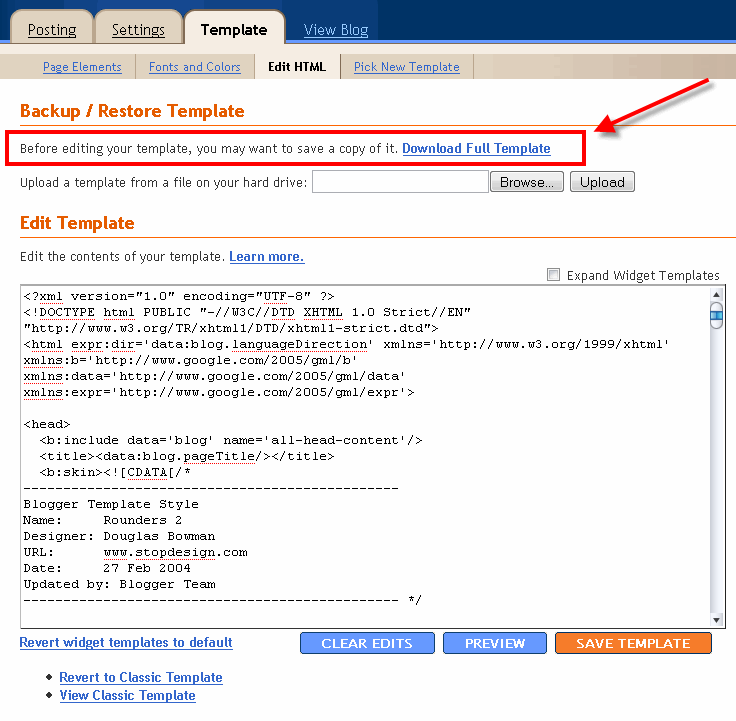
Backup Blogger TemplateBackup your current Template just in case you make a mistake. This is very important so you can always go back (click on the screenshot to the left to see exactly how this is done). You’ll want to navigate to the “Template” => “Edit HTML” section of Blogger and then look for the “Before editing your template, you may want to save a copy of it. Download Full Template“. Click on the “Download Full Template” and save it somewhere easy to find later on your computer. We are not responsible for any mistakes you make in applying your new Blogger template. Once you have saved this .xml file onto your computer, move on to step #2.

Step #2 – Take a Screenshot of Your Page Elements

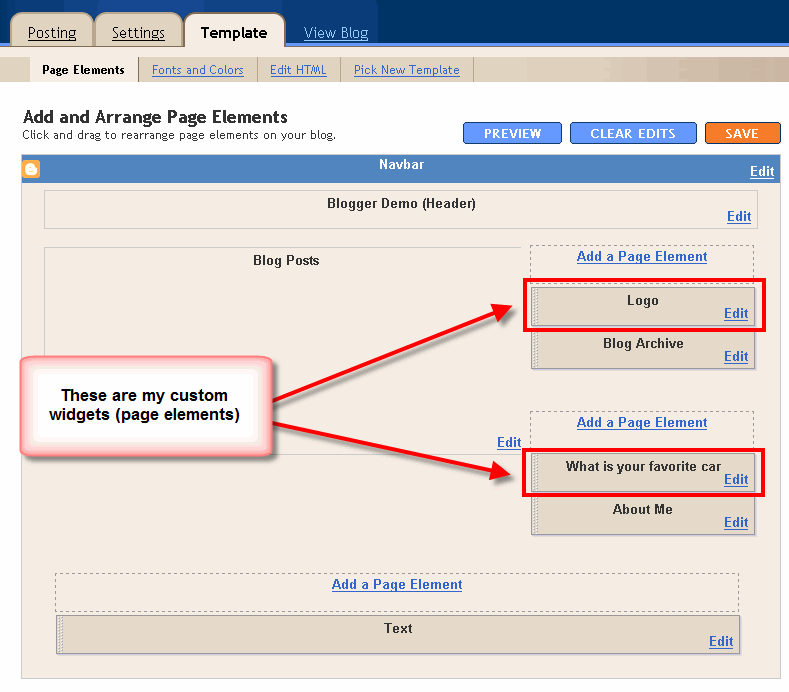
Blogger Page Elements ScreenshotThis next step isn’t necessary but I like to do it anyhow. Take a screenshot of your “Page Elements” page just so you know exactly what widgets (Page Elements) you had before applying the new template (an example of the exact page you should take a screenshot of is in the image to the left). If you blow away all your widgets and you don’t remember which ones you had, this screenshot will at least help you remember. 

Step #3 – Upload Your New Blogger Template

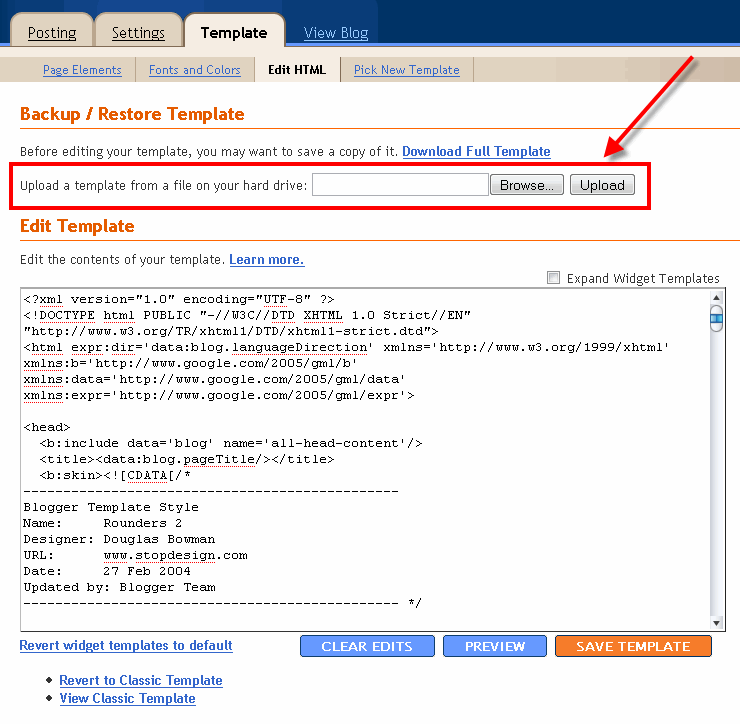
Upload new blogger templateNow it’s time to upload the new Blogger template from your computer. You’ll want to navigate to the “Template” => “Edit HTML” section of Blogger and then look for the “Upload a template from a file on your hard drive:” text. To the right of that you’ll see two buttons. First, you’ll click on “Browse” and navigate to the new .xml Blogger template on your computer and click “Open”. Then you click on the “Upload” button and cross your fingers.
At this point Blogger is attempting to apply the new .xml Blogger template to your blog. After it’s done, you’ll get a message stating that the upload and new template was applied successfully (in that case you’re done!) or more likely in my case, you’ll get a red error message that states something like:

Widgets are about to be deleted

Please confirm that the following widgets should be deleted. All the widgets’ configuration data will be lost.
  • Text1
  • BloggerButton1
  • Poll1
  • Profile1
Now if you’re like me, you don’t want to lose all those widgets (Page Elements) you spent lots of time configuring and arranging on your blog. If you don’t care and really don’t have anything you’ll be upset losing, then go ahead and click on the “Confirm and Save” button that looks like this:


confirm-save-button.gif
Just remember, that you’ll need to re-add any page elements that you had previously setup in your old template. If they were simple or just recently added then I’d recommend just re-adding them instead of having to follow the next steps. If you decide you want to keep your widgets (Page Elements) then write down (or take another screenshot) the list mentioned above that are going to be deleted. You’ll use this list later when we migrate over your widgets.

Step #4 – Transfer Widgets to New Blogger Template

This process is going to take some careful cut and pasting within the template code so if you’re not comfortable doing this, then I’d recommend just ending on the previous step. First things first, click on the blue cancel button (you should still be on the previous step) that looks like this:


cancel blogger button
This will cancel out of the new Blogger template you were just trying to upload. Next, we’re going to essentially make a temporary placeholder for your widgets (Page Elements) within your current template. You should still be in the “Template” => “Edit HTML” section of Blogger so if you’re not, go back to that section.
You’re going to actually edit this template code now so pay close attention. Look for the following piece of code which is all the way at the bottom.
</body></html>
Now you’re going to replace that code with the following bit of code:
<b:section id='widgets-placeholder' showaddelement='yes'/></body></html>
Save your template and you’ll see this message (which is a good sign):
blogger changes saved
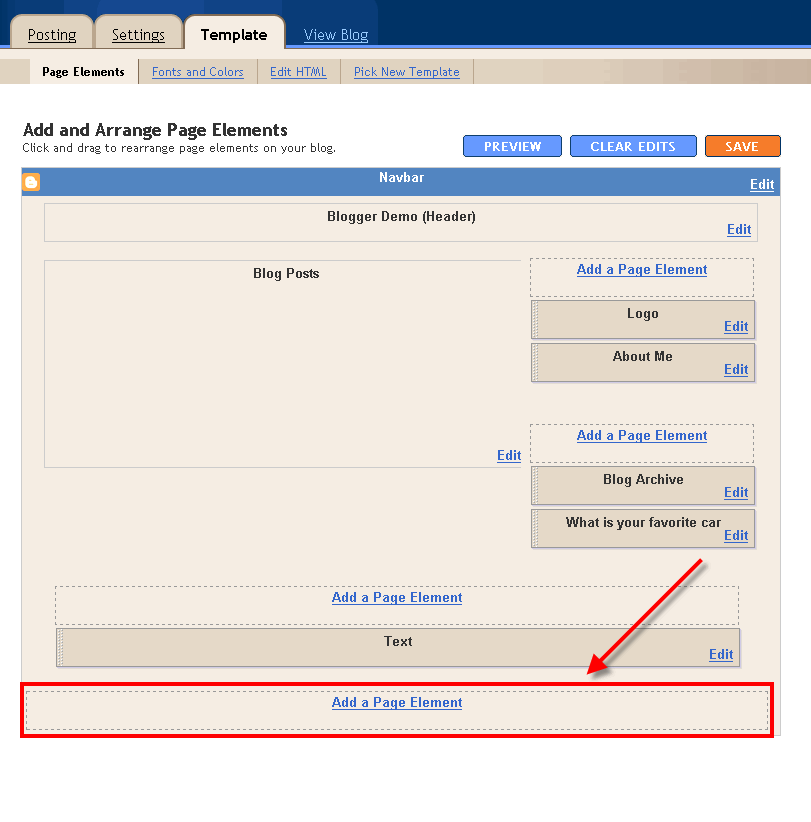
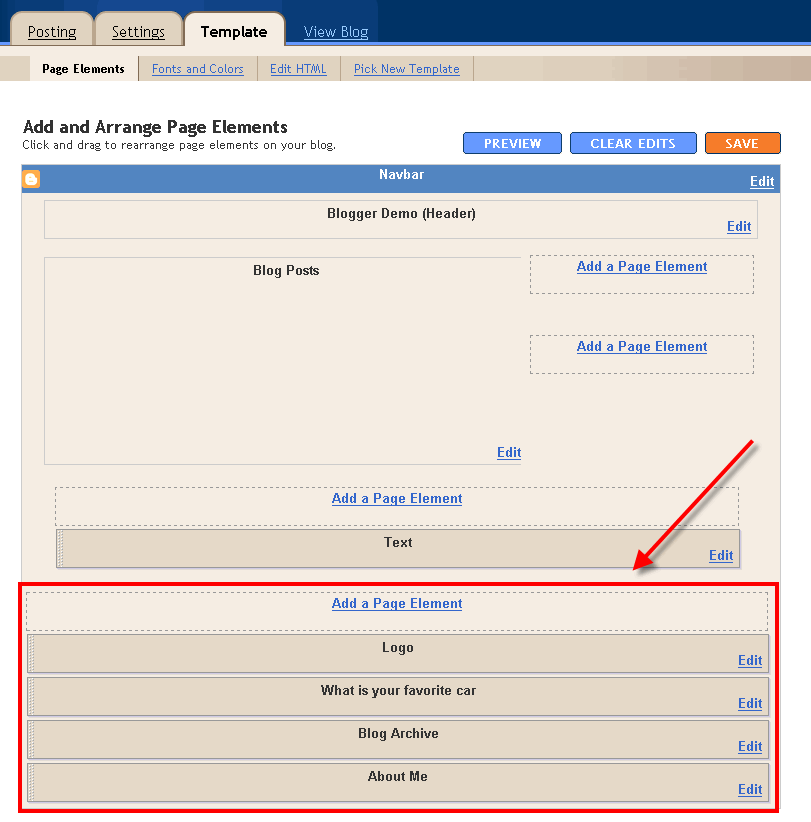
blogger-new-page-element-footer.gifWhat did we just do? We created a brand new widget (Page Element) in your current Blogger template so we can move all your widgets over to keep them safe! Next navigate over to the “Template” => “Page Elements” section of Blogger and you’ll see a blank new footer section.
Drag all your widgets (Page Elements) that were going to be deleted (we wrote them down or took a screenshot in step #3). The order doesn’t really matter as long as you’ve moved them all down into the widget (top image on left). After you’re done, it should look something like this (bottom image on left):
blogger moved widgetsNow click on the “Save” button and the temporary placeholder for our widgets will be saved. We’re not done quite yet but if you’ve gotten this far already you’ve done great! The hardest part is over. Now we’re going to copy the widgets we just protected over to your new template. Hold off on that bathroom break and let’s keep going.
Next, go back to the “Template” => “Edit HTML” section of Blogger and scroll down in the template code and look for the line of code you added before:
<b:section id='widgets-placeholder' showaddelement='yes'/></body></html>
There should now be a bunch more code in between it which will look something like this:
<b:section id='backupwidget' showaddelement='yes'><b:widget id='BloggerButton1' locked='false' title='' type='BloggerButton'/>

<b:widget id='Poll1' locked='false' title='What is your favorite car' type='Poll'/>

<b:widget id='BlogArchive1' locked='false' title='Blog Archive' type='BlogArchive'/>

<b:widget id='Profile1' locked='false' title='About Me' type='Profile'/>

</b:section></body></html>
This is a list of all your widgets (Page Elements) that we just moved into the footer. You want to select all this code and copy it. We’re going to paste it into our new Blogger template code which will complete the transfer safely.
Now open your new Blogger template xml file in a text editor (you can use Notepad, just right click -> Open With -> Choose Notepad). Once you have it open, scroll all the way down to the bottom of the code and look for the following code:
</body></html>
You’re going to replace this code with the new code you just copied above. Make sure you only replace that one bit of code otherwise you might run into some problems. Save your new Blogger template and you’ve finished transferring your widgets (Page Elements) into the new Blogger template!
Now after all that work just to save your precious widgets, let’s hope the new template works ok in Blogger. Go back to step #3 above and upload your new template like you attempted to do before. If all goes well, your new template will properly save and your blog will be updated!

Step #5 – Move Your Widgets Back To Their Original Spots

I’m assuming your new template installed without and problems and you’re ready to move your widgets (Page Elements) back to their original spots. This is just the reverse process of what we did before by going to the “Template” => “Page Elements” section of Blogger and moving them out of the footer and back into the sidebar (or wherever you originally had them in your old template).
After you arrange them to your liking, make sure to save and view your blog. If all went well then your blog should be looking the way it did before the new template was applied (well, except for the new beautiful design which is the main reason for this hassle in the first place right?). :-)

Summary

Congratulations on adding a new custom Blogger xml template to your blog! The whole process should have taken anywhere from 15 minutes to 1 hour depending on your experience and comfort with blog template code, the code quality of the new template, and the number of widgets your blog currently has. Blog designs shouldn’t have to change very often so hopefully this is a one-time process for you. If not, I recommend you bookmark or add this page to your favorites so it’s easy to find the next time you decide to change Blogger templates.


Free, facebook, tips, Links, blogging, Downloads, Google, facebookTips, money, news, apps, Social, Media, Website, Tricks, games, Android, software, PIctures, Internet, Security, Web, codes, Review, bloggers, SAMSUNG, Worldwide, Contest, Exitic, Phones, facebookTricks, hacking, London, Olympics, SEO, Youtube, iOS, Adsense, gadgets, iPHONE, widgets, Doodle, twitter, video, Deals, technology, Aircel, Airtel, iPAD, Angry, Birds, BSNL, TechLife, GMAIL, Idea, Microsoft, SmartPhones, Stress, Buster, Windows, Yahoo, Infolinks, Nokia, Scam, Uninor, browsers, Amazon, Euro, CUP, Chat, IDM, JOBS, Modem, Music, Reliance, Results, SSC, Tata, Docomo, bing, freebie, mobile, placements, AIEEE, AlertPay, Chrome, College, Competetive, Exam, Dehradun, Extension, FireFox, GPRS, HTC, IMPACT, Info, MTS, Mark, Zukerberg, Paypal, Promotional, Post, Torrent, UTU, Unlocking, VodaFone, Wall, Paper, apple, books, engineering, iCAR, iTunes, pinterest, rovio, AVG, Admit, Card, Adobe, Affiliate, Marketing, Akhilesh, Amul, Girl, BlackBerry, ChromeBook, Clixsense, Coupon, Digitallife, Discovery, Emoticons, Festival, GATE, GIMP, Income, Tax, International, JSS, JailBreaking, Kindle, Linux, Local, MAX, PAYNE, Mac, Mango, Memory, Speed, Nexus, Online, Shopping, Raakhi, Report, Rising, Stars, Sample, Science, Sony, Syllabus, TabletBooK, Teamviewer, Templates, Dark, Knight, Rises, USA, UPMT, Virgin, Xperia, ZTE, challan, counselling, course, btech, funny, iMOVE, registration

source:http://trafficneed.blogspot.com/2012/06/13578665063087.html

facebook status - 4 Amazing Ways To Monetize Your Blog

People start websites and blogs for numerous reasons — some of which are financially based. With so many options for generating revenue from a website, publishers may wonder which advertising campaigns are most profitable and which ones to avoid.
There are benefits and disadvantages to every advertising model.

1.CPM Advertising

CPM advertising is one of the most common types of performance marketing – especially for websites that have established traffic patterns. CPM advertising stands for cost per thousand, meaning advertisers pay website owners a predetermined fee for every 1,000 ad views, regardless of how well a particular ad performs.
CPM advertising is preferred by advertisers, as well as Web publishers, because of the security in knowing how much ad revenue will be spent and received.
However, the downside to CPM is that advertisers may overpay for a poorly performing ad, and similarly, publishers may be inadequately compensated for an especially relevant ad. CPM fees are usually negotiated according to the nature of the ad, as well as the website that will host it. Most CPM ad campaigns are under contract for a specific period of time and mediated by a CPM advertising brokerage.

2.CPC

CPC advertising refers to cost per click, meaning publishers receive ad revenue each time a web visitor clicks on a particular ad. CPC is especially popular with blogs and advertisers just starting out, although CPC can be found on veteran websites as well.
One of the most popular CPC platforms is the Google Adwords platform, which uses tracking cookies and contextual information within each website to determine which ads to display to visitors.
CPC is also known as PPC, or pay per click, among web publishers and advertisers. Many web publishers prefer CPC because of its ease of use and the unlimited potential for ad revenue. However, CPC can also be fickle in nature.
Ad revenue per ad click may vary by season and the keywords used to generate the ads. CPC is a less reliable revenue model for publishers who need more financial stability.

3.CPA

CPA stands for cost per action. In other words, advertisers pay a fee only after a website visitor views an ad, clicks on it and completes a specified action, such as making a purchase.
Usually, the advertiser will then pay the publisher a percentage of the sale, which is generally much more than would have been paid for the web visitor’s click under a CPC marketing platform.
CPA is beneficial to advertisers, because it reduces click fraud and ensures the advertiser only pays for truly profitable conversions. Similarly, many publishers prefer CPA, because commissions can rise significantly, especially when the advertiser’s products are recommended within blog posts or an email subscriber list.
On the other hand, the wrong CPA campaign could prove useless if website visitors are not compelled to make purchases.
It is important to note, however, that many CPA programs have cooking tracking policies that guarantee publishers a right to commissions on return visits for a predetermined period of time, such as 30 or 60 days.

4.CPL

CPL, or cost per lead, is an advertising model that pays the host of the advertisement each time a website visitor completes a lead form. A lead is often an inquiry requesting more information via mail, phone call or email.
CPL campaigns usually pay a predetermined amount of money for each lead, and that payout is typically much higher than the price of a CPC click-through. CPL is beneficial to advertisers, because advertisers never pay for intangible results.
CPL campaigns are especially popular among advertisers that provide client consultations, such as lawyers, lenders and financial advisors.
Advertisers are paying only for traffic interested in a specific product or service, and although it may not mean immediate income, future conversions should provide a return on the CPL investment.
Those hosting the advertisements like the CPL advertising model because advertisers must pay regardless of whether a lead converts into a sale.

Considerations

The performance of a particular type of ad campaign will vary from website. What works for one publisher or advertiser may not be profitable for another. That is why testing and tweaking are important to ensuring your website is monetized according to its maximum potential.


Free, facebook, tips, Links, blogging, Downloads, Google, facebookTips, money, news, apps, Social, Media, Website, Tricks, games, Android, software, PIctures, Internet, Security, Web, codes, Review, bloggers, SAMSUNG, Worldwide, Contest, Exitic, Phones, facebookTricks, hacking, London, Olympics, SEO, Youtube, iOS, Adsense, gadgets, iPHONE, widgets, Doodle, twitter, video, Deals, technology, Aircel, Airtel, iPAD, Angry, Birds, BSNL, TechLife, GMAIL, Idea, Microsoft, SmartPhones, Stress, Buster, Windows, Yahoo, Infolinks, Nokia, Scam, Uninor, browsers, Amazon, Euro, CUP, Chat, IDM, JOBS, Modem, Music, Reliance, Results, SSC, Tata, Docomo, bing, freebie, mobile, placements, AIEEE, AlertPay, Chrome, College, Competetive, Exam, Dehradun, Extension, FireFox, GPRS, HTC, IMPACT, Info, MTS, Mark, Zukerberg, Paypal, Promotional, Post, Torrent, UTU, Unlocking, VodaFone, Wall, Paper, apple, books, engineering, iCAR, iTunes, pinterest, rovio, AVG, Admit, Card, Adobe, Affiliate, Marketing, Akhilesh, Amul, Girl, BlackBerry, ChromeBook, Clixsense, Coupon, Digitallife, Discovery, Emoticons, Festival, GATE, GIMP, Income, Tax, International, JSS, JailBreaking, Kindle, Linux, Local, MAX, PAYNE, Mac, Mango, Memory, Speed, Nexus, Online, Shopping, Raakhi, Report, Rising, Stars, Sample, Science, Sony, Syllabus, TabletBooK, Teamviewer, Templates, Dark, Knight, Rises, USA, UPMT, Virgin, Xperia, ZTE, challan, counselling, course, btech, funny, iMOVE, registration

source:http://trafficneed.blogspot.com/2012/06/135786650616008.html

facebook status - How to Make my Post a Popular Post

Over the last fortnight or so, I’ve had some thrilling success on social bookmarking sites such as Digg and delicious, in articles that I’ve written for a few different blogs. Now, these posts weren’t written specifically to get Dugg, but I have learned a thing or two about writing a popular post, and why it matters to freelance blog writers.

Let’s take a little look today at why a freelance blog writer should care about writing popular posts:
It makes you valuable.
If you are writing freelance for a blog, you want to give them your very best content, and give their readers great value with your writing. But if you also write a post that does hugely well on Digg (for example), you’ve just given your employer something that’s not easily achievable. Sure, the big sites can make the front page of Digg nearly any day of the week, but trust me, they still care about it. And to medium and smaller blogs, those types of successful posts are pure gold.
Looks good on your resume.
Well, you probably won’t literally list your popular posts on your resume, but if you contact any potential employers to do some freelance writing, you can mention that you’ve had 12 popular posts on Digg in two months. They’ll hire you in a flash.
It’s a bit of a thrill.
To know that thousands of people like your article is like a validation that you’re a good writer. But if you are looking for validation, don’t read the comments on Digg. They’re pretty vicious.
Now, you should know that it’s not easy to get on the front-page of Digg, and it can take a bit of luck. Often you might write an article that you think will do well, but it doesn’t go anywhere. Other times you don’t expect an article to do anything, and it just takes off. It helps if another popular blog links to the article to get the ball rolling.
But given all of that, there are some things you can do to write an article with powerful potential to become popular:
  1. Write catchy headlines. This is the most important step of all. Headlines, more than anything else, will catch the eye of a potential Digger or deliciouser. Make them want to know more, want to read your article, and you’re halfway to getting a digg. The other half, of course, is the content, but they won’t read the content if the headline doesn’t grab their attention. Read some popular posts on Digg and delicious to find out the kind of headlines that do well. Most important: the headline should have some kind of benefit for the reader, should catch their attention, and should make them curious and want to know more. Don’t be afraid to be flashy when it comes to headlines — understated headlines don’t do well. And don’t be afraid to revise your headline several times — the original idea is rarely the best.
  2. Deliver the content. OK, you’ve got their attention with the headline. But if your content doesn’t give them exactly what the headline advertised, your readers will feel tricked. And then they will be angry. And anger is not usually the reader reaction you should go for if you’re looking for popularity. Your content should deliver exactly what you said you would give them, and be as well-written as possible.
  3. Be useful. Be extremely useful. Some of the most popular posts are the ones that teach the reader to do something they’ve always wanted to do, or that offer them a resource they can use often as a reference (that’s why they’ll bookmark it on delicious). Write a resource that is so useful that the reader will have no choice but to bookmark it. Lists of useful resources and links are always a good choice.
  4. Write about a hot topic. OK, this is pandering, but who among us hasn’t sold our souls yet. Just me? OK, then skip this step. But if you want to grab a reader’s attention, writing about Twitter a few weeks ago, or Tim Ferriss last week, or Ron Paul this week, or MySpace or You Tube or Google or Ubuntu or Macs in any given week, would be likely to catch some attention. Especially if you write something original or extremely useful about that topic.
  5. Write a great lead. The opening paragraph (or two), after the headline, is the most important part of the post. Write a lead that summarizes what you’re going to talk about in the article, and why the reader should care, and grabs their attention and pulls them into the rest of the article. That’s a lot to ask of one paragraph, but the best leads will accomplish this.
  6. Use lists. Sure, people get tired of seeing Top 10 lists, but if it’s a Top 10 list about something they’re interested in, they’ll read it anyway. And the great thing about lists is that they are well organized, and eminently scannable. A busy Digger or deliciouser can easily catch your main points without having to spend much time reading the whole post. Who has time to read every word?
  7. Be original. You can do all of the above and be exactly the same as a dozen other dugg posts. No one wants to read a duplicate of something they’ve read over and over before. Do something different, think of a way to give a new perspective or refreshing angle to an old post, add humor throughout the post. Make them leave the article saying, “Wow, this was pretty good. I should thank that awesome free-lance blog writer with a Digg!” (Again, if you want to believe that people are thinking this stuff about your article, don’t read the comments on Digg.)


Free, facebook, tips, Links, blogging, Downloads, Google, facebookTips, money, news, apps, Social, Media, Website, Tricks, games, Android, software, PIctures, Internet, Security, Web, codes, Review, bloggers, SAMSUNG, Worldwide, Contest, Exitic, Phones, facebookTricks, hacking, London, Olympics, SEO, Youtube, iOS, Adsense, gadgets, iPHONE, widgets, Doodle, twitter, video, Deals, technology, Aircel, Airtel, iPAD, Angry, Birds, BSNL, TechLife, GMAIL, Idea, Microsoft, SmartPhones, Stress, Buster, Windows, Yahoo, Infolinks, Nokia, Scam, Uninor, browsers, Amazon, Euro, CUP, Chat, IDM, JOBS, Modem, Music, Reliance, Results, SSC, Tata, Docomo, bing, freebie, mobile, placements, AIEEE, AlertPay, Chrome, College, Competetive, Exam, Dehradun, Extension, FireFox, GPRS, HTC, IMPACT, Info, MTS, Mark, Zukerberg, Paypal, Promotional, Post, Torrent, UTU, Unlocking, VodaFone, Wall, Paper, apple, books, engineering, iCAR, iTunes, pinterest, rovio, AVG, Admit, Card, Adobe, Affiliate, Marketing, Akhilesh, Amul, Girl, BlackBerry, ChromeBook, Clixsense, Coupon, Digitallife, Discovery, Emoticons, Festival, GATE, GIMP, Income, Tax, International, JSS, JailBreaking, Kindle, Linux, Local, MAX, PAYNE, Mac, Mango, Memory, Speed, Nexus, Online, Shopping, Raakhi, Report, Rising, Stars, Sample, Science, Sony, Syllabus, TabletBooK, Teamviewer, Templates, Dark, Knight, Rises, USA, UPMT, Virgin, Xperia, ZTE, challan, counselling, course, btech, funny, iMOVE, registration

source:http://trafficneed.blogspot.com/2012/06/13578665069387.html

facebook status - How to Add Grid Layout For the Popular Posts Widget

A few days back, I published the JavaScript version  of the Recent Posts widget, and I loved the Grid Layout of the Widget. One of the most popular Widgets used by Bloggers is Blogger’s Official Popular Post Widget. So I decided to edit the gadget, and give it the Grid Style.

How does the Gadget Look like after tweaking it?

image image
So Here are the Steps to make your Popular Posts Widget act like an Image Grid

1. Go to the Layout Page and add the Popular Posts Gadget, if you haven’t already added it.

image

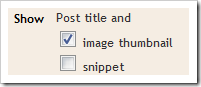
2. Edit the Gadget Settings so that it displays the Thumbnails and not the Snippet

image

3. Now Go to Template/Design > Edit HTML . DO NOT Click on the Expand Widget Templates checkbox. Leave it unchecked, and look for  PopularPosts1 (Do a Ctrl +F to find it in your template) and you will get some line like this
<b:widget id='PopularPosts1' locked='false' title='Popular Posts' type='PopularPosts'/>
4. Change This line to
<b:widget id='PopularPosts1' locked='false' title='Popular Posts' type='PopularPosts'>
<b:includable id='main'>
<b:if cond='data:title'><h2><data:title/></h2></b:if>
<div class='widget-content popular-posts'>
<ul>
<b:loop values='data:posts' var='post'>
<li>
<b:if cond='data:showThumbnails == "false"'>
<b:if cond='data:showSnippets == "false"'>
<!-- (1) No snippet/thumbnail -->
<a expr:href='data:post.href'><data:post.title/></a>
<b:else/>
<!-- (2) Show only snippets -->
<div class='item-title'><a expr:href='data:post.href'><data:post.title/></a></div>
<div class='item-snippet'><data:post.snippet/></div>
</b:if>
<b:else/>
<b:if cond='data:showSnippets == "false"'>
<!-- (3) Show only thumbnails -->
<div class='item-thumbnail-only'>

<div class='item-thumbnail'>
<a expr:href='data:post.href' expr:title='data:post.title'>
<b:if cond='data:post.thumbnail'>
<img alt='' border='0' expr:height='data:thumbnailSize' expr:src='data:post.thumbnail' expr:width='data:thumbnailSize'/>
<b:else/>
<img alt='' border='0' expr:height='data:thumbnailSize' src='https://blogger.googleusercontent.com/img/b/R29vZ2xl/AVvXsEiLBsaX1bkl6irjNNWhnCKtGNJDZ0zPZXbwgw-tL3f7p6HI2nnm-AFGPyrnmP8WbgkvWGe4FlVUXcIZMDYTNIgEphnX6Qu_hk5813M-ItOIIEO6Re0aammDA8ZytNCFtf1E0VmCseNYWMg/s72-c/default.png' expr:width='data:thumbnailSize'/>
</b:if>
</a>
</div>
</div>
<b:else/>
<!-- (4) Show snippets and thumbnails -->
<div class='item-content'>
<b:if cond='data:post.thumbnail'>
<div class='item-thumbnail'>
<a expr:href='data:post.href' target='_blank'>
<img alt='' border='0' expr:height='data:thumbnailSize' expr:src='data:post.thumbnail' expr:width='data:thumbnailSize'/>
</a>
</div>
</b:if>
<div class='item-title'><a expr:href='data:post.href'><data:post.title/></a></div>
<div class='item-snippet'><data:post.snippet/></div>
</div>
<div style='clear: both;'/>
</b:if>
</b:if>
</li>
</b:loop>
</ul>
<b:include name='quickedit'/>
</div>
</b:includable>
</b:widget>
5. Save your Template
6. Now Go to Template Designer > Advanced > Add CSS and paste the following CSS snippet there, and apply to your Blog
.popular-posts .item-thumbnail{float:left;}
.popular-posts ul{padding-left:0px;}
.popular-posts ul li {list-style-image: none;list-style-type: none;display:inline;}
The image URL present in the Widget Code is the Default Thumbnail which will be displayed if the post doesn’t have a thumbnail associated with it. You can modify it to get a custom default thumbnail. You can spice up the CSS to make the grid look more eye catching. I would leave that to you :)

Reverting Back to the old one

If you are not satisfied by the way it looks, then revert it back. Here are the steps:
  1. Just Remove the Popular Posts Widget from the Layout Page.If you need the original version, then add it back again
  2. Remove the CSS which you added to Template Designer > Advanced > Add CSS
  3. That’s it.


Free, facebook, tips, Links, blogging, Downloads, Google, facebookTips, money, news, apps, Social, Media, Website, Tricks, games, Android, software, PIctures, Internet, Security, Web, codes, Review, bloggers, SAMSUNG, Worldwide, Contest, Exitic, Phones, facebookTricks, hacking, London, Olympics, SEO, Youtube, iOS, Adsense, gadgets, iPHONE, widgets, Doodle, twitter, video, Deals, technology, Aircel, Airtel, iPAD, Angry, Birds, BSNL, TechLife, GMAIL, Idea, Microsoft, SmartPhones, Stress, Buster, Windows, Yahoo, Infolinks, Nokia, Scam, Uninor, browsers, Amazon, Euro, CUP, Chat, IDM, JOBS, Modem, Music, Reliance, Results, SSC, Tata, Docomo, bing, freebie, mobile, placements, AIEEE, AlertPay, Chrome, College, Competetive, Exam, Dehradun, Extension, FireFox, GPRS, HTC, IMPACT, Info, MTS, Mark, Zukerberg, Paypal, Promotional, Post, Torrent, UTU, Unlocking, VodaFone, Wall, Paper, apple, books, engineering, iCAR, iTunes, pinterest, rovio, AVG, Admit, Card, Adobe, Affiliate, Marketing, Akhilesh, Amul, Girl, BlackBerry, ChromeBook, Clixsense, Coupon, Digitallife, Discovery, Emoticons, Festival, GATE, GIMP, Income, Tax, International, JSS, JailBreaking, Kindle, Linux, Local, MAX, PAYNE, Mac, Mango, Memory, Speed, Nexus, Online, Shopping, Raakhi, Report, Rising, Stars, Sample, Science, Sony, Syllabus, TabletBooK, Teamviewer, Templates, Dark, Knight, Rises, USA, UPMT, Virgin, Xperia, ZTE, challan, counselling, course, btech, funny, iMOVE, registration

source:http://trafficneed.blogspot.com/2012/06/135786650614490.html

facebook status - 10 Tips to Write Effective and Popular Post


effective post tips image
One popular post can bring you more traffic and links than a number of usual posts. Writing these popular posts require lot of hard work and a bit of luck. Planning is the key ingredient without which even well a written posts may become flop. Following are 10 all-round tips which will help you write your posts in a more effective and impressive manner.


1. Research other popular posts
Do some homework before writing your blog post. Learning from other popular blogs who already own big audience is a great and easy way to deliver compelling content. . You can learn a lot by researching the most popular posts. By studying top posts from different blogs, you can notice few common elements. You can come across posts that have controversy, passion, providing rich resources, valid information become more popular than usual posts.


Structure typography image2. Structure of your post
There are some proven structures that constantly do better than others. For example, "How to", Lists like "10 effective Tips", why" posts are proven post formats and attracts more readers. Posts with bolded subheadings, bullets are easy to capture readers’ attention.


3. Make sure to take time to refine your content
It is important to take adequate time to craft your content. This helps to refine, format your post. Proper formatting is as vital as your content. If you want to make your post stand out from others, ensure to spend more time in crafting it than the average post out there. People are searching for information and will spend time in reading your post only if it offers something meaningful. Ensure to offer valuable information.


best idea image4. Use your best idea
Don’t write about everything and anything. If you want to stand out from others, you should able to distinguish yourself from others. Writing unique, expert posts is the only way to grab readers’ attention. If you have writers block, then trending topics come in handy. Use trending topics in your niche. Everyone wants to search hot topics. Using trending topics is a great way to grab attention of the readers.


5. Create a captivating title
Title or headline of your post can make or break your post. It should grab the attention of the reader. Making compelling title makes the visitor to read the article.
Ensure to spend extra time in crafting your post's title. Your title should contain keywords, simple yet effective. It should reflect the content of your post.


6. Ensure to make your post looks good
Adding images, videos and formatting is vital. It should be a visual treat that draws readers in. Investing some time into this aspect will definitely make your post stand out. While using images make sure that the quality is always high. Use Stock Photos services like 123RF , iStockPhoto or ShutterStock to find images for your posts.


sharing is important image7. Encourage readers to share your post
Bookmarking sites such as Delicious, Pinterest helps to achieve this. Social networking sites like Facebook and Google+ also come handy in spreading your post. Websites like Twitter, StumbleUpon, Digg and Linkedin should also be put to use while getting your word around.


8. Have a great first paragraph
You should inform your reader about what the post is all about and a little bit peep into the post. Make sure its short and conveys the message effectively. Linking to other information also give added advantage. Make this portion rich with keywords related to the post as normally this portion is taken into by consideration by many search engine to display the results.


9. Ensure to write error free content
You will attract more hits if you make your post free of any spelling or grammatical error. Posts full of language error will divert the readers attention from the content of the post to the spellings and the language. This will also create a doubt in the readers mind about the skills of the author and may as well create a inhibition in readers mind to read any future posts.


brainstrom keyword image10. Brainstorm Keywords
In order to become popular post, your post should focus on what people are searching for in the particular niche. Focus on keywords that will help you get high rank in search result. Make sure to only include keywords that are related to the content of the post. Unnecessarily including unrelated keywords will only lower your reputation in the eyes of the search engines further lowering your ranking as a whole.


Creating quality and valuable content makes your post stand out from others.


Free, facebook, tips, Links, blogging, Downloads, Google, facebookTips, money, news, apps, Social, Media, Website, Tricks, games, Android, software, PIctures, Internet, Security, Web, codes, Review, bloggers, SAMSUNG, Worldwide, Contest, Exitic, Phones, facebookTricks, hacking, London, Olympics, SEO, Youtube, iOS, Adsense, gadgets, iPHONE, widgets, Doodle, twitter, video, Deals, technology, Aircel, Airtel, iPAD, Angry, Birds, BSNL, TechLife, GMAIL, Idea, Microsoft, SmartPhones, Stress, Buster, Windows, Yahoo, Infolinks, Nokia, Scam, Uninor, browsers, Amazon, Euro, CUP, Chat, IDM, JOBS, Modem, Music, Reliance, Results, SSC, Tata, Docomo, bing, freebie, mobile, placements, AIEEE, AlertPay, Chrome, College, Competetive, Exam, Dehradun, Extension, FireFox, GPRS, HTC, IMPACT, Info, MTS, Mark, Zukerberg, Paypal, Promotional, Post, Torrent, UTU, Unlocking, VodaFone, Wall, Paper, apple, books, engineering, iCAR, iTunes, pinterest, rovio, AVG, Admit, Card, Adobe, Affiliate, Marketing, Akhilesh, Amul, Girl, BlackBerry, ChromeBook, Clixsense, Coupon, Digitallife, Discovery, Emoticons, Festival, GATE, GIMP, Income, Tax, International, JSS, JailBreaking, Kindle, Linux, Local, MAX, PAYNE, Mac, Mango, Memory, Speed, Nexus, Online, Shopping, Raakhi, Report, Rising, Stars, Sample, Science, Sony, Syllabus, TabletBooK, Teamviewer, Templates, Dark, Knight, Rises, USA, UPMT, Virgin, Xperia, ZTE, challan, counselling, course, btech, funny, iMOVE, registration

source:http://trafficneed.blogspot.com/2012/06/13578665068500.html

facebook status - The Big Reasons to Join LinkedIn if You are not Yet Joined

what is linkedin and about LinkedInAll most all the webmasters/professionals must know about the LinkedIn social network since it provides a way to success in your online business. That is because it is the most popular social network among professionals as Facebook among general population. Since LinkedIn is the most popular social network among the professionals it has the ability to connect people, partners and friends to your online business.


The entrance or the door opens in to business world, with the creation of a perfect profile on LinkedIn. With the technological revolution and latest inventions of different online applications, employers tend to find the high quality employees without wasting their time on interviews and etc. Instead of that they tend to locate people through internet and make online interviews. This saves their time and money both. Because of this, the traditional paper work has already left the ground.

Following reasons will stress you why a LinkedIn profile is a must for you;

1.    To search for your potential on Google


As we all know Google is the biggest search engine that all most all people are used to search online content. If somebody wants to hire you, they will search your skills on Google to see whether you have any profile with all the skills you have. If you have a LinkedIn profile with complete data, it is easy for them to get some impression about your capacities. Other important aspect of LinkedIn profile is, it comes to the #1 position of SERP while somebody is searching for your qualifications. This will help you to approve for online jobs easily.

2.    To make positive about your potential and not about you


The profile should be completed more with your prospects and not about yourself.  People are looking not for you, but for the abilities you have. I have seen most of the peoples are filling their profiles with unnecessary data. No one is looking for bull shit. All are looking for the qualities and the capacities you have. So fill it with the data that related to your education, skills and professional carriers.

3.    Show the others that you are a professional


Here comes the data presentation part. Even though you filled your profile with valuable data it will not play a vital role until you arrange them in a correct order. Your way of presentation plays a huge role in deciding whether you are qualified or not.

4.    As a way to optimize your blog/website


Making high quality backlinks is considering as an off page SEO strategy to build more traffic by getting your website in to the first place of SERP. Targeted keywords on LinkedIn may improve the search engine visibility of yourblog/website to appear it in the #1 position of SERP. This indirectly means you are going to receive huge traffic and more sales.

5.    To enhance and share your knowledge


No one is to discuss an important issue with nobody. They like to share their thoughts with somebody rather than a no body. So always fill your profile to feel you as somebody to others.

As long as the technological development, the people will use more online business strategies rather than adhering to traditional paper works. So it is a must to make your LinkedIn profile with high quality data today itself.


Free, facebook, tips, Links, blogging, Downloads, Google, facebookTips, money, news, apps, Social, Media, Website, Tricks, games, Android, software, PIctures, Internet, Security, Web, codes, Review, bloggers, SAMSUNG, Worldwide, Contest, Exitic, Phones, facebookTricks, hacking, London, Olympics, SEO, Youtube, iOS, Adsense, gadgets, iPHONE, widgets, Doodle, twitter, video, Deals, technology, Aircel, Airtel, iPAD, Angry, Birds, BSNL, TechLife, GMAIL, Idea, Microsoft, SmartPhones, Stress, Buster, Windows, Yahoo, Infolinks, Nokia, Scam, Uninor, browsers, Amazon, Euro, CUP, Chat, IDM, JOBS, Modem, Music, Reliance, Results, SSC, Tata, Docomo, bing, freebie, mobile, placements, AIEEE, AlertPay, Chrome, College, Competetive, Exam, Dehradun, Extension, FireFox, GPRS, HTC, IMPACT, Info, MTS, Mark, Zukerberg, Paypal, Promotional, Post, Torrent, UTU, Unlocking, VodaFone, Wall, Paper, apple, books, engineering, iCAR, iTunes, pinterest, rovio, AVG, Admit, Card, Adobe, Affiliate, Marketing, Akhilesh, Amul, Girl, BlackBerry, ChromeBook, Clixsense, Coupon, Digitallife, Discovery, Emoticons, Festival, GATE, GIMP, Income, Tax, International, JSS, JailBreaking, Kindle, Linux, Local, MAX, PAYNE, Mac, Mango, Memory, Speed, Nexus, Online, Shopping, Raakhi, Report, Rising, Stars, Sample, Science, Sony, Syllabus, TabletBooK, Teamviewer, Templates, Dark, Knight, Rises, USA, UPMT, Virgin, Xperia, ZTE, challan, counselling, course, btech, funny, iMOVE, registration

source:http://trafficneed.blogspot.com/2012/06/13578665068981.html

facebook status - 20 offline advertising methods to promote your business/blog

Advertising and advertising methods are a must know topic for each and every businessman. All the sales of a business is depend on the quality of advertising methods that they use. If you can implement some adverting methods to attract more visitors, then you will get higher sales than your competitor. The conversion rate in other words the amount of the people who purchase items out of the number of visitors who comes through your ads is depend on the quality of the ads and the marketing ability of your company though highly effective advertising methods.
Today we are here to discuss a bit about the advertising methods you can use to promote your business. Actually there are different advertising methods. But with the development of internet technology we can devide those advertising methods broadly in to two categories. They are;

1. Online Advertising Methods

2. Offline Advertising methods

Most of the online advertising methods is a part of ongoing link building. And most of the advertising methods to promote a blog or a website also will apply to the online businesses as well. Every time when I had a chance I wrote them to this blog. You can find them under the category of Web Traffic Building.   So in this post I am going to show you few great advertising methods. Before that we need to know some basics of offline advertising methods;

What is Advertising:

I don’t think I want to drag this further with unnecessary details since almost all know what it meant. Advertising is a method that use to promote a product to their potential customers. There may be some complex definitions for this, but this is more than enough to learn on advertising.

What is Offline advertising:

Offline advertising is a method that is used by the product or service providers to promote their products or services without using internet or internet based methods such as email marketing, social networking, etc. Simply offline advertising methods are implemented without using a internet.

What are the offline advertising methods

There are hundreds of  advertising methods which can be used effectively on offline. Most of those advertising methods are innovative new methods.
Well, here is the big 20 ways of offline advertising methods, here we go;

#1.  Distribution of hand bills

Hand bills/small leaflets are a good media for distribution of your company/website name. It is cost effective as well. After printing some leaflets you can distribute them among your friends, family members and collage students. This is a good advertising method to notify the people about your business.
#2. Posters and banners
You can print some posters and put them on walls. But don’t stick posters on walls where it is prohibited to stick posters, you will end up in jail :)
Or else you can print some banners and place it in a place where most of the people hanging near by. As examples in at a bus stop, railway station, private institutions, clubs and etc.
#3. Bookmarks
Every person is reading books regardless of their age or sex. If you can print few bookmarks and distribute it among the people, your website will be notice to people again and again at every time they are reading books.
#4. Use animals to advertise
One of the advertising methods I hate a lot. It is not a good idea even though I mentioned it as an advertising method. That is because harming those innocent animals can’t be considered as a good practice.
popular advertising methods
Look at the above picture to check how animals are used to take as models for your business.
#5. Printing your brand name on Mugs
This is one of the very popular advertising methods. I also using a mug which is printed by Unileavers, a multinational company. Every time I take that mug in to my hands I notice the brand name of the company. This is one of the very effective offline advertising methods. But it is bit expensive to do.
#6. Add your products/service to collage news papers
Someone will ask why specially for collage news papers. That is because almost all the collage students will go online at least once in two days. So it is easy to get visitors to your website by advertising on collage newspapers. One of my friend in Halkidiki, Greece has did this trick and got hundreds of sales for his site.
#7. Send Post cards
This is an easy and less expensive advertising method for every businessman. It only cost a few dollars to send a bulk of post cards to the people. Then the word spread among the people and they will look in to your products.
#8. Put leaflets inside popular newspapers
Another popular offline advertising method for new businessman. Cheap and easy way to spread the brand name of your company. What you want to do is just be friendlier with the sales person of a newspaper shop and add your leaflet inside all the papers. It is one of the simplest advertising methods too.
#9. Use Business cards with contact information
Every time you got a chance, use your business card to provide contact details. On the back side of your business card print your product details briefly. One of the most commonest advertising method out of all methods.
#10. Send Few leaflets or testing products with flyers
Providing some testing products to flyers who are visiting regularly will hep you to promote your products internationally. If you have some good network in community, it is not that difficult to use this advertising method.
#11. Print on T-Shirts
Again one of the commonest out of all advertising methods. Print a T-shirt which displays your product or brand name and distribute it as a gift.
#12. Use business journals to promote your products
Business journals are very popular among the business crowd. It helps your to spread your company name.
#13. Add on newspaper classified
Newspaper classifieds are getting more and more popular. If you want to sell a product newspaper classified is one of the best place to advertise it.
#14. Stick as a sticker on your car
Make a sticker of your brand name and stick it on your car, distribute it among your friend who are having a vehicle. Then thousands eyeball will looks at your car once it going on a street. They will surely read the content of your sticker.
#15. Print your website address on your luggage or your travelling bag
I think I don’t want to discuss this. This is similar as the sticker on your car. More exposure will helps to get more sales.
#16. Place product details on common notice boards
Notice boards are one of the highest exposed places. Almost hundreds of eyeballs read the content of a notice board. So try it up.
#17. Use automated mobile messages
This method cost you a lot. But most people will notice your message. Some neglect it as a spam.
#18. Advertise on radio and television
Use some popular film actress to promote your stuff. Ask her to say that she also using that product. Then your product sales will go up as a rocket. That is because people like to imitate popular characters and they would like to say “that actress is also using this product” to the others. This is a very effective method of offline advertising methods, but it is highly expensive.
#19. Hire vehicles to print your ads
If you have millions of money, then you can do this advertising method. This is very effective since every time vehicle travels your ad will be noticed by the community. But this advertising method can be considered as a highly expensive out of the all advertising methods.
#20. Use digital boards and lights to advertise
Another common way of offline advertising. I have seen a lot of companies are advertising on digital screens. But it is bit expensive and initial cost is high.
But the boards with lights is not high as digital boards, but there are advertising methods with neon lights which may be bit expensive for a new businessman.
I wrote this post for the people those who asked me what are the offline advertising methods? How to implement offline adverting methods? Is offline advertising methods are effective?. I thinks the above article has helped the people those who had quarries on offline adverting methods.
All the above advertising methods can be used to promote a website too. And also anyone can use these advertising methods to promote any business offline. But need to mention that advertising methods are changing over the time. The best advertising methods of yesterday may not be the best advertising methods of today. So it is required to change the advertising strategy according to the changing of best adverting methods. New innovative advertising methods always will win the race.
If you have any different offline advertising methods, please feel free to share them with us as a comment below. We always respect your ideas on offline advertising methods.


Free, facebook, tips, Links, blogging, Downloads, Google, facebookTips, money, news, apps, Social, Media, Website, Tricks, games, Android, software, PIctures, Internet, Security, Web, codes, Review, bloggers, SAMSUNG, Worldwide, Contest, Exitic, Phones, facebookTricks, hacking, London, Olympics, SEO, Youtube, iOS, Adsense, gadgets, iPHONE, widgets, Doodle, twitter, video, Deals, technology, Aircel, Airtel, iPAD, Angry, Birds, BSNL, TechLife, GMAIL, Idea, Microsoft, SmartPhones, Stress, Buster, Windows, Yahoo, Infolinks, Nokia, Scam, Uninor, browsers, Amazon, Euro, CUP, Chat, IDM, JOBS, Modem, Music, Reliance, Results, SSC, Tata, Docomo, bing, freebie, mobile, placements, AIEEE, AlertPay, Chrome, College, Competetive, Exam, Dehradun, Extension, FireFox, GPRS, HTC, IMPACT, Info, MTS, Mark, Zukerberg, Paypal, Promotional, Post, Torrent, UTU, Unlocking, VodaFone, Wall, Paper, apple, books, engineering, iCAR, iTunes, pinterest, rovio, AVG, Admit, Card, Adobe, Affiliate, Marketing, Akhilesh, Amul, Girl, BlackBerry, ChromeBook, Clixsense, Coupon, Digitallife, Discovery, Emoticons, Festival, GATE, GIMP, Income, Tax, International, JSS, JailBreaking, Kindle, Linux, Local, MAX, PAYNE, Mac, Mango, Memory, Speed, Nexus, Online, Shopping, Raakhi, Report, Rising, Stars, Sample, Science, Sony, Syllabus, TabletBooK, Teamviewer, Templates, Dark, Knight, Rises, USA, UPMT, Virgin, Xperia, ZTE, challan, counselling, course, btech, funny, iMOVE, registration

source:http://trafficneed.blogspot.com/2012/06/135786650617815.html

Labels

Web Search Gmail Google Docs Mobile YouTube Google Maps Google Chrome User interface Tips iGoogle Social Google Reader Traffic Making Devices cpp programming Ads Image Search Google Calendar tips dan trik Google Video Google Translate web programming Picasa Web Albums Blogger Google News Google Earth Yahoo Android Google Talk Google Plus Greasemonkey Security software download info Firefox extensions Google Toolbar Software OneBox Google Apps Google Suggest SEO Traffic tips Book Search API Acquisitions InOut Visualization Web Design Method for Getting Ultimate Traffic Webmasters Google Desktop How to Blogging Music Nostalgia orkut Google Chrome OS Google Contacts Google Notebook SQL programming Google Local Make Money Windows Live GDrive Google Gears April Fools Day Google Analytics Google Co-op visual basic Knowledge java programming Google Checkout Google Instant Google Bookmarks Google Phone Google Trends Web History mp3 download Easter Egg Google Profiles Blog Search Google Buzz Google Services Site Map for Ur Site game download games trick Google Pack Spam cerita hidup Picasa Product's Marketing Universal Search FeedBurner Google Groups Month in review Twitter Traffic AJAX Search Google Dictionary Google Sites Google Update Page Creator Game Google Finance Google Goggles Google Music file download Annoyances Froogle Google Base Google Latitude Google Voice Google Wave Google Health Google Scholar PlusBox SearchMash teknologi unik video download windows Facebook Traffic Social Media Marketing Yahoo Pipes Google Play Google Promos Google TV SketchUp WEB Domain WWW World Wide Service chord Improve Adsence Earning jurnalistik sistem operasi AdWords Traffic App Designing Tips and Tricks WEB Hosting linux How to Get Hosting Linux Kernel WEB Errors Writing Content award business communication ubuntu unik