Even if Google has been founded 10 years as a company, there aren't too many great videos about Google's history. I compiled a list of 10 videos: interviews with Google's co-founders, press events, an interesting documentary and some highlights from Googleplex.
1. "Charlie Rose" (PBS, July 2001) - a conversation with Larry Page (Google's CEO at that time) and Sergey Brin.
2. "60 Minutes" (CBS, 2005) - transcript. "To this day, Google has still never run a TV commercial. Their popularity has spread literally by word of mouth around the world, as people everywhere search for everything under the sun."
3. "Sergey Brin and Larry Page: Inside the Google machine" (TED conferences, 2004)
4. "Google - Behind the Screen" (Ijsbrand van Veelen, 2006). The documentary asks interesting questions like "How can you convince people that Google isn't a Big Brother company?", "What happens if a search engine becomes dominant?", but the answers from Google's executives aren't always convincing.
5. "Sergey Brin Speaks with UC Berkeley Class" (2005) - 40 minutes about Wikipedia, search engines, China, desktop software and more.
6. "Google Factory Tour" (a press event from 2005) - 340 minutes
7. "Googling the Googlers' DNA: A Demonstration of the 23andMe Personal Genome" (2008). Anne Wojcicki reveals interesting details about Sergey Brin, Larry Page and Eric Schmidt - skip to minute 27.
8. "Marissa Mayer at Stanford University" (2006) - Marissa Mayer's 9 Notions of Innovation
9. "The Science and Art of User Experience at Google" (2006) - Jen Fitzpatrick
10. "Working at Google" (2008) - interviews with Google employees and images from Googleplex.
Google Chrome, a Shell for the Web
"In the long term, we think of Chromium as a tabbed window manager or shell for the web rather than a browser application. We avoid putting things into our UI in the same way you would hope that Apple and Microsoft would avoid putting things into the standard window frames of applications on their operating systems. The tab is our equivalent of a desktop application's title bar; the frame containing the tabs is a convenient mechanism for managing groups of those applications. In future, there may be other tab types that do not host the normal browser toolbar," explains a document about Chrome's user experience.
This philosophical shift might explain why there are few interface distractions and the browser is barely visible. Google Chrome is built for web applications that have their own menus, keyword shortcuts and status bars.
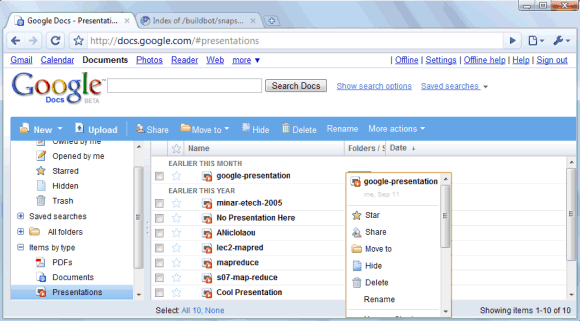
Chrome comes with intelligent defaults to minimize the interaction with the browser. The settings dialog doesn't include many options available in other browsers and the team hopes to "reduce the number of options further". The lack of customization is not a good news for advanced users, but normal users might appreciate the simplicity of the interface.
"The heck with more features, is Safari 3 faster, more stable, less memory-hungry and more compatible on the web at large? That's what I want to see in each release," commented Peter Kasting on an article from 2006 about Safari 3. Peter Kasting is now an engineer in the Google Chrome team.
This philosophical shift might explain why there are few interface distractions and the browser is barely visible. Google Chrome is built for web applications that have their own menus, keyword shortcuts and status bars.
Chrome comes with intelligent defaults to minimize the interaction with the browser. The settings dialog doesn't include many options available in other browsers and the team hopes to "reduce the number of options further". The lack of customization is not a good news for advanced users, but normal users might appreciate the simplicity of the interface.
"The heck with more features, is Safari 3 faster, more stable, less memory-hungry and more compatible on the web at large? That's what I want to see in each release," commented Peter Kasting on an article from 2006 about Safari 3. Peter Kasting is now an engineer in the Google Chrome team.
Subscribe to:
Posts (Atom)