Google Latitude Check-ins

Google Latitude is useful if you want to share your location with a group of friends, but not everyone wants to do that. As Foursquare's success showed, people want to manually "check in" and only share some of the places they visit.

To make Google Latitude more useful and to better integrate it with other social services, Google added support for check-ins. "You can still use Latitude to automatically update and share your location, but check-ins let you add context to the location — like captions to a photo," explains Google. It's an opportunity to improve Google Maps by sharing your favorite places, which could also make social recommendations better.


Check-ins connect locations to places and they're better suited for sharing because there's no real-time tracking involved. Google says that check-ins will be added to your Google Buzz stream and you can share them with your friends, make them public or private. There are some additional features that help you use check-ins: notifications to check in at a nearby place once you arrive, automatic check-ins at specific places, the option to check out and status level (visitor/Regular/VIP/Guru). Google Places pages include information about your check-ins, your friends' check-ins and your status.

Check-ins are supposed to work if you use the latest version of Google Maps for Android. If you use an iPhone, you should see a new version of the Latitude app in the near future. I've installed Google Maps 5.1 for Android, but I couldn't find the new features.


Google says that there are 10 million active Latitude users. Check-ins could attract new users and make Google's social services more popular.

Ironically, check-ins were made popular by Foursquare, a startup created by Dodgeball's founder and former Google employee Dennis Crowley. Dennis quit Google two years after Google acquired Dodgeball. "The whole experience was incredibly frustrating for us - especially as we couldn't convince them that dodgeball was worth engineering resources, leaving us to watch as other startups got to innovate in the mobile + social space."

{ Thanks, Michael. }
A New Google Docs Homepage

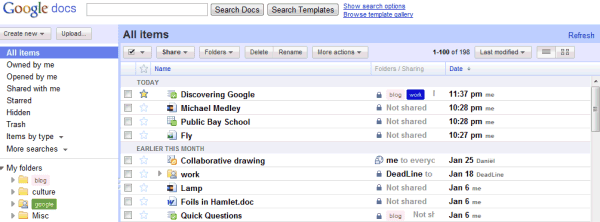
As previously anticipated, Google Docs has a new homepage that's better suited for managing files, not just editable documents.

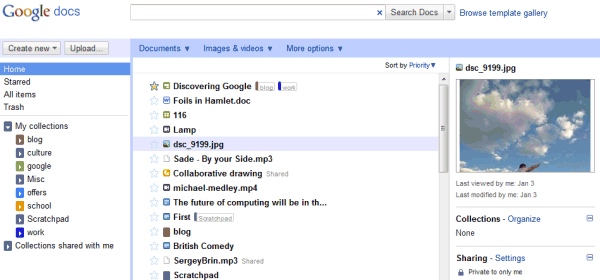
There's a sidebar that shows a small thumbnail and some useful information about the selected file. Google added new filters for images and videos, for public and private files, but dropped the advanced search form, which was more difficult to use. The drawback is that there are many search features that are no longer available in the interface and you need to use operators to get them back.


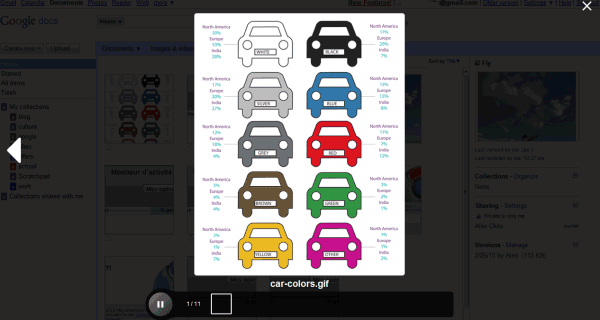
The slideshow feature borrowed from Google Wave is one of the most useful additions:


For some reason, Google Docs has a new name for folders: they're now called collections. "Collections are designed to combine the best features of labels and folders. A file can live in multiple collections, just like with Gmail labels. Collections can also be stored hierarchically, just like folders on your desktop. And of course, collections can be shared, just like you can share docs," explains Google. Technically speaking, none of these features is new, but it's much easier to add a file to multiple folders collections. Unfortunately, Google's new terminology will probably confuse users and many people won't realize that clicking "Organize" lets you add a file to a collection.

Google also dropped checkboxes, so now it's much more difficult to select multiple files: you need to use Shift for contiguous selections or Control for scattered files (Cmd if you're using a Mac).

Another new feature is priority sorting, which orders files based on importance. For example, a starred document that has been last updated 5 hours ago is likely to rank higher than a more recent document that hasn't been starred. Google says that it's like Gmail's Priority Inbox, but there's an important difference: Gmail always sorts conversations by date.

Overall, the new Google Docs homepage is a mixed bag. Google tries to morph Google Docs into an online storage service, while moving away from the initial goal of the service: editing documents online. Suddenly Google Docs is no longer an appropriate name for the service, 1 GB of free storage is not enough, the APIs are no longer useful because they're limited to editable documents and Google's applications seem limited because they can't handle all the files that can be uploaded. The new homepage can't address these issues, but it manages to make the interface more complicated: now it's a lot easier to open a file when you want to select it and to select the file when you want to open it.

Tip: If you don't like the new interface, there's an option at the top of the page that lets you temporarily switch to the old version. You should bookmark the URL: https://docs.google.com/?ui=1, since there's no option to permanently switch to the old UI.


{ Thanks, Karol and Ben. }

Labels

Web Search Gmail Google Docs Mobile YouTube Google Maps Google Chrome User interface Tips iGoogle Social Google Reader Traffic Making Devices cpp programming Ads Image Search Google Calendar tips dan trik Google Video Google Translate web programming Picasa Web Albums Blogger Google News Google Earth Yahoo Android Google Talk Google Plus Greasemonkey Security software download info Firefox extensions Google Toolbar Software OneBox Google Apps Google Suggest SEO Traffic tips Book Search API Acquisitions InOut Visualization Web Design Method for Getting Ultimate Traffic Webmasters Google Desktop How to Blogging Music Nostalgia orkut Google Chrome OS Google Contacts Google Notebook SQL programming Google Local Make Money Windows Live GDrive Google Gears April Fools Day Google Analytics Google Co-op visual basic Knowledge java programming Google Checkout Google Instant Google Bookmarks Google Phone Google Trends Web History mp3 download Easter Egg Google Profiles Blog Search Google Buzz Google Services Site Map for Ur Site game download games trick Google Pack Spam cerita hidup Picasa Product's Marketing Universal Search FeedBurner Google Groups Month in review Twitter Traffic AJAX Search Google Dictionary Google Sites Google Update Page Creator Game Google Finance Google Goggles Google Music file download Annoyances Froogle Google Base Google Latitude Google Voice Google Wave Google Health Google Scholar PlusBox SearchMash teknologi unik video download windows Facebook Traffic Social Media Marketing Yahoo Pipes Google Play Google Promos Google TV SketchUp WEB Domain WWW World Wide Service chord Improve Adsence Earning jurnalistik sistem operasi AdWords Traffic App Designing Tips and Tricks WEB Hosting linux How to Get Hosting Linux Kernel WEB Errors Writing Content award business communication ubuntu unik