Gmail's Friend Suggest Algorithm

A recent Google paper [PDF] offers a lot of interesting information about an algorithm used by Gmail to suggest friends and to create contact groups.

Analyzing the outgoing and incoming messages, Gmail creates a social graph for each user. "We call the hypergraph composed of all of the edges leading into or out of a single user node that user's egocentric network. (...) Edges in the implicit social graph have both direction and weight. The direction of an edge is determined by whether it was formed by an outgoing email sent by the user, or an incoming email received by the user. There may be both outgoing and incoming edges joining a user and an implicit group, if the user has both sent and received email from the group. We consider a user to have received mail from a group by joining the sender of the mail and the other co-recipients into an implicit group. (...) The weight of an edge is determined by the recency and frequency of email interactions between the user and the group."

The social graph exists, even if it's not very obvious and not many Gmail features use it. The Friend Suggest algorithm uses the implicit groups to suggest contacts when you send a message to multiple recipients ("Don't forget Bob!") and to find contacts that are added by mistake to a list of recipients ("Got the wrong Bob?"). The two features have recently graduated from Gmail Labs.


"Our algorithm is inspired by the observation that, although users are reluctant to expend the eff ort to create explicit contact groups, they nonetheless implicitly cluster their contacts into groups via their interactions with them."

According to Google, more than 10% of the Gmail messages are sent to more than one recipient and more than 4% of the messages are sent to 5 or more recipients. All of these messages allow Google to automatically cluster contacts into groups that change dynamically.

Google says that Friend Suggest could have many other uses, "such as identifying trusted recommenders for online recommendation systems, or improving content sharing between users in various online contents."

{ via Greg Linden }
An Easy Way to Find Chrome Web Apps

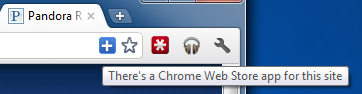
Mihai Parparita, who is now a Chrome engineer, wrote a Chrome extension that lets you find apps from the Chrome Web Store without visiting the store. The extension simply adds a plus icon to the address bar when you visit a site that has a corresponding app in the Chrome Web Store.


"Discovery (i.e., how a user finds apps to install) is an interesting aspect of app stores. In some ways, discovery is not necessary: a significant appeal of the store is that it catalogs all the apps, so if the user is looking for a todo list or Twitter client, it's pretty obvious what to search for. However, that assumes that the user has a specific need in mind already, and is aware that that class of application exists," explains Mihai.

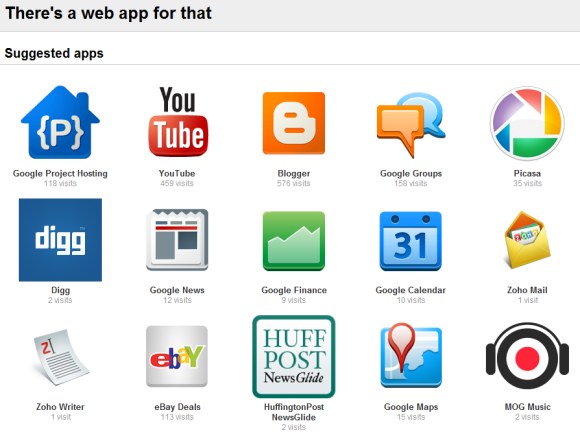
For now, Mihai's extension is just an experiment. The list of supported apps is included in a text file, which is incomplete and has to be updated. One of the advantages of using a static list is that the extension doesn't send your browsing history to a server. Another advantage is that it's much easier to find matches for the sites you've already visited. After installing the extension, a page titled "there's a Web app for that" will suggest some apps for the sites you're visiting frequently.


It's important to mention that the Chrome Web Store only lists official hosted apps. "If your hosted app is listed in the Chrome Web Store, you must prove that you control each domain specified in [the app field]," informs Google. There's a workaround for this, as the unofficial Google Music app shows: linking to a local HTML file that redirects to the app's URL. The Google Music app is a packaged app, not a hosted app, so Mihai's extension doesn't include it.

Right now, most of the apps are just shortcuts and the main benefit is that they're easily accessible from the new tab page. Some apps offer additional features and a small number of apps are actually full-fledged extensions (packaged apps). Google doesn't categorize apps and doesn't inform users if an app works offline.

Labels

Web Search Gmail Google Docs Mobile YouTube Google Maps Google Chrome User interface Tips iGoogle Social Google Reader Traffic Making Devices cpp programming Ads Image Search Google Calendar tips dan trik Google Video Google Translate web programming Picasa Web Albums Blogger Google News Google Earth Yahoo Android Google Talk Google Plus Greasemonkey Security software download info Firefox extensions Google Toolbar Software OneBox Google Apps Google Suggest SEO Traffic tips Book Search API Acquisitions InOut Visualization Web Design Method for Getting Ultimate Traffic Webmasters Google Desktop How to Blogging Music Nostalgia orkut Google Chrome OS Google Contacts Google Notebook SQL programming Google Local Make Money Windows Live GDrive Google Gears April Fools Day Google Analytics Google Co-op visual basic Knowledge java programming Google Checkout Google Instant Google Bookmarks Google Phone Google Trends Web History mp3 download Easter Egg Google Profiles Blog Search Google Buzz Google Services Site Map for Ur Site game download games trick Google Pack Spam cerita hidup Picasa Product's Marketing Universal Search FeedBurner Google Groups Month in review Twitter Traffic AJAX Search Google Dictionary Google Sites Google Update Page Creator Game Google Finance Google Goggles Google Music file download Annoyances Froogle Google Base Google Latitude Google Voice Google Wave Google Health Google Scholar PlusBox SearchMash teknologi unik video download windows Facebook Traffic Social Media Marketing Yahoo Pipes Google Play Google Promos Google TV SketchUp WEB Domain WWW World Wide Service chord Improve Adsence Earning jurnalistik sistem operasi AdWords Traffic App Designing Tips and Tricks WEB Hosting linux How to Get Hosting Linux Kernel WEB Errors Writing Content award business communication ubuntu unik