Offline Google Docs

As promised, Google started to roll out the offline version of Google Docs, but don't expect too much. Much like the offline Gmail and offline Google Calendar, Google Docs works offline only if you use Chrome and install an app from the Chrome Web Store.

When you're offline, Google Docs shows a simplified interface that only lists the documents and spreadsheets that are cached. You can only view them, so most of the features from Google Docs menus are disabled.
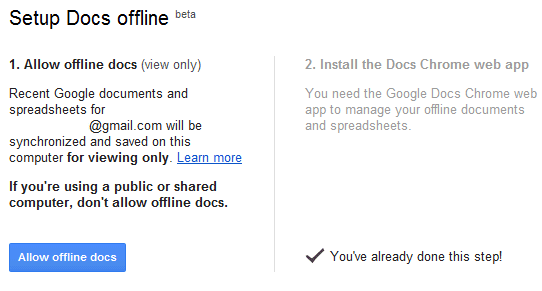
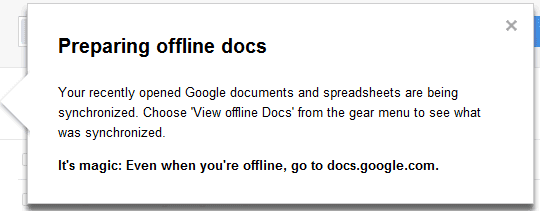
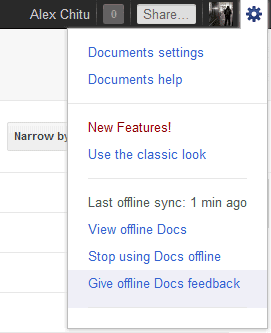

Just like the offline Gmail, Google Docs uses a different interface that can also be accessed when you're online if you go to: https://docs.google.com/offline/. "Offline access is available only for documents and spreadsheets. When you have Google Docs open and have an Internet connection, your most recently opened documents and spreadsheets will sync and become available offline. Presentations, drawings and other items are not currently available offline," explains Google.
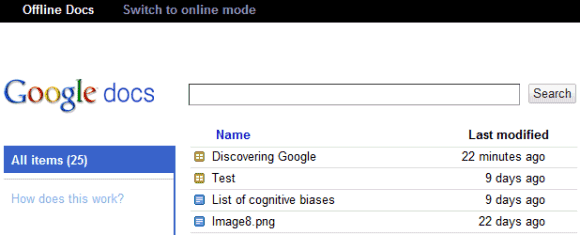

Another downside is that you can't edit your documents and spreadsheets, a feature that was available in the Gears implementation.
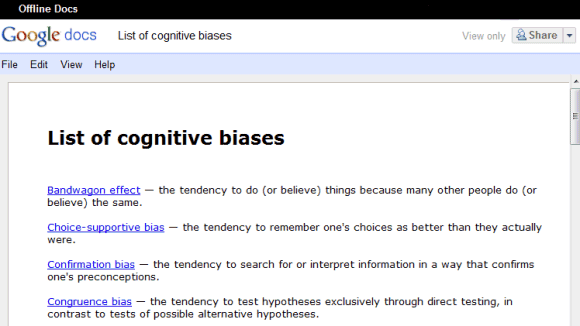

Right now, offline Google Docs is very limited and can only be used to access some of your documents and spreadsheets. It's interesting to notice that the apps powered by Gears were a lot more powerful and worked in other browsers: Firefox, Safari, IE. Maybe Google shouldn't have deprecated Gears and disabled the features that used Gears until the HTML5 implementations were good enough.

Switch to the Classic Google Search Interface on a Tablet

Google's search interface for tablets is great, but it lacks some of the features from the regular interface. One of the most important missing features is the link to the cached search results. Sometimes a site goes down, a page changes a lot or redirects you to a stripped-down mobile interface and Google's cache is really useful.


Now you can switch between the tablet interface and the classic interface using a link displayed at the bottom of the search results page: "View Google in: Tablet | Classic". The nice thing is that Google remembers the query and sends you to the same page of results.


Other missing features from the tablet interface: the number of search results, the link to the advanced search page, the "something different" section, the smart sidebar that shows the most relevant specialized search engines and options, while hiding the other features. While these options are still available in the tablet interface, Google no longer highlights those that are the most relevant.


To switch to the classic interface, Google adds "&nota=1" to the URL (there's a similar parameter for the mobile interface: "&nomo=1"). While there's no way to permanently switch to the classic interface, you can bookmark this URL to access it: http:/www.google.com/webhp?nota=1.

Labels

Web Search Gmail Google Docs Mobile YouTube Google Maps Google Chrome User interface Tips iGoogle Social Google Reader Traffic Making Devices cpp programming Ads Image Search Google Calendar tips dan trik Google Video Google Translate web programming Picasa Web Albums Blogger Google News Google Earth Yahoo Android Google Talk Google Plus Greasemonkey Security software download info Firefox extensions Google Toolbar Software OneBox Google Apps Google Suggest SEO Traffic tips Book Search API Acquisitions InOut Visualization Web Design Method for Getting Ultimate Traffic Webmasters Google Desktop How to Blogging Music Nostalgia orkut Google Chrome OS Google Contacts Google Notebook SQL programming Google Local Make Money Windows Live GDrive Google Gears April Fools Day Google Analytics Google Co-op visual basic Knowledge java programming Google Checkout Google Instant Google Bookmarks Google Phone Google Trends Web History mp3 download Easter Egg Google Profiles Blog Search Google Buzz Google Services Site Map for Ur Site game download games trick Google Pack Spam cerita hidup Picasa Product's Marketing Universal Search FeedBurner Google Groups Month in review Twitter Traffic AJAX Search Google Dictionary Google Sites Google Update Page Creator Game Google Finance Google Goggles Google Music file download Annoyances Froogle Google Base Google Latitude Google Voice Google Wave Google Health Google Scholar PlusBox SearchMash teknologi unik video download windows Facebook Traffic Social Media Marketing Yahoo Pipes Google Play Google Promos Google TV SketchUp WEB Domain WWW World Wide Service chord Improve Adsence Earning jurnalistik sistem operasi AdWords Traffic App Designing Tips and Tricks WEB Hosting linux How to Get Hosting Linux Kernel WEB Errors Writing Content award business communication ubuntu unik