Google Image Search Suggest

Google started to show suggestions when you type a query in Google Image Search one week after the worldwide rollout of Google Suggest for web search. The suggestions from Google Image Search include many specific words like "paintings", "pictures", "wallpaper", "cartoon", "photos", "landscape", "logo", so they're obtained by analyzing the most popular queries from the image search engine. It's worth noting that Google Image Search shows suggestions on the results pages as well, not just on the homepage.


Google Suggest is now enabled by default in 3 Google search engines: web search, image search, Google Video and it can be disabled from the preferences page or by appending &complete=0 to the URL.

Since August 2008, when the suggestions were first enabled at Google.com, some people complained that the feature is annoying, distracting and it disables browser's autocomplete. Others find it useful: "I rather enjoy this feature, it sometimes helps me form a more coherent search term that yields more results, and it also reduces the number of keystrokes since it finishes words for me even if I've never searched them before". It's also an idea generator, a way to explore trends, attitudes, reactions, and a tool that helps you type complicated queries.


Now that most browsers and toolbars, all major search engines and many other important sites (Amazon, eBay, YouTube) offer query suggestions, people will expect to see them in any search box.
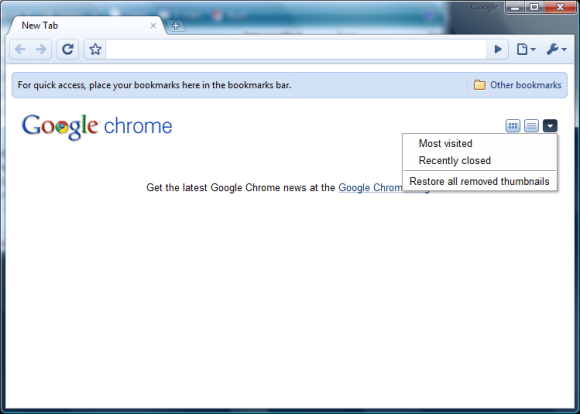
Disable Google Chrome's New Tab Page

Google Chrome used to display a special page that included nine thumbnails for the most frequently visited pages, a list of recent bookmarks and recently closed pages. The feature couldn't be disabled from the interface and you couldn't remove the thumbnails you didn't like.

Google Chrome 3 updated the new tab and you can now hide the thumbnails and the list of recently visited pages. Just click on the small arrow at the top of the new tab page and disable the features you don't like. You'll still see Google Chrome's logo and some tips, but the page is almost blank.


The recent builds of Google Chrome include support for user scripts and it's not very difficult to write a script that hides all the content from the new tab page.

If you use Google Chrome 2 Beta, the developer version or a recent Chromium build, you can easily enable the user scripts support by following the instructions from this page: find or create a shortcut for Chrome's executable, right-click on the shortcut, select "Properties" and append to the value from the Target field --enable-user-scripts (include a space before the flag). Create a directory named User Scripts in one of these locations and save this user script in the directory. You may need to restart Google Chrome if it's already running.

Another useful user script for Google Chrome is AdSweep, a basic version of AdBlock Plus without user interface and subscriptions. "AdSweep is a small addon that aims to hide advertising from the web pages you visit like Adblock. In technical terms, AdSweep is a user javascript that defines CSS rules based on the web site you are visiting to hide elements of the page that show advertisements." If you are familiar with JavaScript, you can edit the script and add or remove some patterns.

Labels

Web Search Gmail Google Docs Mobile YouTube Google Maps Google Chrome User interface Tips iGoogle Social Google Reader Traffic Making Devices cpp programming Ads Image Search Google Calendar tips dan trik Google Video Google Translate web programming Picasa Web Albums Blogger Google News Google Earth Yahoo Android Google Talk Google Plus Greasemonkey Security software download info Firefox extensions Google Toolbar Software OneBox Google Apps Google Suggest SEO Traffic tips Book Search API Acquisitions InOut Visualization Web Design Method for Getting Ultimate Traffic Webmasters Google Desktop How to Blogging Music Nostalgia orkut Google Chrome OS Google Contacts Google Notebook SQL programming Google Local Make Money Windows Live GDrive Google Gears April Fools Day Google Analytics Google Co-op visual basic Knowledge java programming Google Checkout Google Instant Google Bookmarks Google Phone Google Trends Web History mp3 download Easter Egg Google Profiles Blog Search Google Buzz Google Services Site Map for Ur Site game download games trick Google Pack Spam cerita hidup Picasa Product's Marketing Universal Search FeedBurner Google Groups Month in review Twitter Traffic AJAX Search Google Dictionary Google Sites Google Update Page Creator Game Google Finance Google Goggles Google Music file download Annoyances Froogle Google Base Google Latitude Google Voice Google Wave Google Health Google Scholar PlusBox SearchMash teknologi unik video download windows Facebook Traffic Social Media Marketing Yahoo Pipes Google Play Google Promos Google TV SketchUp WEB Domain WWW World Wide Service chord Improve Adsence Earning jurnalistik sistem operasi AdWords Traffic App Designing Tips and Tricks WEB Hosting linux How to Get Hosting Linux Kernel WEB Errors Writing Content award business communication ubuntu unik